

Acoustic is a premium destination and is only available on Business tier plans.
Supported syncing
For more information about sync modes, refer to the sync modes docs.
Connect to Acoustic
Go to the Destinations overview page and click the Add destination button. Select Acoustic and click Continue. You can then authenticate Hightouch to Acoustic by entering the following required fields into Hightouch:- Pod
- Client Token
- Client Secret
- Refresh Token
6, in your Acoustic Account Settings.
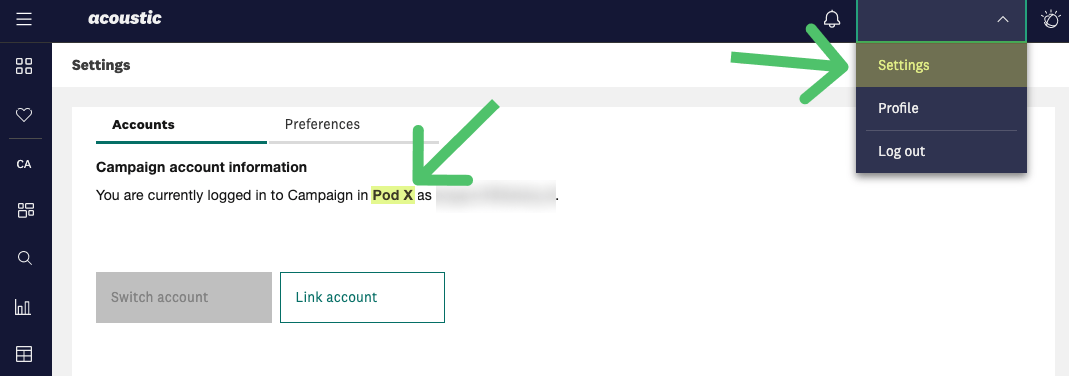
You can generate the other credentials in the Application Account Access section of your Acoustic Organization Settings.
See these instructions for more details.
Sync configuration
Once you’ve set up your Acoustic destination and have a model to pull data from, you can set up your sync configuration to begin syncing data. Go to the Syncs overview page and click the Add sync button to begin. Then, select the relevant model and the Acoustic destination you want to sync to.Syncing relational tables or databases
Hightouch requires an existing database or relational table in Acoustic to sync to. The only supported sync mode is Upsert. In Upsert mode, Hightouch inserts new records and keeps mapped attributes up-to-date on existing records in Acoustic.Record matching
You can match rows from your model to rows in Acoustic on any column in your model and any key fields in Acoustic. Refer to the record matching docs for more information.Field mapping
Hightouch lets you sync model columns via field mapping. You can map data from any of your model columns to any existing columns in your Acoustic database or relational table. Ensure your model columns data types match the data types of the fields you want to sync to.Delete behavior
The delete behavior you select dictates what to do when a row no longer appears in your model’s query results. You have the following options:
If you enable deletion, Hightouch provides all columns to Acoustic in the deletion API request.
This enables Hightouch to uniquely identify a single record, rather than a single key column, which could match multiple records.