

Overview
Hightouch lets you pull data stored in Amazon Athena and push it to downstream destinations. Connecting Hightouch to Amazon Athena requires some setup in both platforms. In Amazon, you need to make sure the AWS credentials you will use to connect Hightouch has the correct permissions.You may need to allowlist Hightouch’s IP addresses to let our systems connect to your warehouse. Reference our networking docs to determine which IP addresses you need to allowlist.
Required permissions
The AWS user that you use to connect to Athena must have the following permissions: Read and list permissions for Athena resources and execute permissions for Athena queries:ListWorkGroupsListDataCatalogsListDatabasesListTableMetadataStartQueryExecutionGetQueryExecutionGetQueryResultsGetQueryResultsStream
PutObjectListBucketListBucketMultipartUploadsListMultipartUploadPartsGetBucketLocationGetObjectAbortMultipartUploadDeleteObject
AmazonAthenaFullAccess
for reference.
Connection configuration
To get started, go to the Sources overview page and click the Add source button. Select Amazon Athena and follow the steps below.Configure your credentials
You can either select AWS credentials you’ve previously configured in Hightouch or choose to add New credentials directly from this page. The credentials must be for a user who has permission to access Athena and the S3 output location. Refer to the required permissions section for permission details and to the AWS credential configuration docs for credential setup information.Configure your Amazon Athena source
Enter the following fields into Hightouch:- Athena workgroup you previously set up in AWS.
- (Optional) Query output location—you only need to enter this if your workgroup doesn’t have an output location configured. This is an S3 path.
- Data catalog name
- Database name
- (Advanced) VPC connection endpoint. To connect through a private VPC endpoint, and we can provide the endpoint for this step.
Choose your sync engine
For optimal performance, Hightouch tracks incremental changes in your data model—such as added, changed, or removed rows—and only syncs those records. You can choose between two different sync engines for this work. The Basic engine requires read-only access to Amazon Athena. Hightouch executes a query in your database, reads all query results, and then determines incremental changes using Hightouch’s infrastructure. This engine is easier to set up since it requires read—not write—access to Amazon Athena. The Lightning engine requires read and write access to Amazon Athena. The engine stores previously synced data in a separate schema in Amazon Athena managed by Hightouch. In other words, the engine uses Amazon Athena to track incremental changes to your data rather than performing these calculations in Hightouch. Therefore, these computations are completed more quickly.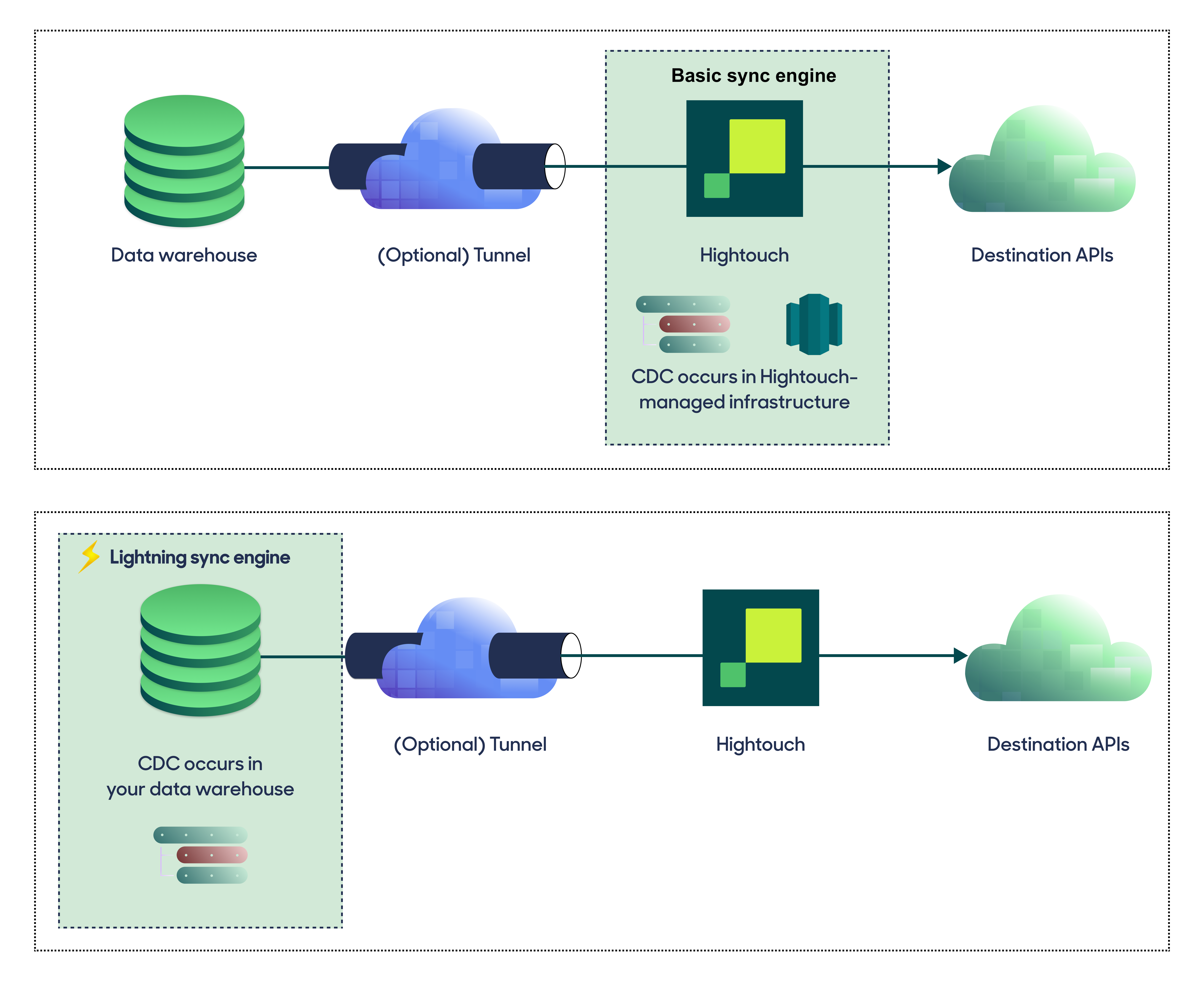
Basic versus Lightning engine comparison
Lightning engine setup
Hightouch uses two schemas (hightouch_planner and hightouch_audit) for storing logs of previously synced data. Hightouch must be able to read and write to these schemas, but the specific schema names might vary.
Test your connection
When setting up a source for the first time, Hightouch validates the following:- Network connectivity
- Amazon Athena credentials
- Permission to list schemas and tables
- Permission to write to
hightouch_plannerschema - Permission to write to
hightouch_auditschema
Create models
Once your source configuration has passed the necessary validation, your source setup is complete. Next, you can set up models to define which data you want to pull from Athena. The Athena source supports these modeling methods:- writing a query in the SQL editor
- using the visual table selector
- leveraging existing dbt models
- leveraging existing Looker Looks
Data types
Hightouch parses most Athena data types into JavaScript types before sending them to your destination. Hightouch leaves the following Athena data types as strings:BIGINTARRAYMAP
Tips and troubleshooting
Performance considerations
The following Service Quota changes to Amazon Athena are recommended in order to support fast and reliable syncs:- Active DML queries: 400
- To support concurrent
CREATE TABLE ASqueries which are DML statements.
- To support concurrent