

Overview
When you connect Hightouch to your warehouse as a source, Hightouch runs directly in that warehouse. When you build audiences, run syncs, calculate traits, or execute journeys in Hightouch, your warehouse runs SQL queries to power those actions. Because of this, Hightouch contributes to your warehouse compute usage. Many customers find that Hightouch accounts for less than 1% of their annual warehouse compute costs. This guide explains how to plan for, monitor, and optimize that usage intentionally. You’ll learn:- What typically increases warehouse cost
- How your data structure affects performance
- What you can change in your warehouse
- What you can change in Hightouch
How warehouse billing works
Most warehouses charge separately for:- Compute – the processing power used to run queries
- Storage – how much data is stored
- Platform services – management and metadata features
What usually increases warehouse compute
Warehouse cost typically goes up for one of five reasons:- Queries run more often
- Queries do more work
- More queries run at the same time
- The warehouse is not the right size for the workload
- The warehouse stays on longer than necessary
1. Queries run more often
More frequent queries increase total compute usage. Common drivers include:- Syncs scheduled more frequently
- Triggered journeys running continuously
- Audiences recalculating often
2. Queries do more work
Queries that perform large joins, heavy aggregations, or full-table scans consume more compute. Queries become more expensive when they:- Join large tables repeatedly
- Scan long time ranges of event data
- Perform heavy calculations each time they run
3. More queries run at the same time
Concurrency (sometimes called parallelization) refers to how many queries run at the same time. When many syncs, journeys, or recalculations start at once, your warehouse must process them simultaneously. Higher concurrency can:- Increase short-term cost spikes
- Slow down interactive work
4. The warehouse is not the right size for the workload
Warehouse size (sometimes called a compute engine) determines how much compute is available at once.- Larger warehouses process more data per unit time but cost more while running.
- Smaller warehouses cost less while running but may introduce wait times during spikes.
Some warehouses can automatically add capacity during busy periods (for example, multi-cluster or serverless) and scale down when demand drops.
5. The warehouse stays on while idle
Warehouses that remain running when no queries are executing still incur compute cost. Idle behavior depends on:- Auto-suspend (how quickly the warehouse turns off when it’s idle)
- How jobs are scheduled throughout the day
- Whether background jobs run continuously or in batches
How Hightouch uses your warehouse
Understanding how Hightouch workloads behave helps explain why certain cost drivers appear in practice. Hightouch workloads fall into a few broad categories. Understanding them helps you decide what needs to be fast and what can run in the background.Interactive workloads
Interactive workloads are user-driven and show up directly in the platform UI:- Audience previews in Audiences
- Trait previews in Traits
- Insights and dashboards in Intelligence
- Identity Resolution jobs
- Some AI-assisted workflows
Batch workloads
Batch workloads run on a schedule or in the background:- Sync runs to downstream tools
- Large trait recalculations
- Audience snapshots and backfills
Background jobs
Some jobs run periodically but are not time-sensitive:- Match Booster enrichment refreshes
- Cached column suggestion refreshes
- Non-urgent audience updates
- Lower-frequency schedules
- Smaller, dedicated warehouses
- Running during off-peak windows
Strategies to reduce warehouse compute
There are three main levers that affect how much compute Hightouch consumes: Optimizing across all three provides predictable performance and cost control.1. Warehouse configuration
Use a dedicated warehouse and user for Hightouch
Create:-
A dedicated warehouse for Hightouch
- Allows you to clearly see what Hightouch costs and prevents it from competing with other workloads.
-
A dedicated user (or service account) and role with access only to the data Hightouch needs
- Makes it easier to control access and audit the queries Hightouch runs.
Choose the right warehouse size
Start with a modest size (often Medium) and scale based on runtime and queueing patterns. Increase size if jobs regularly exceed acceptable runtimes.Decrease size if the warehouse is mostly idle.
Use serverless or multi-cluster options when appropriate
If your warehouse supports dynamic scaling (for example, serverless or multi-cluster configurations), consider enabling it. These options:- Add capacity automatically during busy periods
- Scale down when demand drops
- Prevent you from permanently running a larger warehouse
Reduce idle time
Lower auto-suspend (around 1 minute is common) and keep auto-resume enabled to prevent idle compute waste.Control how many queries run at once
Adjust how many queries your warehouse can run at the same time.- Increasing concurrency allows more work to finish sooner but may increase peak usage.
- Decreasing concurrency smooths load but can extend total runtimes.
Set query time limits
Configure maximum query runtimes to prevent a single query from running indefinitely.- Set reasonable time limits to guard against runaway compute usage.
- If queries frequently hit the limit, optimize the underlying model before increasing the threshold.
Use budgets and resource monitors
Most warehouses provide built-in tools to:- Track credit usage
- Set spending thresholds
- Alert on anomalies
Route different workloads to different warehouses
If your warehouse supports multiple compute engines, route:- Interactive workloads (e.g., audience previews, dashboards, IDR, AI-powered workflows) to a warehouse tuned for low-latency (fast UI queries)
- Batch workloads (e.g., syncs, heavy traits) to a warehouse tuned for throughput (large scheduled jobs)
2. Data modeling and table design
These strategies reduce how much work your warehouse performs each time Hightouch runs a query.Turn complex queries into tables
If a model performs heavy joins or aggregations every time it runs, your warehouse must repeat that work for every sync, audience, or trait. This can quietly increase compute usage over time. To reduce repeated work:- Run those joins and calculations earlier in your data pipeline (for example, in dbt) and have Hightouch read from a simpler, materialized table or view that serves as a presentation layer.
- Simplify the model Hightouch reads from.
SELECT * FROM your_model LIMIT 1 query runs slowly, the model is likely doing too much work at read time and should be refactored.
Structure your tables intentionally
Hightouch frequently runs queries that filter, join, and aggregate data to compute audiences, traits, and journey steps. Efficient table structure reduces repeated work and lowers compute usage. A practical default is:- Keep core warehouse layers normalized by default (separate entities into separate tables and follow good modeling practices).
- Expose a flattened, presentation-layer table or view for Hightouch when it clearly removes slow, repeated joins for the way you actually query the data (especially for Customer Studio parent models).
- Avoid denormalizing very large fact tables unnecessarily, as this can increase how much data the warehouse must read; instead, denormalize surgically where it meaningfully reduces query cost for common patterns.
3. Hightouch configuration
These strategies involve controls inside Hightouch that affect how often and how intensively queries run.Simplify the models that power your Customer Studio schema
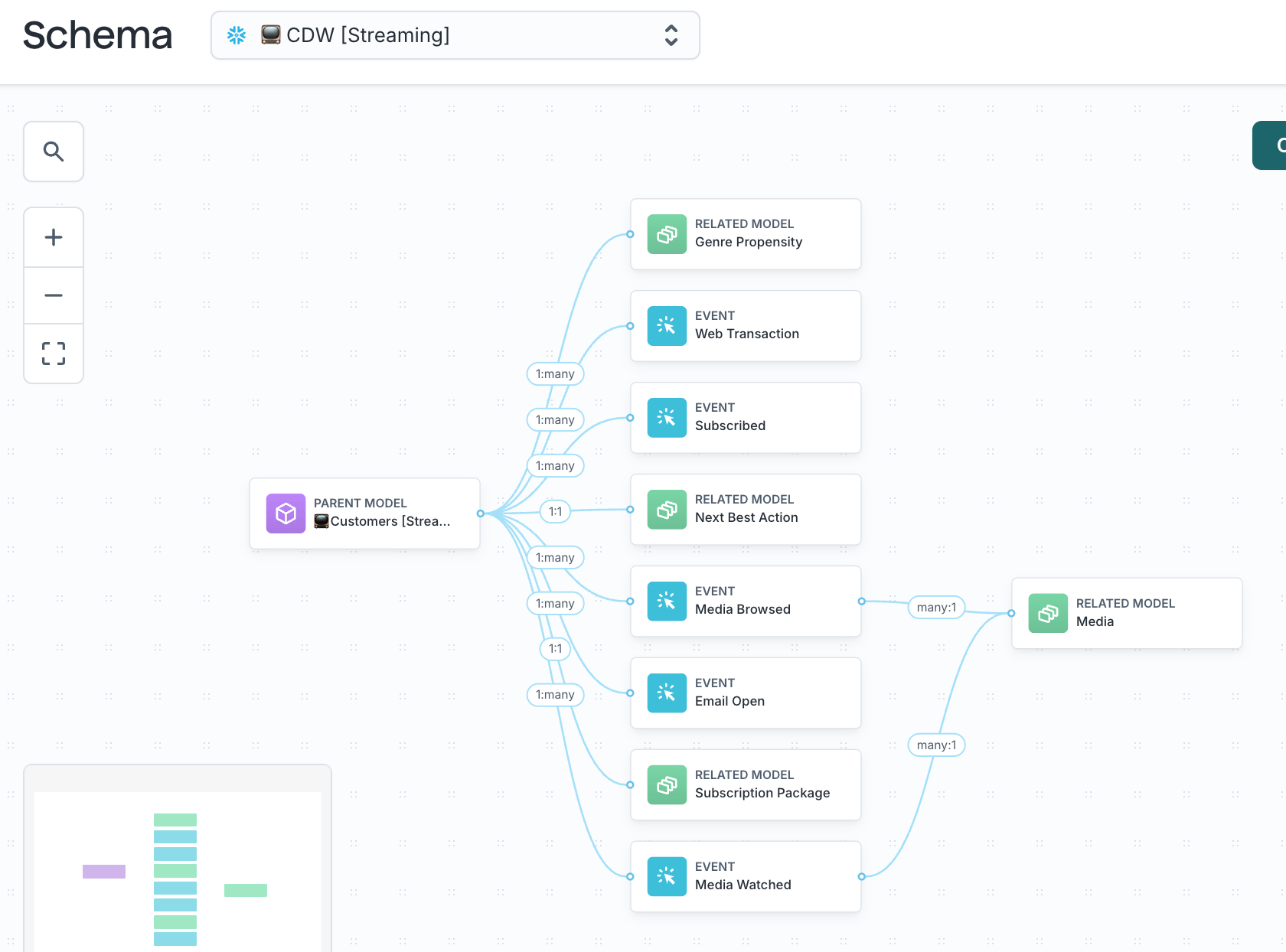
- Parent models for users or accounts
- Related models for supporting records (like orders or subscriptions)
- Event models for behavioral activity
Limit large event tables to what activation requires
Event tables can grow quickly. To keep them efficient:- Limit time windows to what activation actually requires
- Use pre-aggregated tables for common metrics when helpful
- Organize tables based on the columns most often used in filters (for example, date or tenant)
Schedule background jobs at the lowest effective frequency
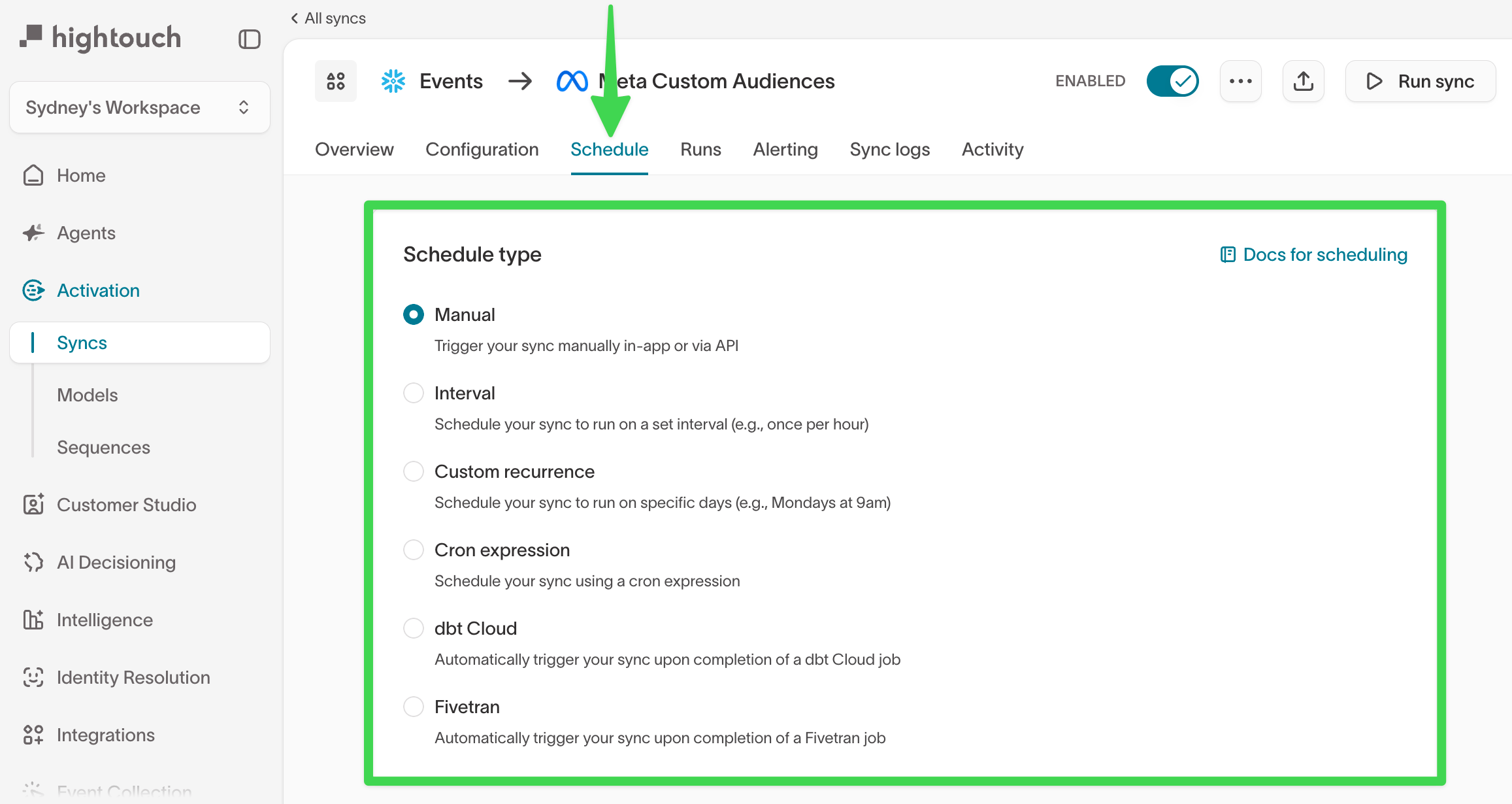
- Reduce sync frequencies for enrichment updates, cached column suggestions (often daily or weekly is sufficient), and non-time-sensitive audiences
- Choose schedules that match when stakeholders actually use the data
Use sampling and fast queries for exploration
Audience and trait exploration does not always require exact counts.- Sampling maintains a smaller, regularly refreshed copy of your parent model.
- Fast queries instruct Hightouch to use that sample for previews instead of scanning the full dataset.
Enable fast queries in audiences
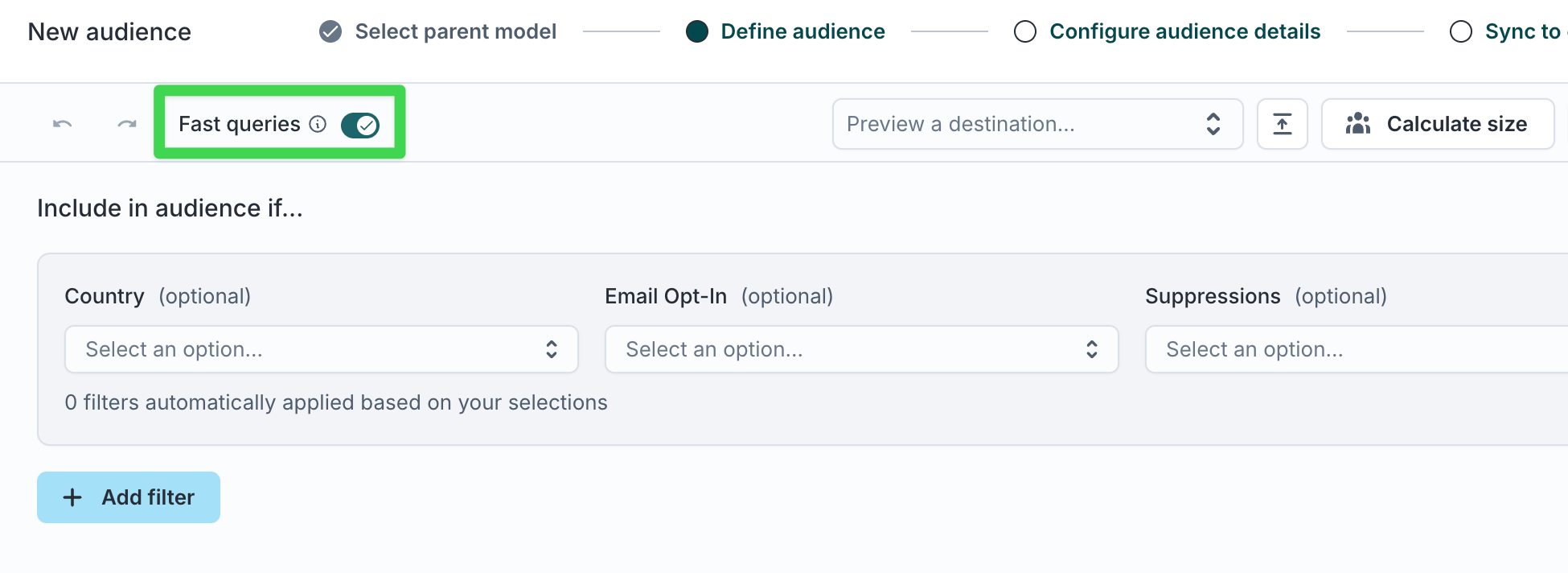
- Brainstorming logic
- Validating filters
- Comparing audience shape
- Go to Customer Studio → Audiences.
- Open an audience.
- Enable the Fast queries toggle in the audience header, if available.
Enable sampling in models
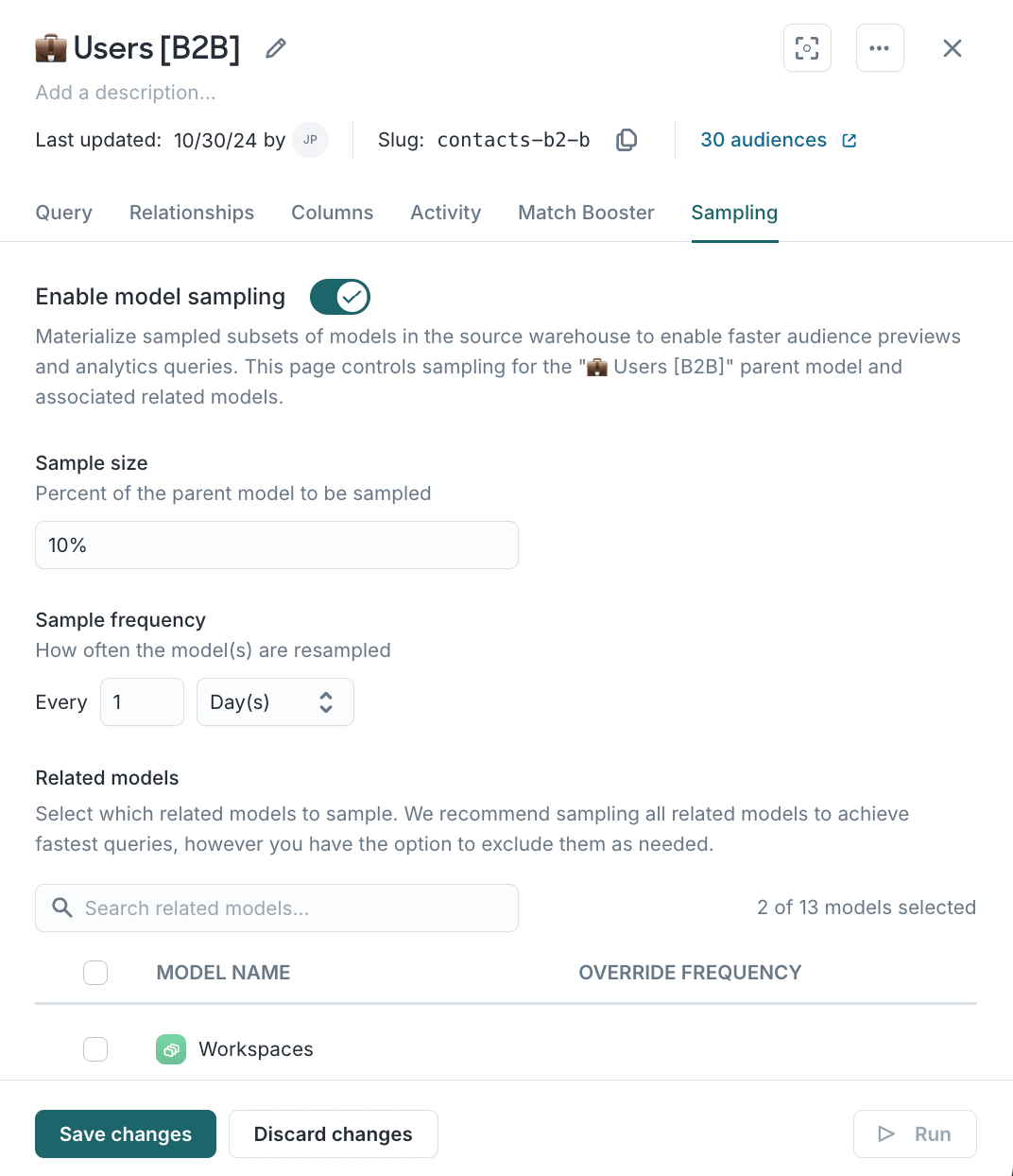
- Your parent model contains millions or billions of rows
- Audience previews feel slow during filter changes
- Data teams want to reduce compute usage from iterative exploration
Control how many jobs Hightouch runs at once
Work with your Hightouch team to modify the number of concurrent workers that are available when triggering syncs within your Hightouch workspace.
- Higher concurrency reduces how long jobs take overall but increases short-term compute usage.
- Lower concurrency spreads work out over time and reduces peak load.
If warehouse costs increase unexpectedly
Start with these checks:- Did sync or journey frequency change?
- Did event volume grow?
- Did new audiences or traits launch?
- Did concurrency settings change?
- Did auto-suspend settings change?
- Did a data model change introduce heavier joins or scans?