

Overview
With Hightouch and the TikTok marketing API, you can send data from your warehouse to events and custom audiences in TikTok. Deliver relevant ads by utilizing data from various sources within your data warehouse.Supported syncing
For more information about sync modes, refer to the sync modes docs.
Connect to TikTok
Go to the Destinations overview page and click the Add destination button. Select TikTok and click Continue. You can then authenticate Hightouch to TikTok via OAuth.
Sync configuration
Once you’ve connected your TikTok destination and have a model to pull data from, you can set up your sync configuration to begin syncing data. Go to the Syncs overview page and click the Add sync button to begin. Then, select the relevant model and the TikTok destination you want to sync to.Syncing web events
Syncing to TikTok’s web events lets you report different events from your source model.Pixel code
You need to provide your TikTok pixel code to sync web events. To find the pixel code, navigate to your TikTok Marketing Dashboard and go to Assets menu > Manage Web Events. Select the pixel you want to sync to and copy the ID.Event name
You can set the event name to a static value or map it from a column in your model. You can select one of these event names: AddPaymentInfo, AddToCart, AddToWishlist, ApplicationApproval, ClickButton, CompletePayment, CompleteRegistration, Contact, CustomizeProduct, Download, FindLocation, InitiateCheckout, Lead, PlaceAnOrder, Purchase, Schedule, Search, StartTrial, SubmitApplication, SubmitForm, Subscribe, or ViewContent. To send a custom event, type its name instead.Field mapping
You can send additional details on your web events such as the timestamp, event (object) properties, and context (customer) properties. TikTok recommends that you provide as much context information as possible to increase probability of matching web events with TikTok ads.Batch size
You can increase the TikTok events API batch size up to 1,000 per call. This can improve your sync’s speed performance. The default is one event per API call. Keep in mind that TikTok fails an entire batch if it detects an erroneous row. If you suspect that you could have erroring rows, don’t use a high batch size.Test event codes
Test event codes are special codes you can include in your event payload to simulate events. This allows you to test your API implementation without actually recording real event data. You can optionally enter a test event code as part of your sync configuration. Navigate to Events Manager by clicking the Assets tab, Event and then Manage Web Events. You can find your test event code in the Test Events tab.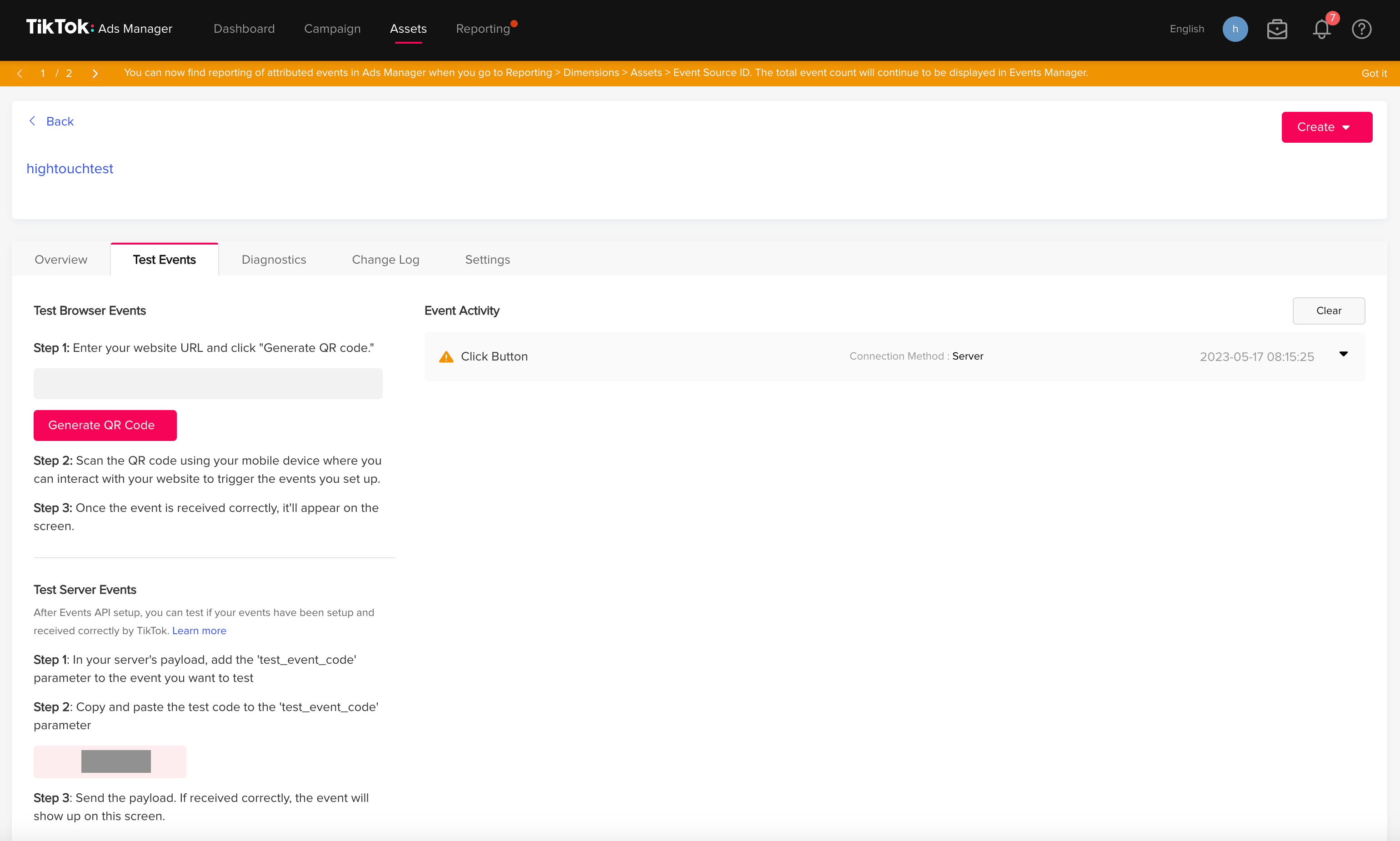
PII hashing
TikTok requires customer identity information (email, external_id, and phone_number) to be hashed using a SHA256 hash. By default, Hightouch automatically hashes these properties for you but you can choose to opt out of this and hash the identity information yourself.Syncing offline events
Syncing to TikTok’s offline events lets you track and measure offline activity from people that see or interact with your ads.Event set ID
You need to select an event set ID to sync your offline events. You can create a new event set in your TikTok offline events manager dashboard.Event name
You can set the event name to a static value or map it from a column in your model. You can select one of these event names: AddPaymentInfo, AddToCart, AddToWishlist, ApplicationApproval, ClickButton, CompletePayment, CompleteRegistration, Contact, CustomizeProduct, Download, FindLocation, InitiateCheckout, Lead, PlaceAnOrder, Purchase, Schedule, Search, StartTrial, SubmitApplication, SubmitForm, Subscribe, or ViewContent. To send a custom event, type its name instead.Field mapping
You need, at minimum, the event name and at least one user property, emails or phones. The emails and phones array values must include at least one value, but you can include multiple elements. If you have single email or phone number as strings in a model column, Hightouch converts them into arrays with one element.Batch size
You can increase the TikTok events API batch size up to 100 per call. This can improve your sync’s speed performance. The default is 100 events per API call. Keep in mind that TikTok fails an entire batch if it detects an erroneous row. If you suspect that you could have erroring rows, don’t use a high batch size.PII hashing
TikTok requires user identity information (emails and phone_numbers) to be hashed using a SHA256 hash. By default, Hightouch automatically hashes these properties for you but you can choose to opt out of this and hash the identity information yourself.Syncing app events
Syncing to TikTok’s app events lets you track mobile app activity like launching the app or in-app purchases.TikTok app ID
You need to select an app ID to sync your app events. You can create a new app set in your TikTok ads manager dashboard. To learn about how to generate a TikTok App ID, see TikTok App ID.Event name
You can set the event name to a static value or map it from a column in your model. You can select one of these event names: AddPaymentInfo, AddToCart, AddToWishlist, ApplicationApproval, ClickButton, CompletePayment, CompleteRegistration, Contact, CustomizeProduct, Download, FindLocation, InitiateCheckout, Lead, PlaceAnOrder, Purchase, Schedule, Search, StartTrial, SubmitApplication, SubmitForm, Subscribe, or ViewContent. To send a custom event, type its name instead.Field mapping
You can send additional details on your app events such as the timestamp, event properties, and context properties. TikTok recommends that you provide as much context information as possible to increase the probability of matching app events with TikTok ads.Batch size
You can increase the TikTok events API batch size up to 100 per call. This can improve your sync’s speed performance. The default is 100 events per API call. Keep in mind that TikTok fails an entire batch if it detects an erroneous row. If you suspect that you could have erroring rows, don’t use a high batch size.Syncing custom audiences
Hightouch lets you create and maintain custom audiences via the File upload API or Segment API. You can read more on the different APIs and decide which is best for your use case in TikTok’s docs.Segment API mode (Recommended)
TikTok lets you make real-time batch updates through their Segment API. Hightouch sends data to the selected audience list as data gets added in your source model. We recommend this integration type because the API is newer and the integration is maintained by our team.User identifiers
To identify which users to add or update in an audience, select model columns and the corresponding Tiktok fields. You can match on any of the following hashed user fields:- IDFA_SHA256
- IDFA_MD5
- GAID_SHA256
- GAID_MD5
- EMAIL_SHA256
- PHONE_SHA256
If you map an identifier field that contains an array of values, Hightouch automatically fans out each element into a separate record when syncing to TikTok. Learn more about array identifier fan-out.
File upload API mode (Deprecated)
TikTok lets you upload an entire audience through their file upload API. Hightouch uploads the entire model query results for each sync run. These results effectively replaces the previous file upload.Record matching
The File upload mode lets you match on any one of these hashed user properties:- IDFA_SHA256
- IDFA_MD5
- GAID_SHA256
- GAID_MD5
- EMAIL_SHA256
- or PHONE_SHA256
Advertiser account
For both modes, you need to select the advertiser account you want to sync to.Custom audience list
Hightouch lets you use an existing audience in TikTok or create a new one for both modes. Note that if you’re using Segment mode, you can’t change your audience list name once your sync has run, instead, you will have to create a new sync.Tips and troubleshooting
To see the exact API requests and responses from each sync run, use the live debugger. To get notified by Slack, PagerDuty, SMS, or email when a sync fails, set up sync alerts. If you run into an issue this page doesn’t cover, .For Hightouch platform error codes related to TikTok, see Error codes: TikTok.
Matched users count
Below only applies to the custom audiences sync type. Hightouch retrieves the audience metadata from TikTok Ads in real-time. The matched number displayed in Hightouch should reflect what you see in TikTok Ads. Note that the matched numbers are approximated to maintain privacy thresholds. Hightouch takes the matched count to calculate a match rate for your sync, where applicable. The calculation breakdown:matched_user_count / # of rows queried in the latest sync run
The match rate is not calculated when:
- syncing to an existing segment because the total number of records to ever be uploaded to the segment is unknown
- removed users from your model is not removed in TikTok Ads because the matched user count would be inflated in the calculation
- Your audience model is too small. Most ad platforms do not display the matched number unless there’s at least one thousand matched users to maintain privacy thresholds.
- The upload is still processing. We recommend waiting at least 72 hours from the first sync run for numbers to settle.
- Your data isn’t cleaned or hashed properly. Hightouch normalizes and hashes your data according to destination requirements, but it’s still good to make sure that the data is as clean as possible. Note that Hightouch cannot clean your data if you opt to hash it yourself. In that case, ensure you follow the data cleaning requirements for TikTok Ads.
Live debugger
Hightouch provides complete visibility into the API calls made during each of your TikTok sync runs, except for syncs in custom audience file upload mode. In this mode, Hightouch syncs the full query results set, and therefore doesn’t make a change data capture computation. As a result, you won’t see any payload details in the Live debugger. For the web event and custom audience segment mode syncs, we recommend reading our article on debugging tips and tricks to learn more.Common errors
Custom audiences
If you want to switch your custom audience sync mode from File upload API to Segment API, you need to run a full resync after saving the new configuration.Error 40001: No permission to operate advertiser
This error can happen if the TikTok user credentials used to connect to TikTok don’t have the necessary permissions to send data to the advertiser account selected in the sync configuration. When this error happens, you might also see that the advertiser account dropdown menu in the sync configuration is empty. To solve this, make sure that the credentials used to connect TikTok to Hightouch have the necessary permissions to send data to your advertiser accounts.File upload API mode
Audiences with fewer than 1000 users are invalid and won’t be available in TikTok. For more information, please refer to TikTok’s documentation. TikTok allows one file-based audience upload per day per audience. See TikTok’s docs for more information on their limits.Web events
Most errors that occur with web event syncs are validation errors, like an invalid currency code or phone number. TikTok rejects any requests with invalid data, so Hightouch preemptively rejects these rows to make syncs run more efficiently. Please refer to TikTok’s documentation to learn more about the expected phone number format and currency codes.TikTok may update their currency code list.