

Overview
Through mParticle’s diverse integration library, Hightouch users can sync enriched customer profiles and events to hundreds of partner integrations. Use your data warehouse as the source of truth and keep your team’s tools up to date with the latest data using Hightouch and mParticle.Supported syncing
Connect to mParticle
To give Hightouch access to mParticle, you need to enter:- API key
- API secret
Retrieve API key and API secret
- Navigate to Inputs in your mParticle account.
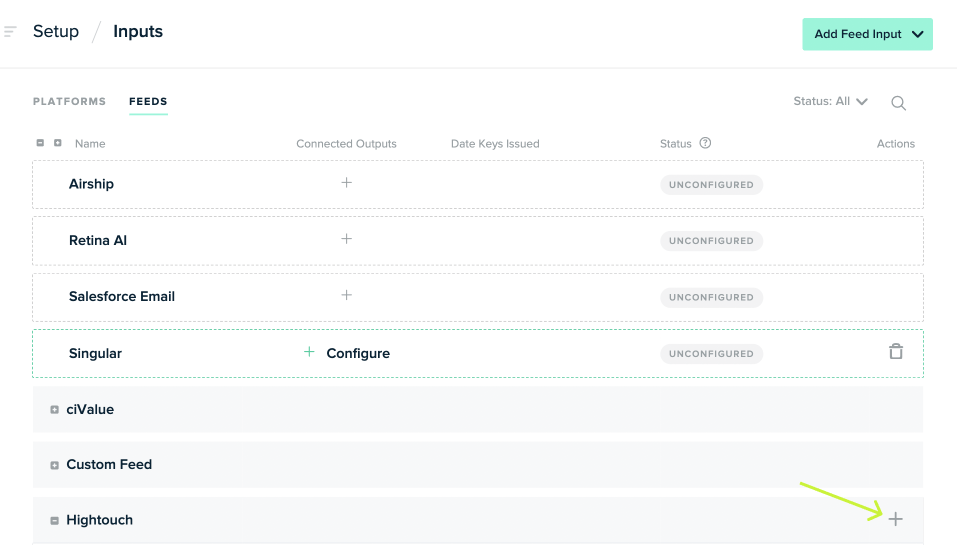
- Add a feed under the Hightouch tab by clicking the + button.
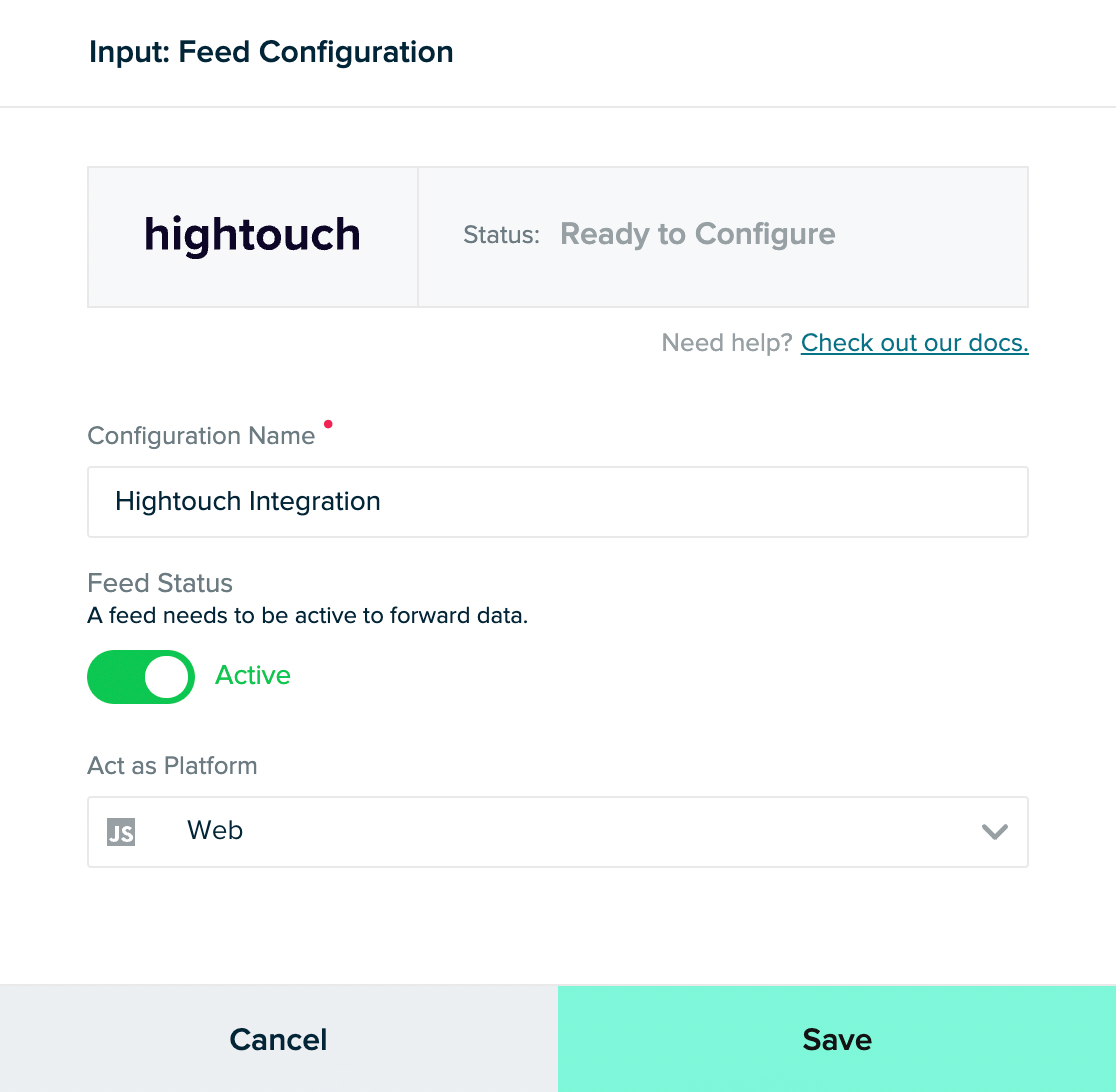
- Give your configuration a name and select Web under Act as Platform.
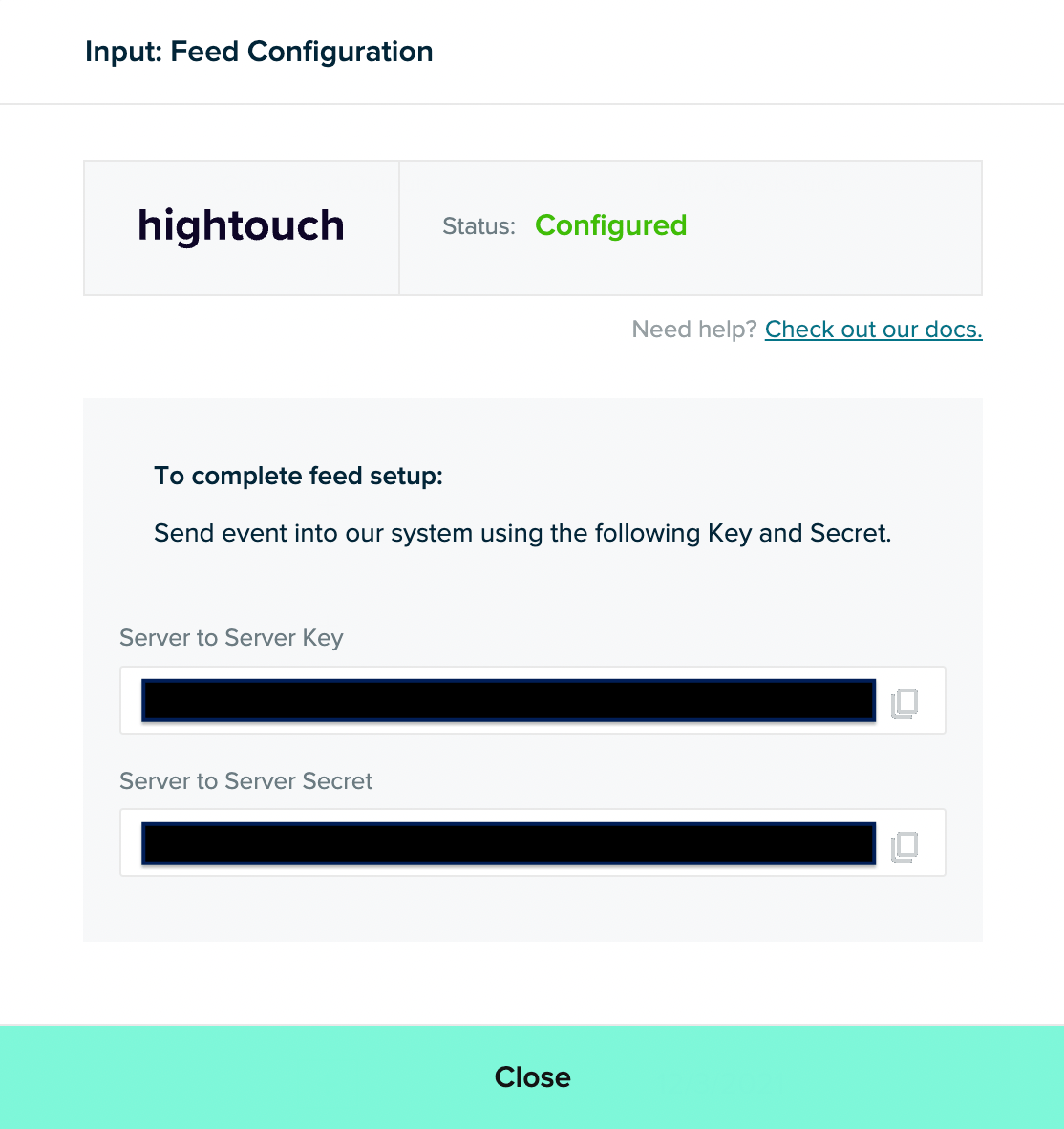
- Copy your generated keys. Your Server to Server Key is your API key and your Server to Server Secret is your API secret.
Syncing data
Users
Sync data from any source as user attributes without an event to mParticle.Record matching
You can match rows in your model with users in mParticle with the provided identifiers. Hightouch uses the identifier you select in this section and as theexternal Id for this sync.
Additional identifiers
In addition to the column selected for record matching, you can choose to provide more user identifiers in this section. There is no limit to the number of columns you can select here.Field mapping
You can sync columns from your source to mParticle as user attributes. If the customer attribute doesn’t exist, Hightouch creates it.Custom field mapping
You can sync columns from your source to mParticle as custom user attributes. If the customer attribute doesn’t exist, Hightouch creates it.Environment
In this section, select the environment you would like to sync your data to. The available choices are:
mParticle recommends using Development mode first to ensure the data meets your expectations before moving to Production.
Delete behavior
You have the following options for how Hightouch should handle rows leaving your query results:Events
You can sync the following event types:- Custom Event
- Commerce Event
Events and historical events
Given a validDate, DateTime, or timestamp column as a timestamp for events, Hightouch separates events based on the age of the data.
- Hightouch sends events that are older than 28 days to the
/v2/bulkevents/historicalendpoint. - Hightouch sends events that are newer than 28 days to the
/v2/bulkeventsendpoint.
Custom event
Sync data from any source as a custom event.Event name
Provide an event name. This is how you can reference the event in mParticle campaigns or segments.Event timestamp
Provide a timestamp of when the event occurred. If this field is empty, Hightouch uses the time the event arrives at the server. AnyDateTime value provided from your source is converted to Unix timestamp as expected by mParticle.
Custom event type
Select the type of custom event you would like to sync out of the provided selections.User identifiers
In this section, you can provide user identifiers for each event that occurred.Event attributes field mapping
You can sync columns from your source to mParticle as event attributes. If the event attribute doesn’t exist, Hightouch creates it.Event attributes custom field mapping
You can sync columns from your source to mParticle as custom event attributes. If the custom event attribute doesn’t exist, Hightouch creates it.User attributes field mapping
You can sync columns from your source to mParticle as user attributes. If the customer attribute doesn’t exist, Hightouch creates it.User attributes custom field mapping
You can sync columns from your source to mParticle as custom user attributes. If the customer attribute doesn’t exist, Hightouch creates it.Environment
In this section, select the environment you would like to sync your data to. The available choices are:
mParticle recommends using Development mode first to ensure the data meets your expectations before moving to Production.
Commerce event
Sync data from any source as a commerce event.Event timestamp
Provide a timestamp of when the event occurred. If this field is empty, Hightouch uses the time the event arrives at the server. AnyDateTime value provided from your source is converted to Unix timestamp as expected by mParticle.
User identifiers
In this section, you can provide user identifiers for each event that occurred.Event attributes field mapping
You can sync columns from your source to mParticle as event attributes. If the event attribute doesn’t exist, Hightouch creates it.Event attributes custom field mapping
You can sync columns from your source to mParticle as custom event attributes. If the custom event attribute doesn’t exist, Hightouch creates it.User attributes field mapping
You can sync columns from your source to mParticle as user attributes. If the customer attribute doesn’t exist, Hightouch creates it.User attributes custom field mapping
You can sync columns from your source to mParticle as custom user attributes. If the customer attribute doesn’t exist, Hightouch creates it.Environment
In this section, select the environment you would like to sync your data to. The available choices are:
mParticle recommends using Development mode first to ensure the data meets your expectations before moving to Production.