

The Lightning sync engine was previously known as warehouse planning. Both
terms describe the same feature.
Before you begin
- A supported source and write access to your data warehouse.
How the Lightning sync engine works
Hightouch identifies the incremental changes in your data model so that syncs send only the necessary updates to your destinations. For every sync, Hightouch computes what rows to send by pulling all rows within your data model and comparing them with the last sync. This process is called change data capture (CDC) or diffing. You can find more details in the change data capture overview. By default, the change data capture computation and file storage happens on Hightouch managed infrastructure. This can be slow for large models that take a long time to query. With the Lightning sync engine, Hightouch computes change data capture directly in your warehouse. It stores previously synced data into a special schema managed by Hightouch. Customers with extensive datasets requiring high performance syncs typically use the Lightning sync engine.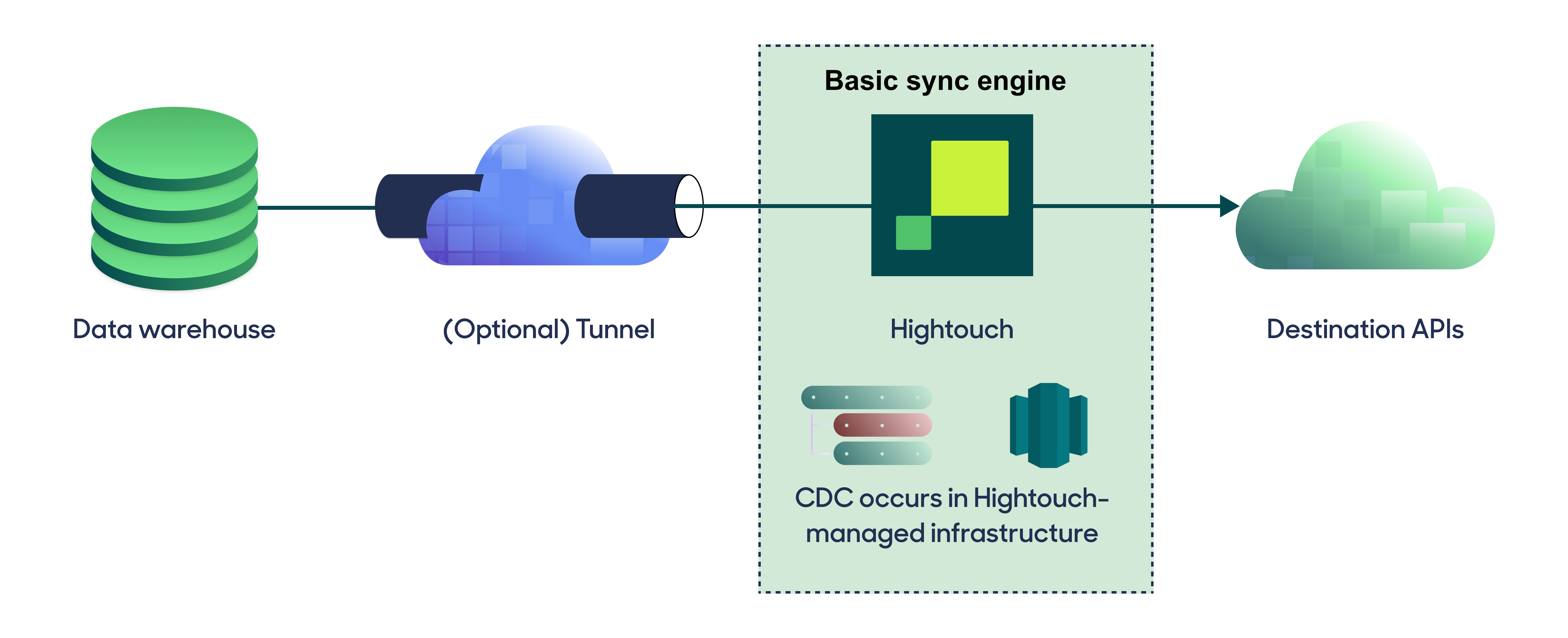
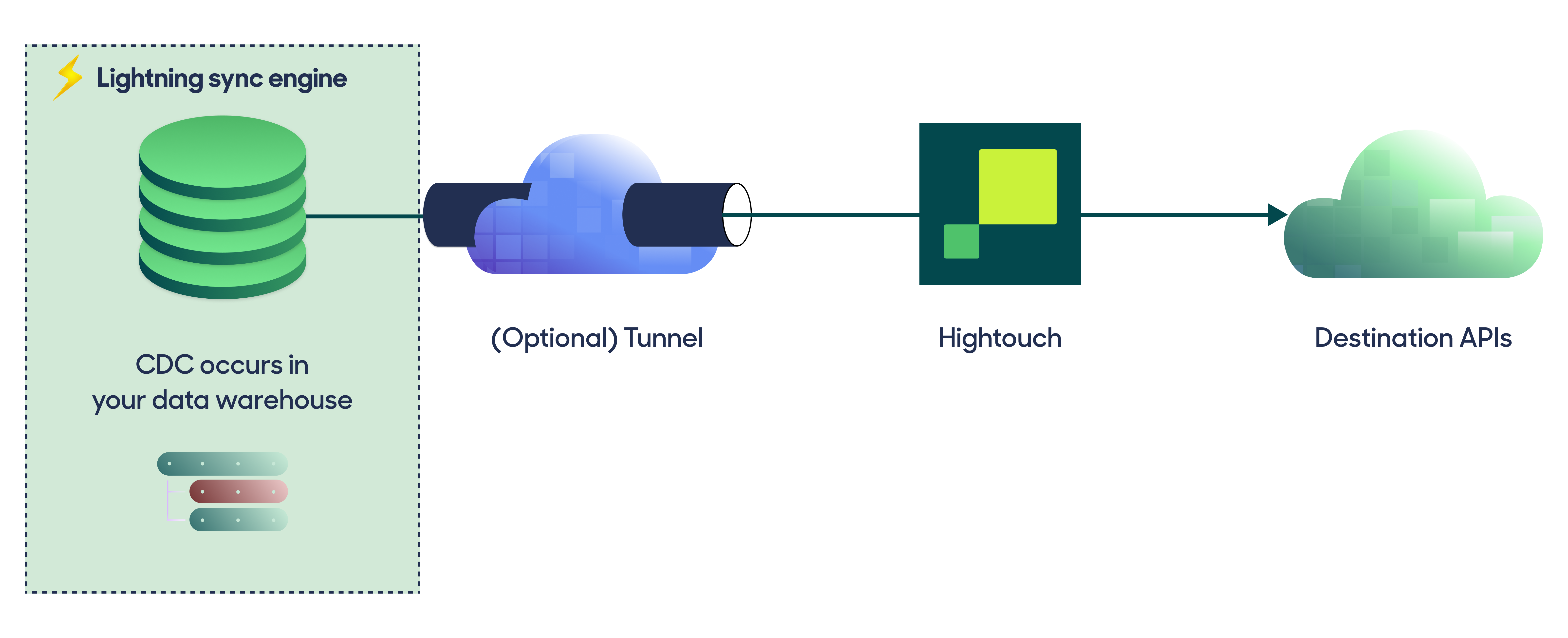
Engine comparison
The Lightning sync engine requires granting write access to your data warehouse, which makes its setup more involved than the Basic sync engine. However, it is more performant and reliable than the Basic engine. This makes it the ideal choice to guarantee faster syncs, especially with large data models. It also unlocks features that are not available with the Basic engine, including Journeys, Sampling, Warehouse Sync Logs, Audience Snapshots, Match Booster, and Identity Resolution.When the Lightning sync engine is required
The Basic sync engine supports standard audience syncs, but several Hightouch features require the Lightning sync engine. Enable the Lightning sync engine if you plan to use any of the following:- Journeys
- Sampling
- Warehouse Sync Logs
- Audience Snapshots
- Experiment holdout group logs
- Match Booster
- Identity Resolution
Supported sources
The Lightning sync engine works with the following sources:- Amazon Athena
- Amazon Redshift
- Azure Synapse
- ClickHouse
- Databricks
- Google BigQuery
- Greenplum Database
- Lakebase
- Microsoft Fabric
- PostgreSQL
- Snowflake
- Snowflake Iceberg
- Trino
Enable the Lightning sync engine
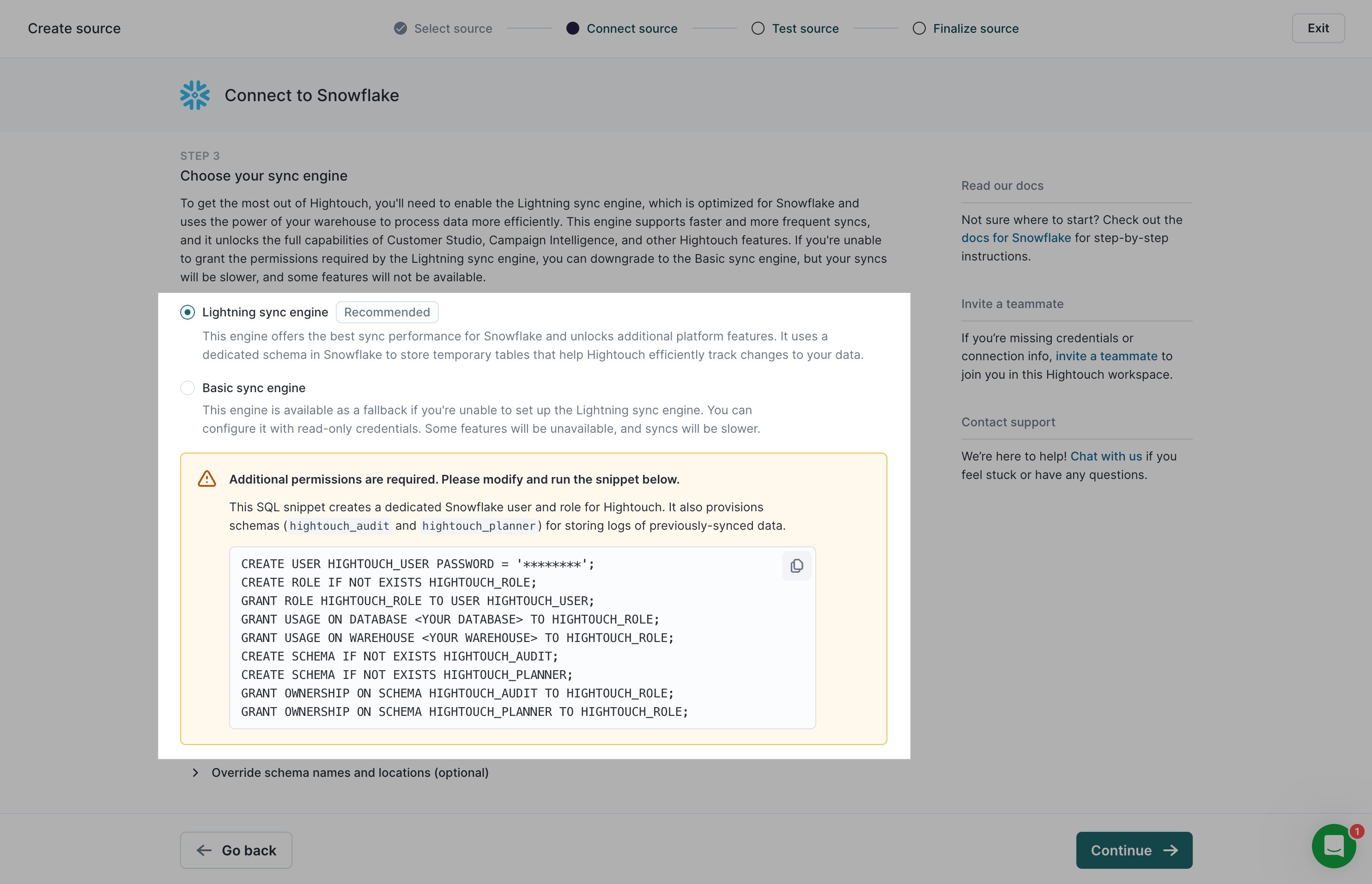
When first setting up one of the supported sources, Hightouch prompts you to Choose your sync engine. Select Lightning sync engine, marked Recommended.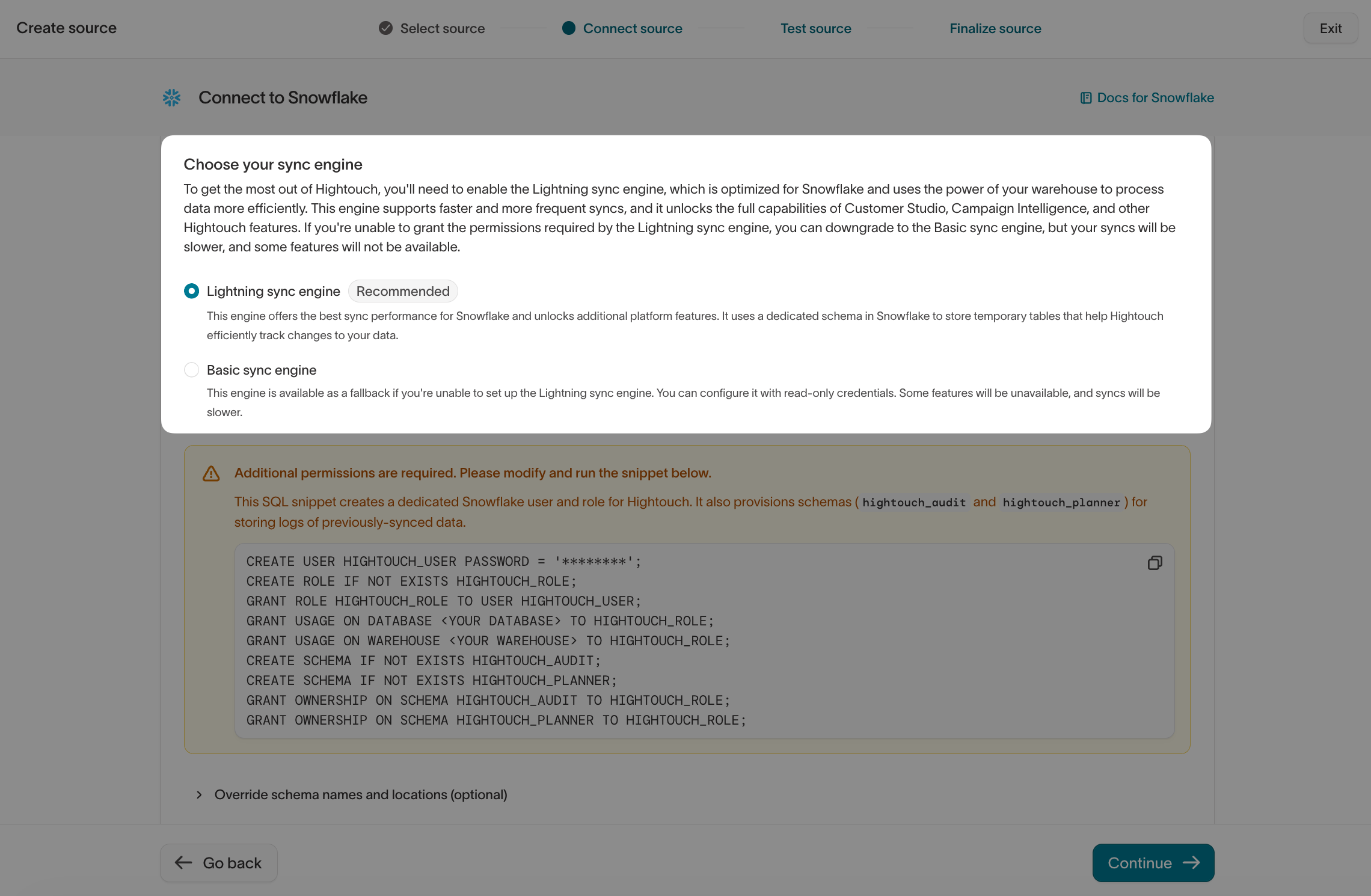
- Grant Hightouch write permission to your data warehouse.
- Create the warehouse schemas for Hightouch to use.
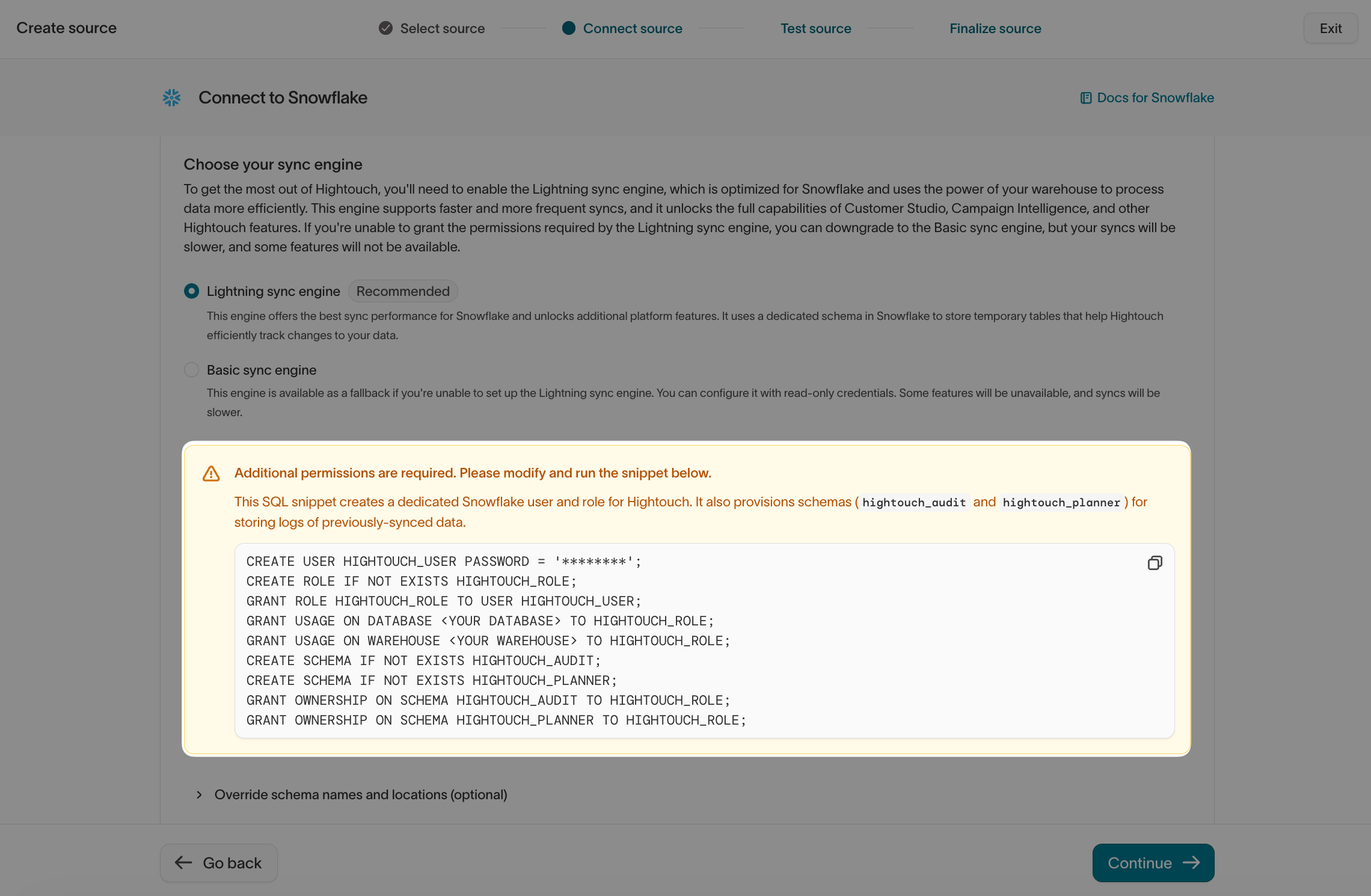
Warehouse schemas
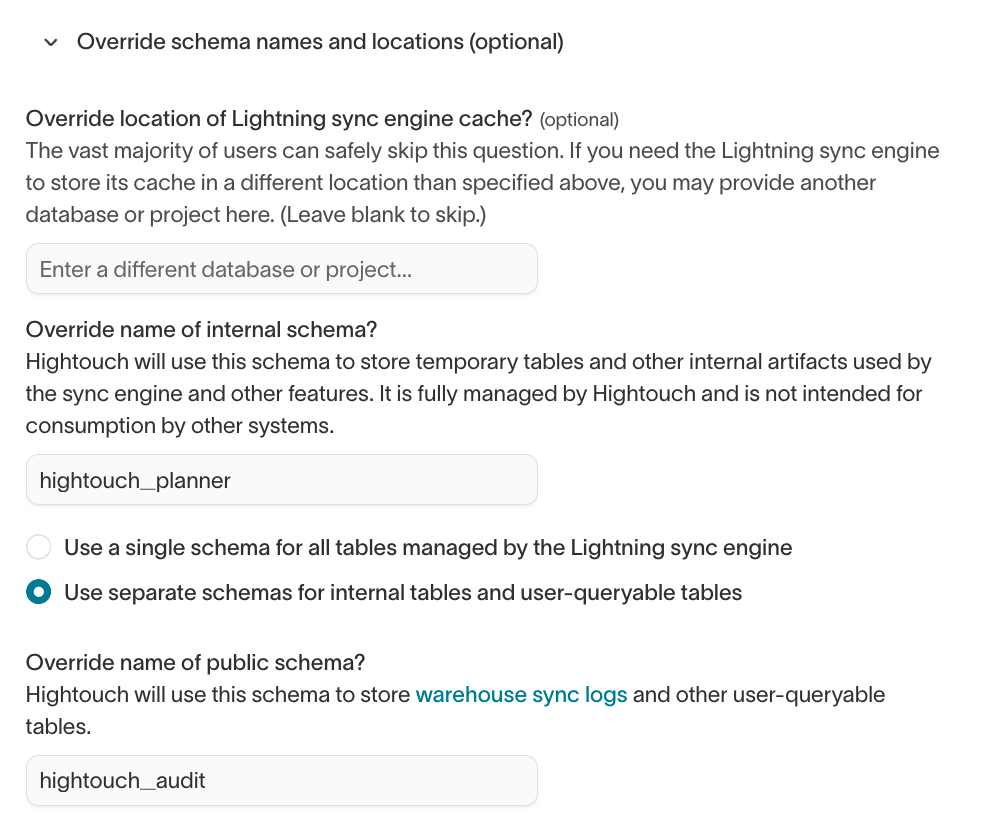
Hightouch requires you to create two schemas:hightouch_planner: the internal schema that powers the Lightning sync engine. Hightouch manages it, and you don’t query it directly.hightouch_audit: the public schema that holds Warehouse Sync Logs and other tables you can query.
Storing the Lightning schema in a different database or project can limit some
sources to SQL models. See your source’s documentation
for details.
hightouch_planner schema: one to log the model’s query results (the _plan table) and one to log rows rejected during the sync (the _rejections table).
Hightouch uses these tables to perform change data capture and plan which rows to sync.
Hightouch only keeps the two most recent pairs of tables to compute the diff for the current sync.
In other words, Hightouch doesn’t maintain historical records of these tables, and any given sync never has more than the two most recent pairs of tables.
Because these tables and their names change with every sync run, Hightouch requires permission to write to the entire hightouch_planner schema rather than specific tables.
You can learn more about the
hightouch_audit schema on the Warehouse Sync
Logs page.Table removal
Removing tables from thehightouch_planner and hightouch_audit schemas isn’t recommended:
hightouch_planner: these tables are required for change data capture to work correctly; if you delete these tables, you need to trigger a full resync to fix your syncs.hightouch_audit: removing tables from thehightouch_auditschema would mean deleting the Warehouse Sync Logs related to a sync’s prior runs, which are useful for historical analysis.
hightouch_planner schema and the Snapshot table in the hightouch_audit schema, removing all older PII before it reaches the 30-day threshold.
The Sync runs table in the
hightouch_audit schema doesn’t contain PII.Migrate from Basic sync engine
You can migrate to the Lightning sync engine by going to the Configuration tab of any previously setup supported source.- From the source’s Configuration tab, select Lightning sync engine under Choose your sync engine .
- Follow the source-specific in-app instructions to grant Hightouch write permissions to your warehouse and create the schemas for Hightouch to use.
- Click Save changes.
- Test your connection to ensure setup is correct.
The first run after migrating to the Lightning sync engine can take longer
than usual, as it uses a special migration sync engine to create the necessary
schemas in your warehouse.
Migration tips
Follow these tips when performing the migration:- The Lightning sync engine requires your primary key to be unique for every model using the source. If you’re unsure if your primary key is unique, check before migrating.
- If you have a large number of syncs to migrate, please so that we can help you migrate incrementally.
- If you hit any errors, you can often fix them with a full resync. Ensure your sync meets the full resync prerequisites before doing so. Otherwise, you can reset change data capture (CDC).
Common errors
Primary key is not unique
The Lightning sync engine requires that every row in your model has a unique value for its primary key. This is because the primary key is used to uniquely identify each row, and for example, whether it failed previously. Models with duplicate primary keys can be deduplicated in SQL with theROW_NUMBER() function.
For example:
ORDER BY or WHERE to filter and select which data from the duplicates you want to keep.