

Realtime formula traits calculate a value from other realtime traits, such as 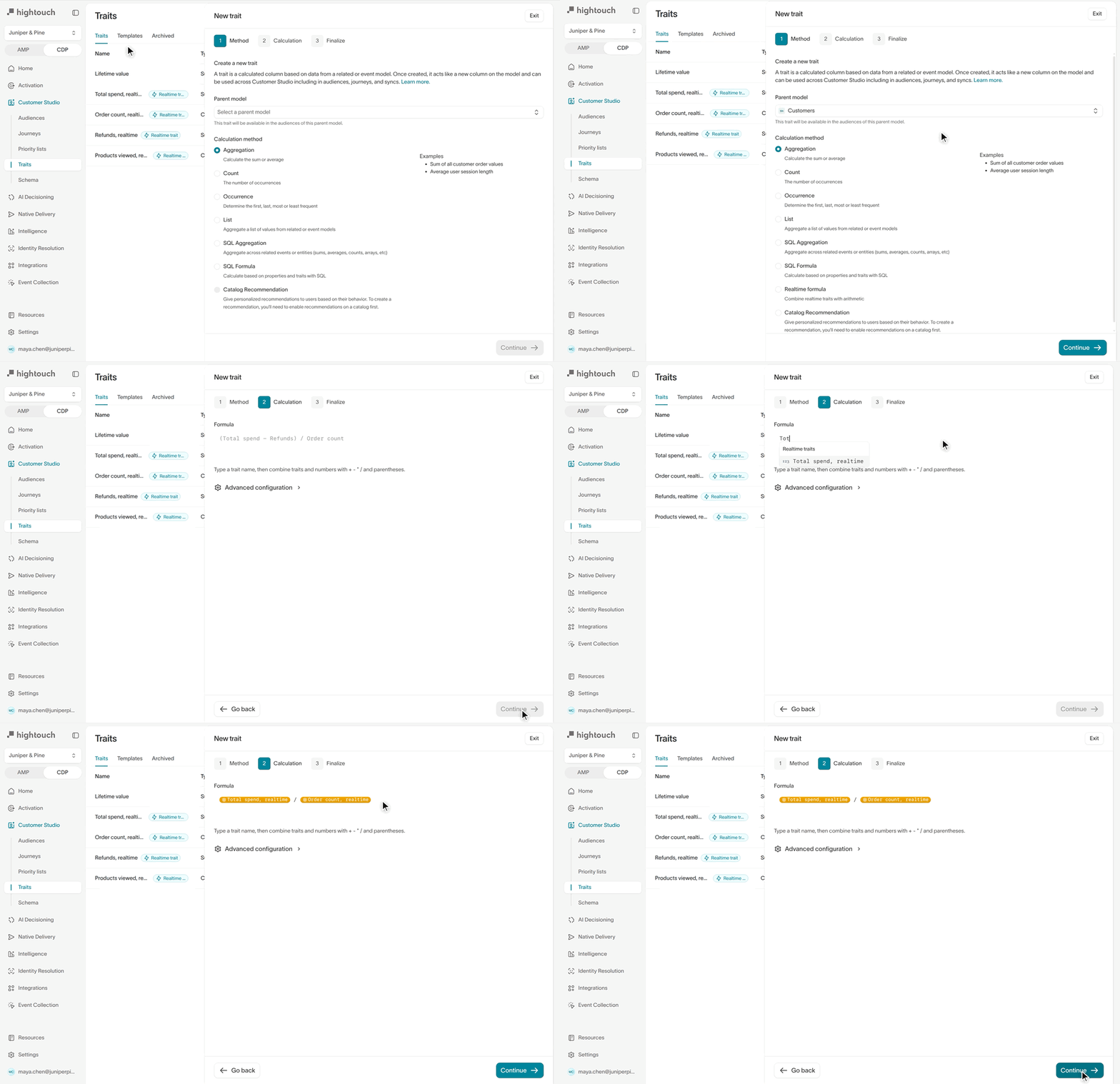
(Total spend - Refunds) / Order count, and update with every event. Combine count, sum, and average traits, and first or last traits that hold a number, with +, -, *, /, and parentheses. Use the result like any other realtime trait in realtime audiences and journeys, syncs, and the Personalization API.ChangedSaving a model that removes a column Hightouch relies on now stops and shows what uses it. If it’s the primary key, a join key, or the event model column, you can choose a replacement in the same dialog. If syncs, audiences, or traits use it, select Download CSV to get the list. Workspace admins can select Save anyway.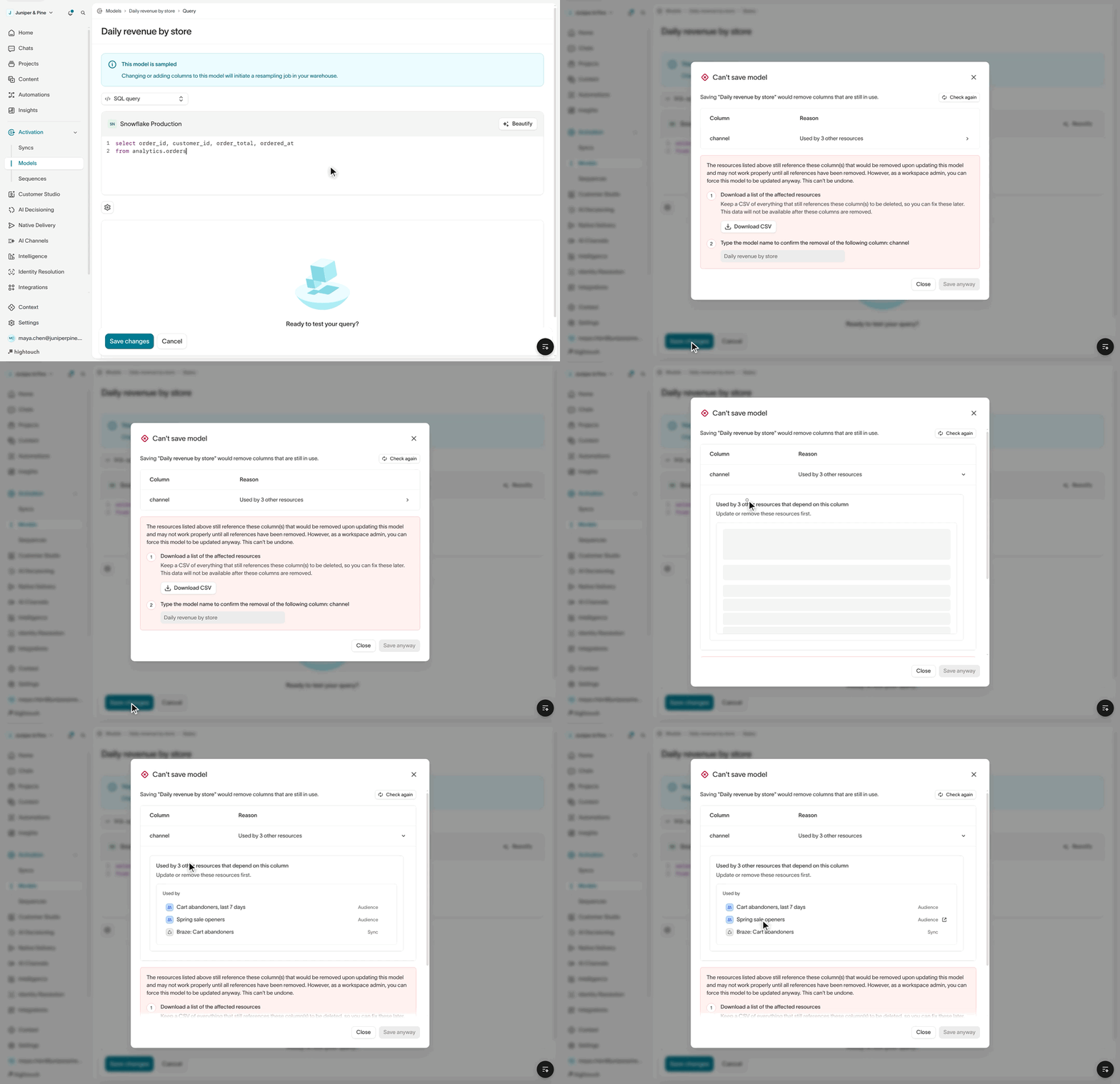
Delivery campaigns and journey messages can each use a brand profile from Context, so one workspace can send for several brands. The email editor uses the brand’s fonts and colors, each brand has its own email footer and consent page, and reporting and the Profile explorer can filter by brand.
Agent chats now let you jump between the prompts you sent without scrolling past each answer. Press ⌘↓ or ⌘↑ (Ctrl on Windows) to move to the next or previous prompt, or hover the marks on the chat’s right edge to list every prompt and click one to go to it. This works in full-page chats and in the docked agent panel.
ChangedWhen Hightouch creates a new Pinterest Ads customer list audience, the audience now gets exactly the name you enter in the sync, or your model name if you leave it blank, without the
Audience- prefix. Audiences created earlier keep their names. To keep the old naming, enter Audience-{model.name} in the name field.New Actito destination for creating and updating profiles in your Actito profile tables, one at a time or as bulk imports. You can also push audiences into Actito external target lists, which your campaigns and scenarios target with the File targeting module.
ImprovementA one-time campaign’s CSV audience can now carry other columns, such as first name or an offer code, to personalize the message. Pick the columns under Campaign variables when you upload the CSV, then insert them like any other variable.
ChangedA sync run that keeps retrying now stops after 30 days and fails with a runtime limit error, instead of retrying indefinitely. On the free plan, the limit is 7 days. To find out about failures before a run reaches the limit, set up sync alerts.
ImprovementJourney tests can now simulate a journey over a date range, not just one run. Set Test mode to Multi step and choose a start and end date to see how members move through delays and later tiles.
ImprovementAgent reports are now called Routines. A routine runs the same analysis on a schedule and delivers a report by email or Slack, so you don’t rerun the prompt yourself.
ImprovementWhen a source’s SSH tunnel is offline, sync runs now fail after about 15 minutes with a
Tunnel not connected error and send the sync’s alerts, instead of waiting indefinitely. Reconnect the tunnel, then run the sync again.ImprovementA journey’s evaluation schedule can now start on a set date and stop on an end date. At the end date, the journey turns off, hard stops, or pauses, whichever you choose, just as if you’d done it by hand.
ImprovementProduct feeds from a file URL or SFTP now support XML files, in addition to CSV, TSV, and JSONL.
ImprovementBraze Track Event syncs can now send an exit event when a row leaves your model, in addition to the event sent when a row is added. Use exit events to remove users from a Braze Canvas once they leave an audience.
New Superchat destination for syncing contacts and their custom attributes, matched by email or phone number. You can also add synced contacts to a new or existing Superchat contact list.
ImprovementA sync template can now send the same audience to more than one ad account. Apply it again and pick a different account each time, instead of creating a template for each account. This works for Google Ads, Meta, Microsoft Ads, and TikTok.
ImprovementWhen an identity resolution run finds a supercluster, where one identifier value such as a test account’s email links thousands of unrelated profiles, the run no longer fails. It quarantines the values that caused the over-merge, finishes without merging on them, and keeps updating your golden records. Quarantined values stay in their existing clusters but aren’t merged into new rows until you choose Keep or Block. A warning banner shows when values are waiting on review, and the Runs tab shows what each run flagged.
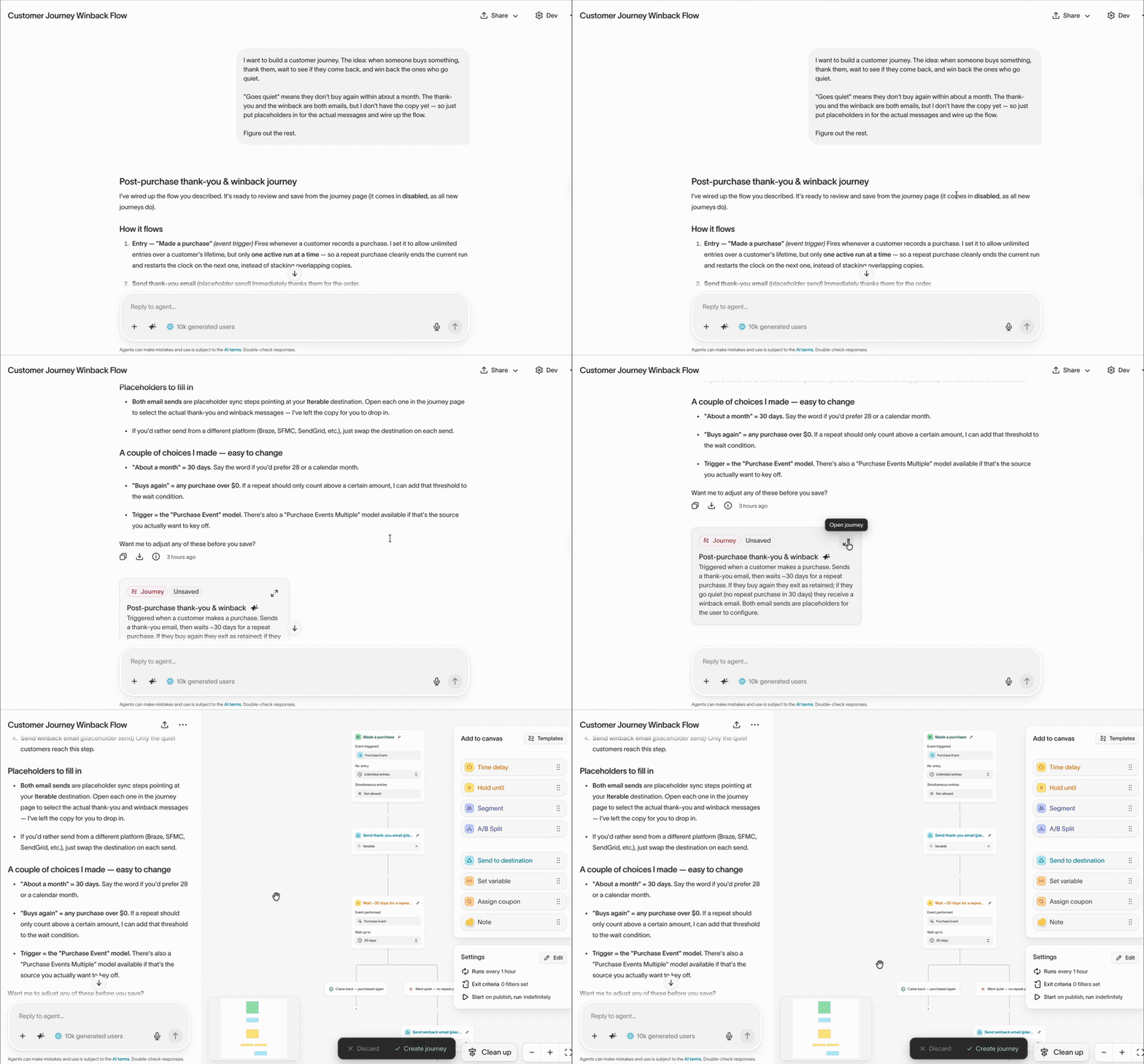
The agent now opens in a side panel next to the journey canvas. It knows which journey you’re viewing, including edits you haven’t saved yet. Ask it to explain the journey, suggest improvements, or analyze performance to see where users drop off. When you ask for changes, the agent applies them to the canvas, highlights the changed tiles, and lists each change in the chat so you can review it before you select Save changes.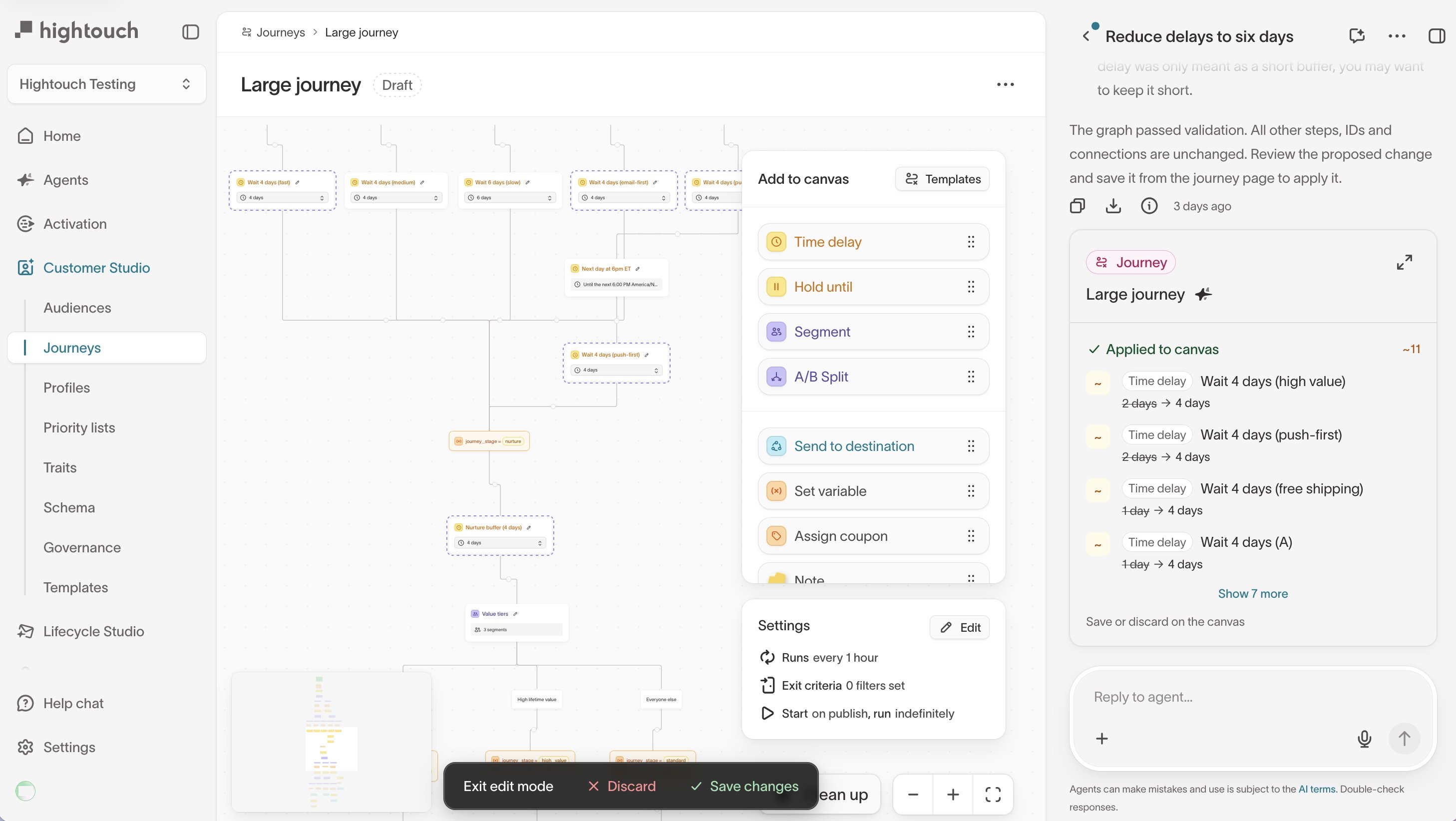
Tags label your ad creative by attributes such as hook tactic, messaging angle, and offer type. An agent tags the images and videos from your connected ad accounts, so you can group performance by tag in Insights and compare creative approaches instead of single ads.
Context Hub now connects to Google Drive, so agents can read the docs and sheets your team already keeps there. Hightouch keeps the synced files up to date, so you don’t need to upload them again each time they change.
New MNTN destination for syncing audience segments and conversion events to MNTN, the connected TV (CTV) advertising platform. Use segments to target people in MNTN campaigns or to exclude them, such as current subscribers and recent purchasers.
ChangedStarting February 1, 2027, Emarsys no longer accepts WSSE authentication. Before then, switch existing Emarsys destinations to OpenID Connect, which uses a client ID and client secret, on the destination’s Configuration tab. Your existing syncs keep working without other changes.
The new Actions page lists every plan your workspace’s agents propose for changes in your connected tools, such as launching ads in Meta or building an email in Braze. Filter plans by status to see which ones are waiting for approval, and open a plan to approve it or go back to its chat.
Braze plugins are now available for the Hightouch browser, iOS, and Android SDKs. They pass the user updates, events, and purchases you track with Hightouch on to Braze, so you can use Braze in-app messages and Content Cards without adding separate Braze tracking.
ImprovementWarehouse Export speeds up large syncs by having your warehouse write results straight to cloud storage. When a setup problem, such as missing bucket permissions, turns it off, Hightouch now shows that it’s off and why, and you can re-enable it for a single sync or for all of a source’s syncs.
Snowflake sources can use a named external stage for Warehouse Export, so Snowflake writes to your storage bucket with its own access instead of temporary credentials from Hightouch. Use it if your Snowflake account blocks writes that use temporary credentials.
ImprovementThe Connections page shows the status, run history, and any errors or warnings for each Fivetran connection that brings data to your agents. You can also test connections and run syncs on demand.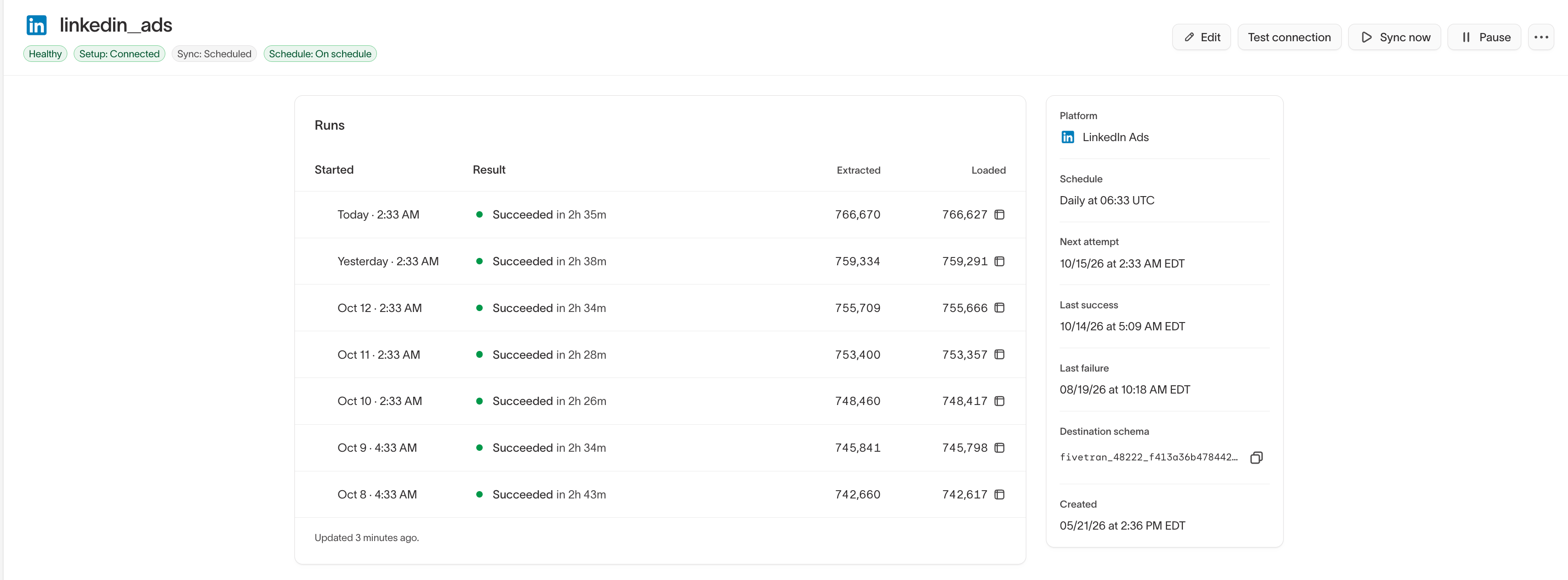
When AI Decisioning schedules messages for the best time of day, you can choose the exact send time within each three-hour window. For example, send early-morning messages at 7 AM instead of 6 AM while morning messages still go out at 9 AM. Send times follow each user’s time zone and apply to new recommendations.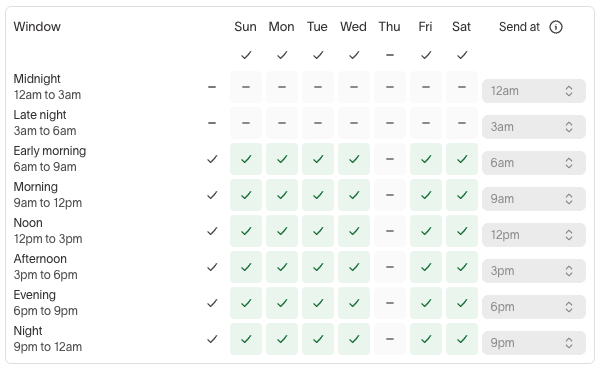
New Amazon SQS event source for collecting events directly from SQS queues.
New Amazon Kinesis event source for collecting events directly from Kinesis streams.
ImprovementEach channel connection in Context now has a status page with its schedule, open alerts, and run history. Select Test connection to rerun the setup checks, or Sync now to start a sync without waiting for the schedule.
Localization sends one Delivery message in several languages. Write the message once and load a translation for each locale from a CSV. Each recipient gets the version that matches the locale on their profile.
ChangedCustom roles that can use agents now get data access to general models by default, so agents can query those warehouse tables for the people in that role. Hightouch also updated existing custom roles in workspaces that use general models. Review your roles if some people shouldn’t see that data.
ImprovementAgent responses now include citations for the definitions and assumptions behind each part of an answer. A citation appears at the end of each paragraph or list item it supports, and the full list still appears at the end of the response.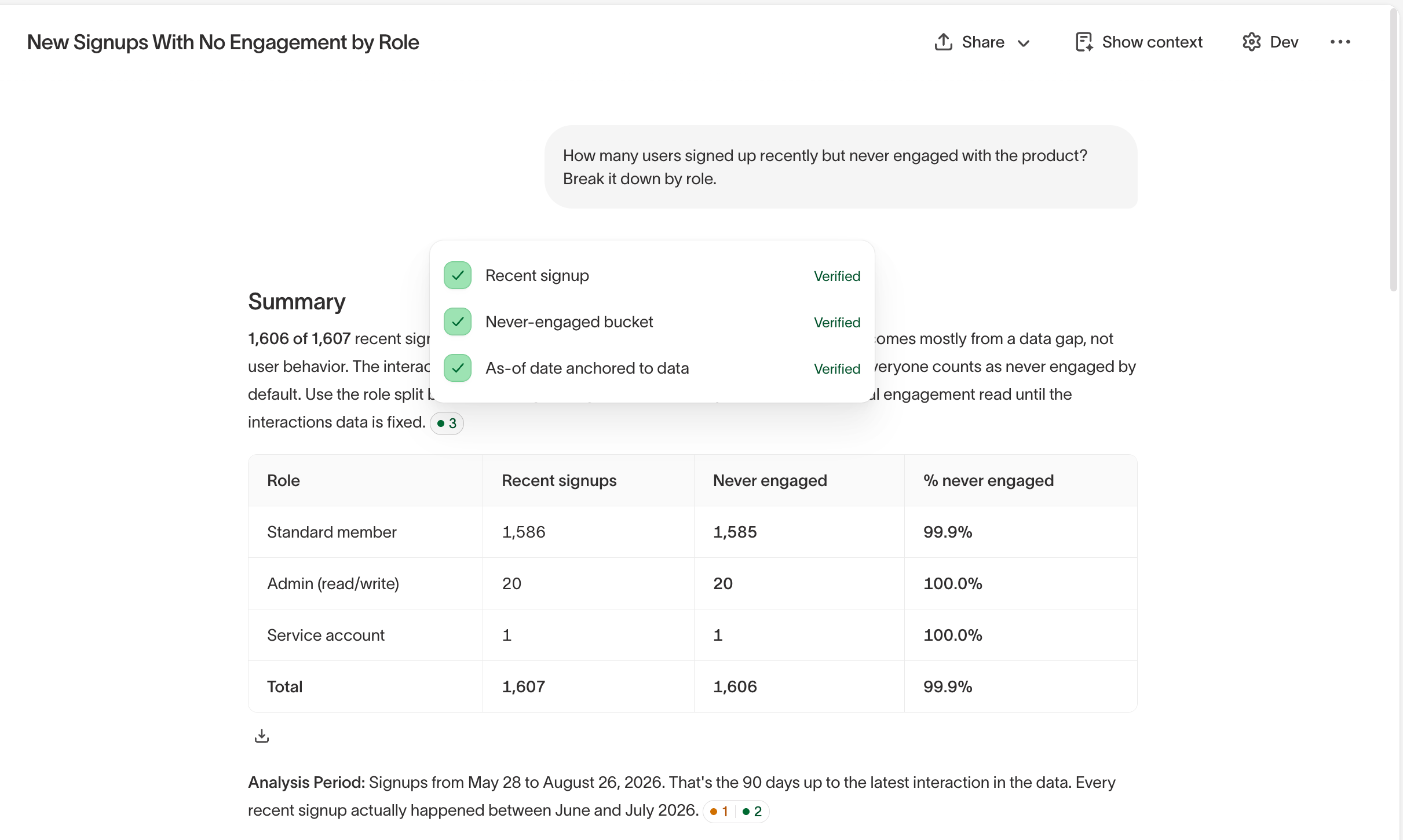
Automatically sync images and creative files from your digital asset manager (DAM), the tool where your team stores brand assets, into your asset library. Run the sync on a schedule, or start it whenever you need fresh assets.
The OpenAI destination now supports syncing custom audiences, in addition to conversion events. You can match users on email, phone number, or Google advertising ID.
Ask the agent for SMS and push notification copy on a campaign canvas, next to the brief and emails, so every message uses the same offer and dates. Edit the messages, send them for review, and export them to Iterable or Klaviyo as campaigns.
Event-based journeys now let you select subsets on the Start tile. Select a subset in each required category before you select Update. Your selections determine who can enter the journey and who can receive messages sent from it.
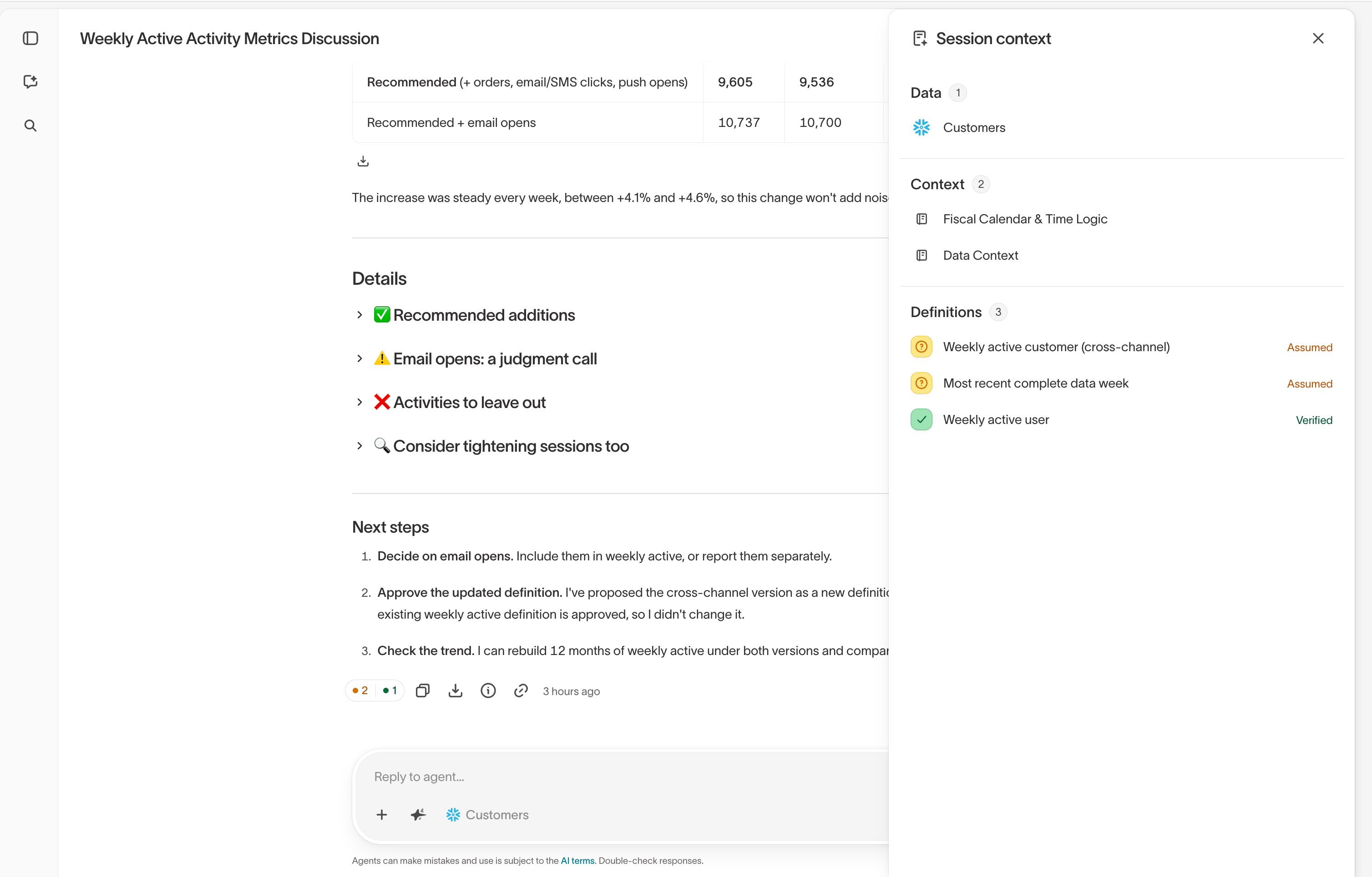
ImprovementWhen an agent makes an assumption in chat, such as how your business defines an active customer, it’s saved to the Definitions tab. Review, edit, and approve it there, and agents use the same definition in future chats. The Session Context panel shows everything an agent used in a chat, including definitions, audiences, and files.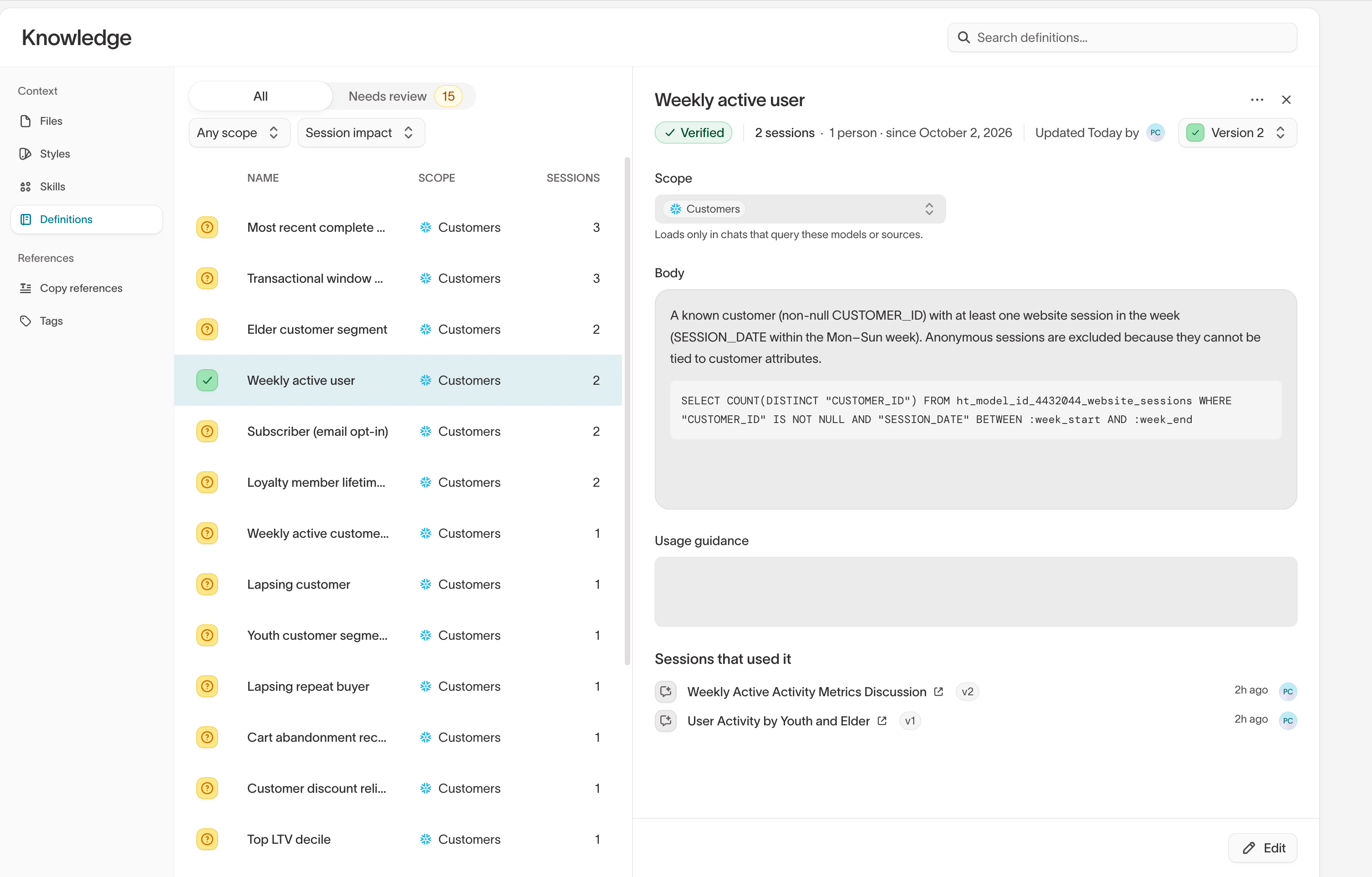
The Health tab for an AI Decisioning agent shows whether the syncs that deliver its messages are working. A Syncs card lists the last 12 hours of runs for each channel, and failed runs show the error with a link to investigate.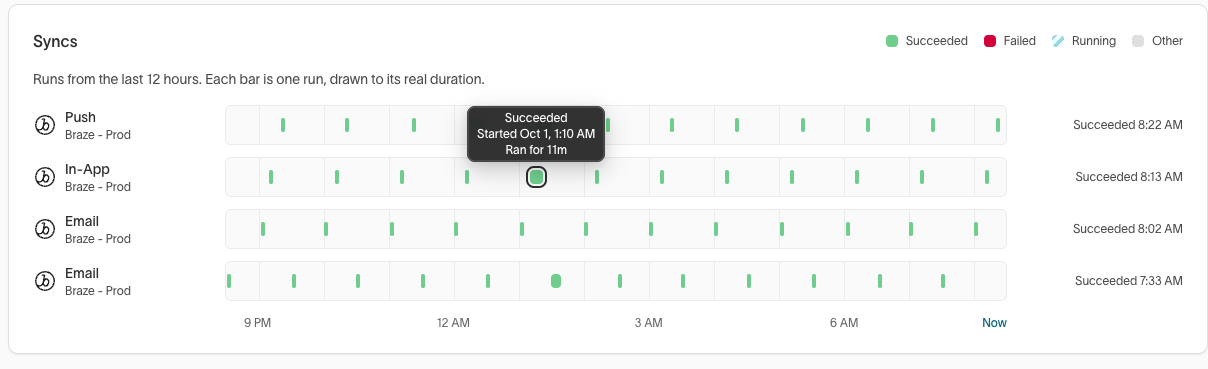
Dynamic content in Delivery shows recipients different versions of part of an email, SMS, or push message based on their data, such as a different image for each loyalty tier. Set a condition for each version, and each recipient gets the first one they match. It works in campaigns and journey messages.
Delivery reporting shows how your messages perform across channels in one overview, and every campaign and journey has its own Reporting tab. Filter recipients by status, engagement, or reason, and open a recipient’s profile to see the exact message they got.
Realtime audiences and realtime traits can filter on arrays of objects in event payloads, like the products in an order. Choose any item or all items, and every item condition is checked against the same item, so 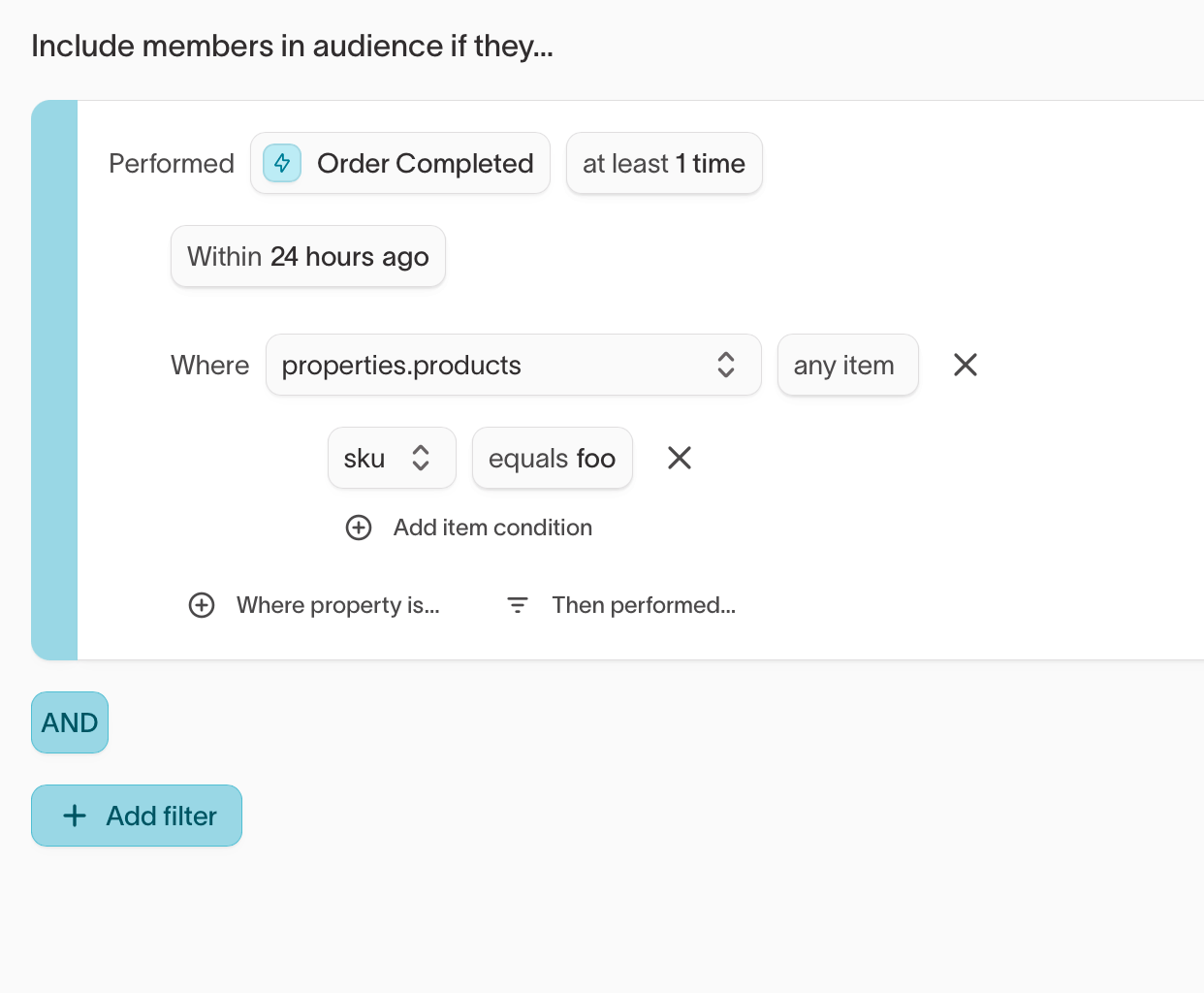
brand = Acme and price > 100 only match a single product that meets both.ChangedAmazon Ads first-party audience syncs now use Ads Data Manager, which replaces Amazon’s older AMC audiences. Hightouch creates the audience and shares it with Amazon DSP, so you no longer set it up in AMC first. New syncs need your manager account ID in the destination settings, and existing syncs keep working as they are.
Consent settings link a feature matrix to consent records. When a user revokes consent, you can remove features that depend on that consent from warehouse data and stored historical interactions, or report the revoked consent without removing the data. Not yet available for Redshift or Databricks.
Templates reuse a layout across many ads so they follow your brand’s look and feel, making it faster to create variants for different audiences and channels.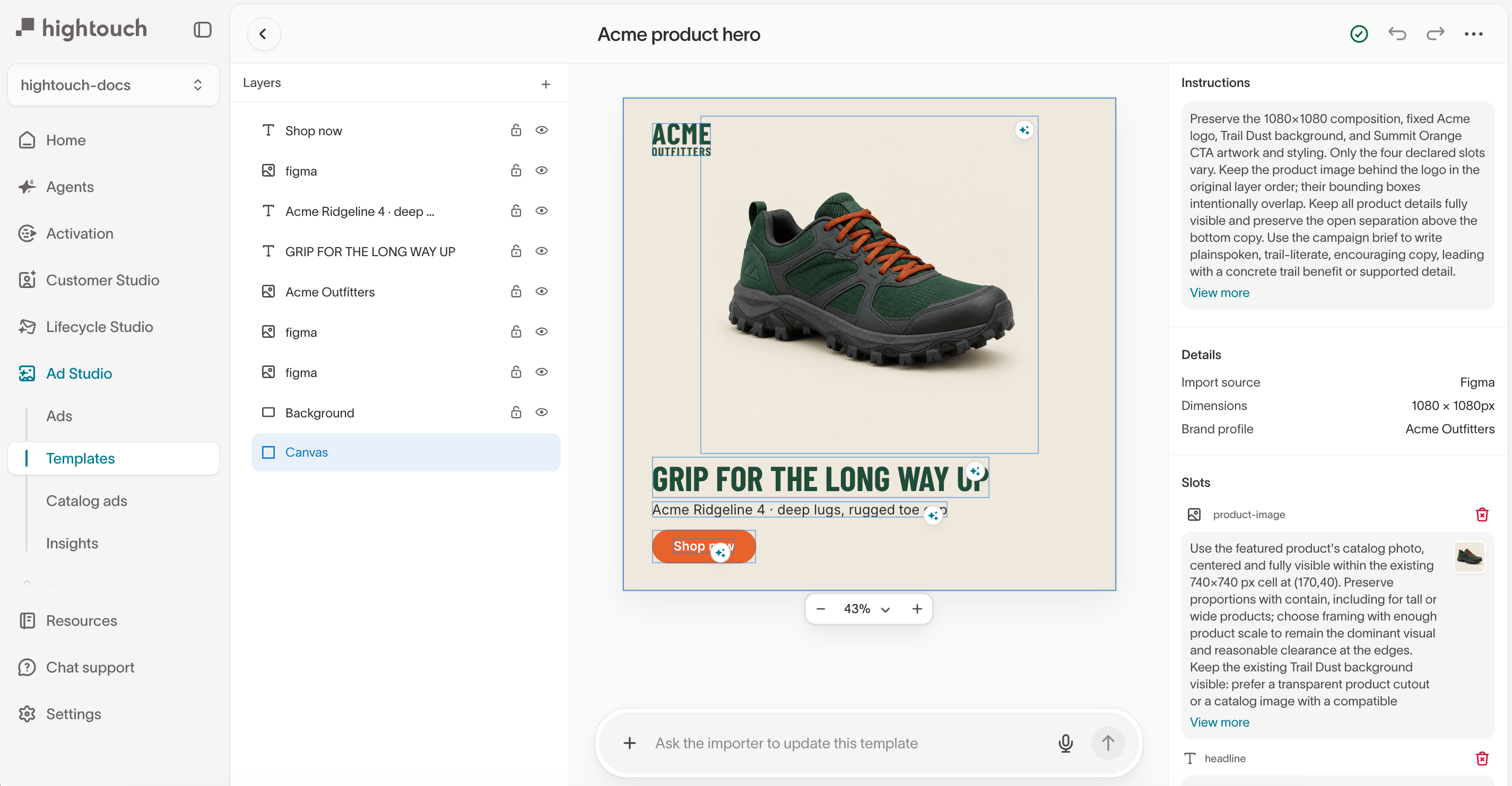
ImprovementThe agent and Insights now open in a sidebar that stays available as you work on an audience. On smaller screens, the sidebar appears as an overlay. It also suggests prompts to help you get started and makes it easier to return to previous chats.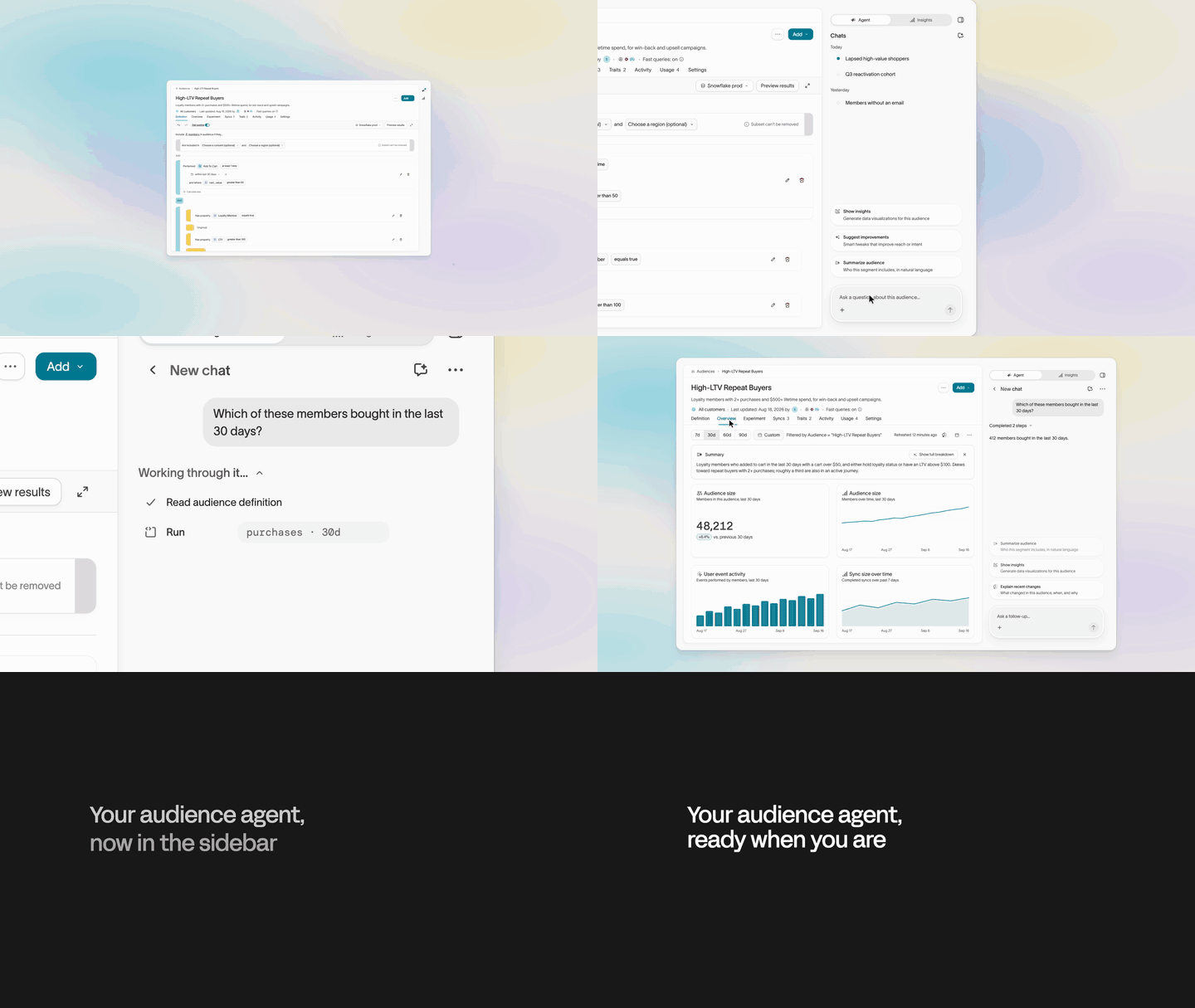
The Context agent suggests changes to your files, styles, and brand profiles from a chat panel in Context. Review each suggested change and approve it before it takes effect.
Speak to an agent instead of typing your message. Useful for describing an analysis you want or an audience you’re building, where saying it out loud is faster than writing it out.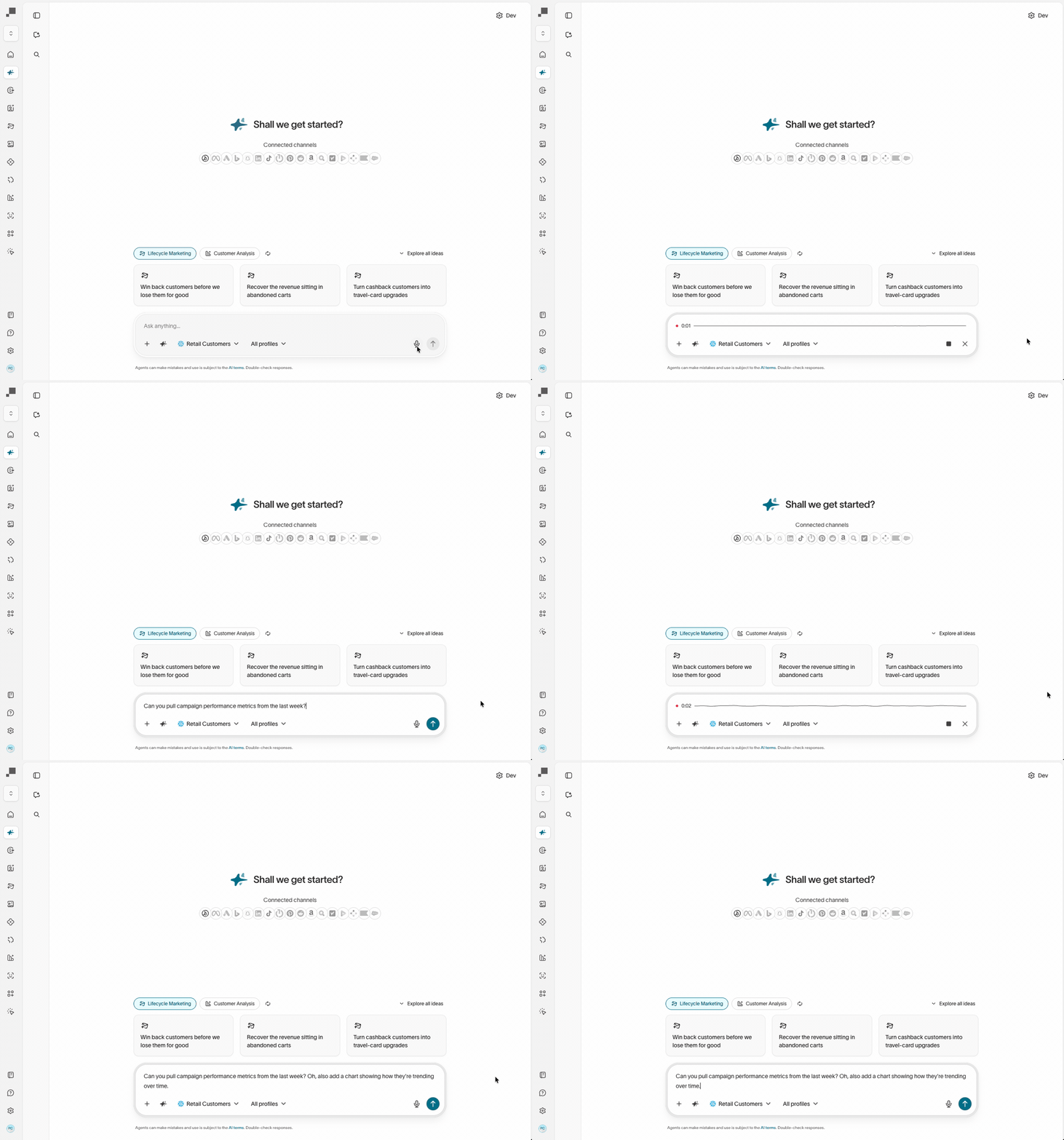
Context can sync files from a GitHub repository, so agents read the docs your team already keeps in GitHub. Pick the folders and files to sync, and Hightouch keeps them up to date.
ImprovementAudience size limits accept a percentage of members, not just a fixed number. The limit applies after your filters, so a top-25% limit sorted by purchase total scopes to the audience you built rather than to every user in the parent model.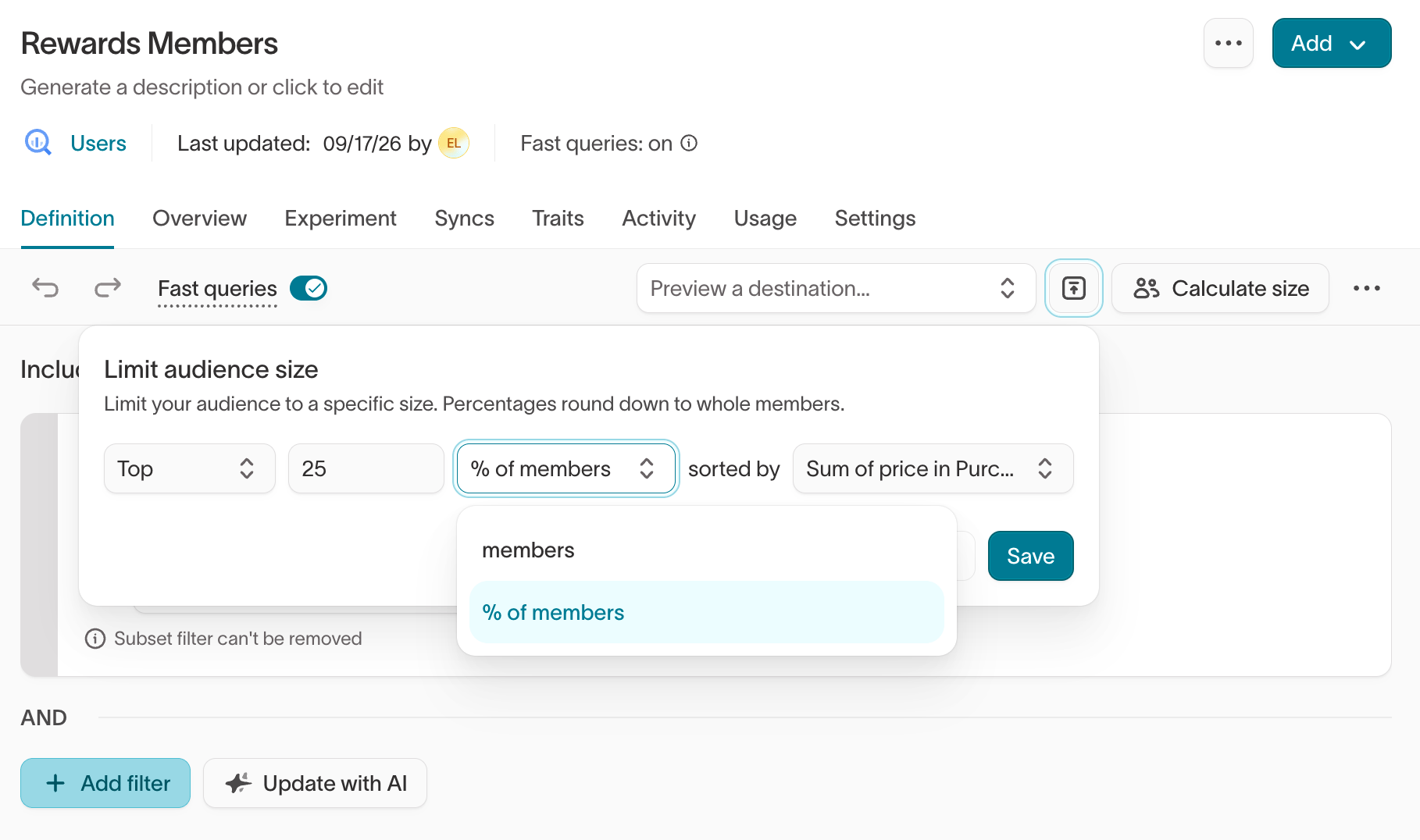
Agents can create PowerPoint decks in chats and routines. Preview a deck in the chat, then download it from the chat’s outputs.
ImprovementIterable trigger syncs support Insert, Update, and Upsert modes across trigger email, push, in-app, SMS, and journey. A row previously fired only when it first appeared in the model, so Update and Upsert let you re-trigger a campaign when a contact’s data changes.
Audience membership traits list every audience a user currently belongs to as a column on the parent model. Sync that list to a destination alongside a user’s other traits, or filter on its length to find users who belong to fewer than five campaigns.
SMS messages in Delivery can include an RCS card with a title, an image, and up to four buttons. Phones that can’t show RCS get the message as MMS or plain SMS instead.
The Events CLI generates typed SDK wrappers from event contracts so you can catch schema mismatches in your editor.
ImprovementRename a chat in the agent sidebar by double-clicking its name, typing, and pressing Enter. The sidebar is also fully keyboard-navigable, and switching between chats is faster.
ImprovementConfiguration forms for syncs, sync templates, destinations, sources, and event syncs respond faster to typing and toggles. Large field mappings that used to lag behind keystrokes now keep up.
Skills give agents the same steps to follow every time they do a task, such as preparing a weekly performance report or reviewing copy before it’s published. You no longer explain the process in every chat.
Move ads through review and approval inside Ad Studio. A status view groups ads on a kanban board, status updates are available from the gallery view or the ad itself, and the ad’s activity sidebar shows the full status and comment history.
Comment on an ad in the visual editor to gather feedback before you launch. Pin a note to a spot on a static ad or a moment in a video, mention teammates to notify them by email, and track unread threads from the notifications bell above the Ads page.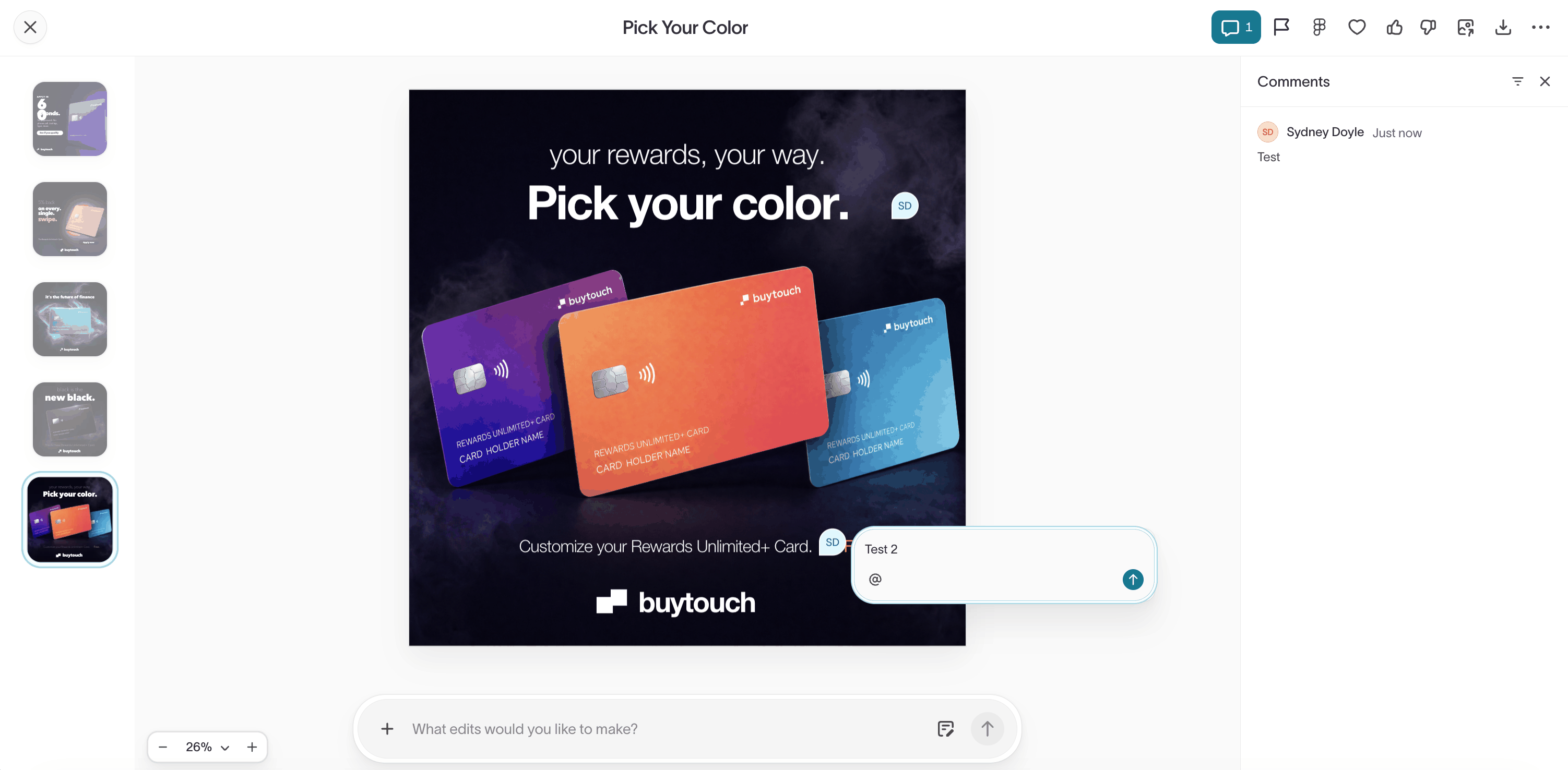
Sync Snowflake semantic views or Databricks Unity Catalog metric views into Context Hub as an external context source. Agents read your governed definitions for terms like LTV, net revenue, and active customer, then use them to interpret questions and write queries.
Catalog ads give every product in your catalog a branded ad image. Design a template with the agent, render it across your catalog, and copy a feed URL that adds the new images to your product feed, so the catalog ads in your ad platform use them.
New FreeWheel Data Suite destination — create FreeWheel segments and keep their membership current for targeting across CTV inventory. Hightouch computes which users entered or left the audience between runs and delivers those changes as incremental additions and removals.
New Purchasely destination — sync audience membership into Purchasely custom audiences to personalize in-app paywalls. Members are added and removed as your audience changes, matched by your own user ID or the Purchasely anonymous ID.
A Manage traits grant lets you give marketers access to create and edit traits and trait templates without granting full schema configuration access. Scope the grant globally or to specific parent models.
Pin chats on the agent chat page to keep important conversations accessible as new ones come in. Pinned state is stored locally in the browser.
Agents can read and analyze journey definitions, runs, and logs — ask an agent for help understanding a complex journey, debugging a run issue, or analyzing journey performance.
Journey time delay tiles support a Next matching time mode. Release members at a specific time of day (for example, 9 AM ET), optionally after a fixed number of days, and optionally only on selected weekdays.
Suggested reports appear on the Reports page as pre-generated options tailored to the workspace’s context and data. Pick one and customize it through follow-up questions, or write a custom report from scratch.
ImprovementProbabilistic IDR (pIDR) graphs support incremental configuration changes: adding a pIDR identifier, removing one, turning pIDR on for a previously deterministic-only graph, or enabling a second (Strict or Loose) confidence threshold. Each change applies on the next run without a full rerun, and existing
ht_id values are preserved.Workspace admins can require approval before a Delivery campaign or journey goes live. Drafters submit it to an approver, and approving it activates it. If the approver denies it, the drafter gets their feedback.
Copy references give agents approved examples of the emails, SMS, push messages, and ads your team already sends. The copy agents write then matches your tone, structure, and calls to action. Connect and approve references for each channel separately.
MoEngage segment syncs support MoEngage’s new partner cohort API — route audiences to a specific MoEngage Team, and write user attributes in the same call as cohort membership so a single sync replaces separate Users and Segments syncs. Existing syncs continue on the legacy API.
Realtime traits support sliding time windows up to 24 hours on Count, Sum, List, and First/Last trait types. Realtime trait values were previously lifetime-only; you can now scope them to a trailing window like pages viewed in the last 10 minutes or cart adds in the last 24 hours.
ImprovementOrganization users are split into Members and Pending invites tabs, each with a count badge, and one search box filters both. Pending invites show color-coded expiry badges so you can see at a glance which ones are about to lapse.
Sync mappings can now spread a JSON or object column so every key becomes its own destination field at sync time. Available on Marketo, Adobe Target, and Google Sheets, with optional per-column key and value transforms.
A new home page centered on agent chat is being gradually rolled out to workspaces with agentic features enabled. The new experience surfaces personalized suggestions, recent report summaries, and a sidebar of recent ads, campaigns, and chat sessions.
ImprovementGeneral models now support SQL-defined selections and dbt-defined tables, so you can scope which rows or dbt models an agent can query instead of exposing full warehouse tables.
Build campaigns around your product catalog. Select products by title or SKU when creating a Lifecycle Studio campaign, or describe them in free text, and generated emails use real catalog imagery instead of invented products.
ImprovementCode fields across the app now include a Beautify button that formats JSON, XML, LiquidJS, SQL, and other supported languages.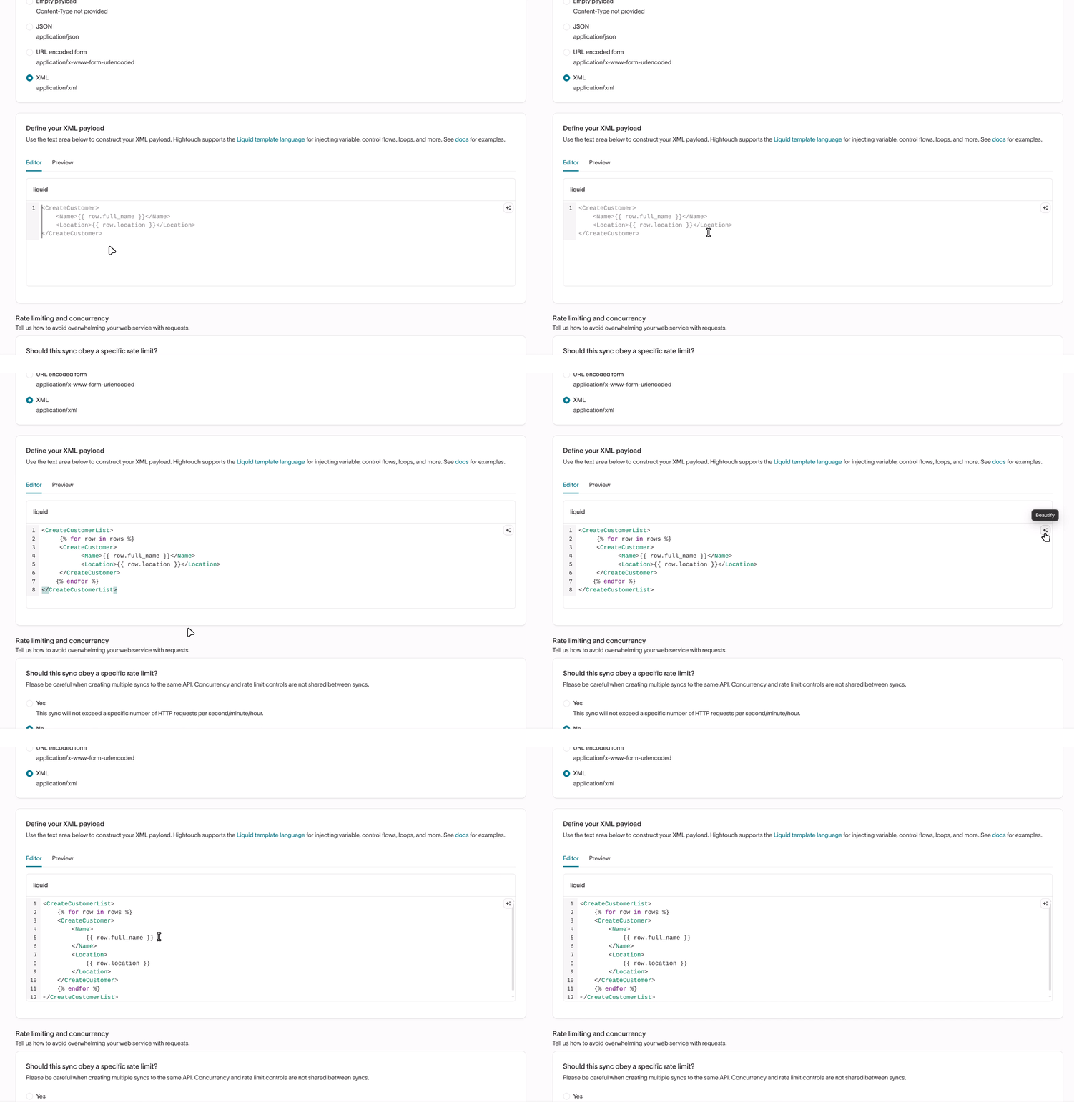
Build a library of reusable email components. Import components as HTML, extract them from existing emails, or bring them in from Figma, then drop them into any email you build.
ImprovementSupport chat has moved from the bottom-right of the app to the left nav sidebar, with an unread indicator when new replies come in.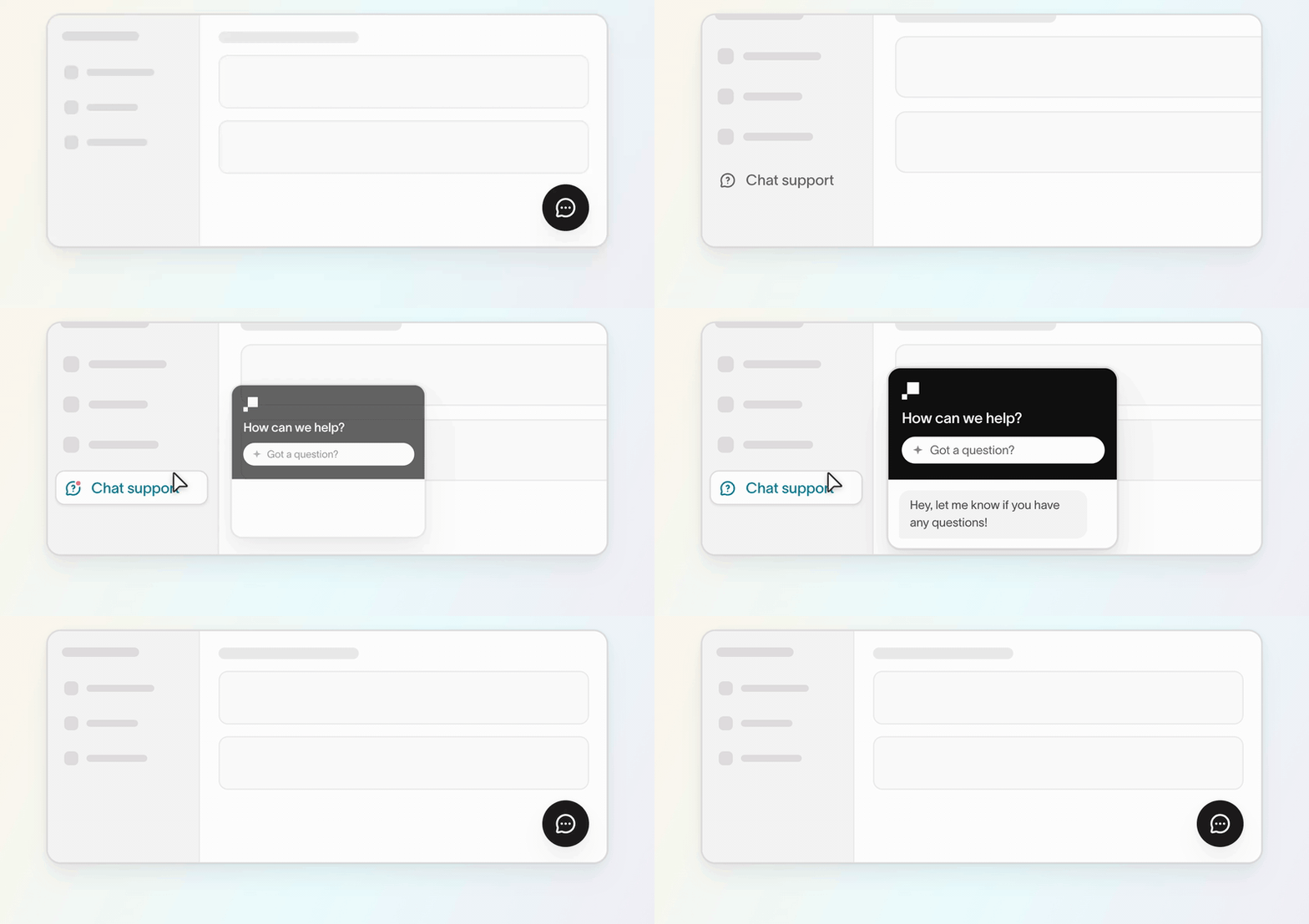
New Eagle Eye destination — issue loyalty coupons to audience members for a selected Eagle Eye campaign, with automatic cancellation when a member exits the audience.
ImprovementFile-based destinations now log upload metadata on the sync run summary page, so you can see which files were sent and how much data was uploaded on each run.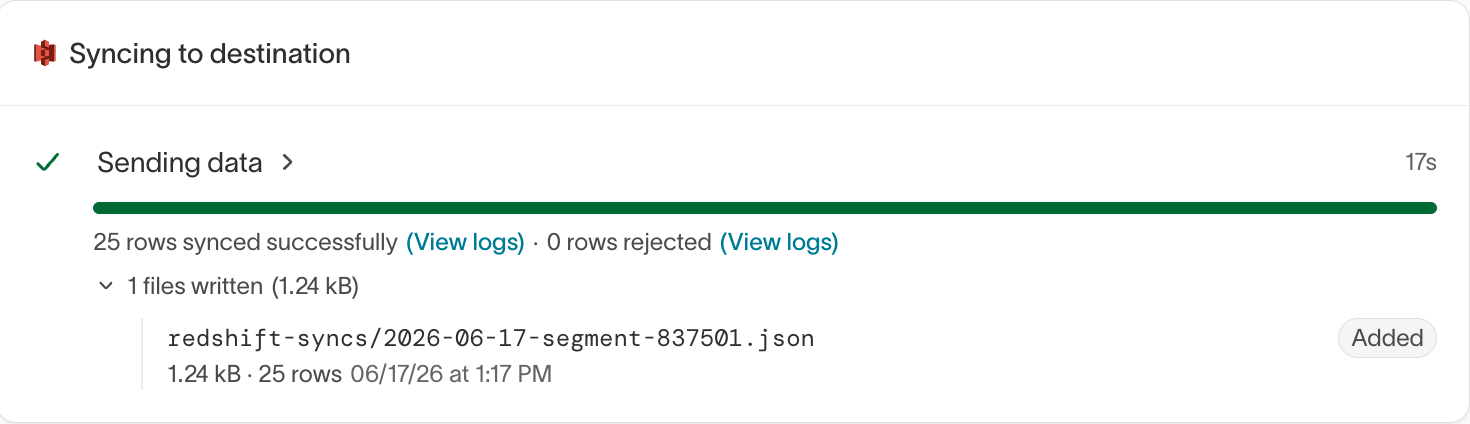
API-triggered sends let your own systems send a personalized Delivery message through the Hightouch API, such as an order confirmation or a password reset. You can check each send’s status through the API too.
The iOS, Android, Flutter, and React Native SDKs automatically enrich every event with session tracking context, including
sessionId, sessionStart, and a session object.ImprovementEvent warehouse syncs can be enabled and disabled like event forwarding syncs, and you can multi-select syncs to enable, disable, or run them in bulk.
The schema page now flags misconfigured relationships by checking join key cardinality when you set up related models. Warnings surface incorrect 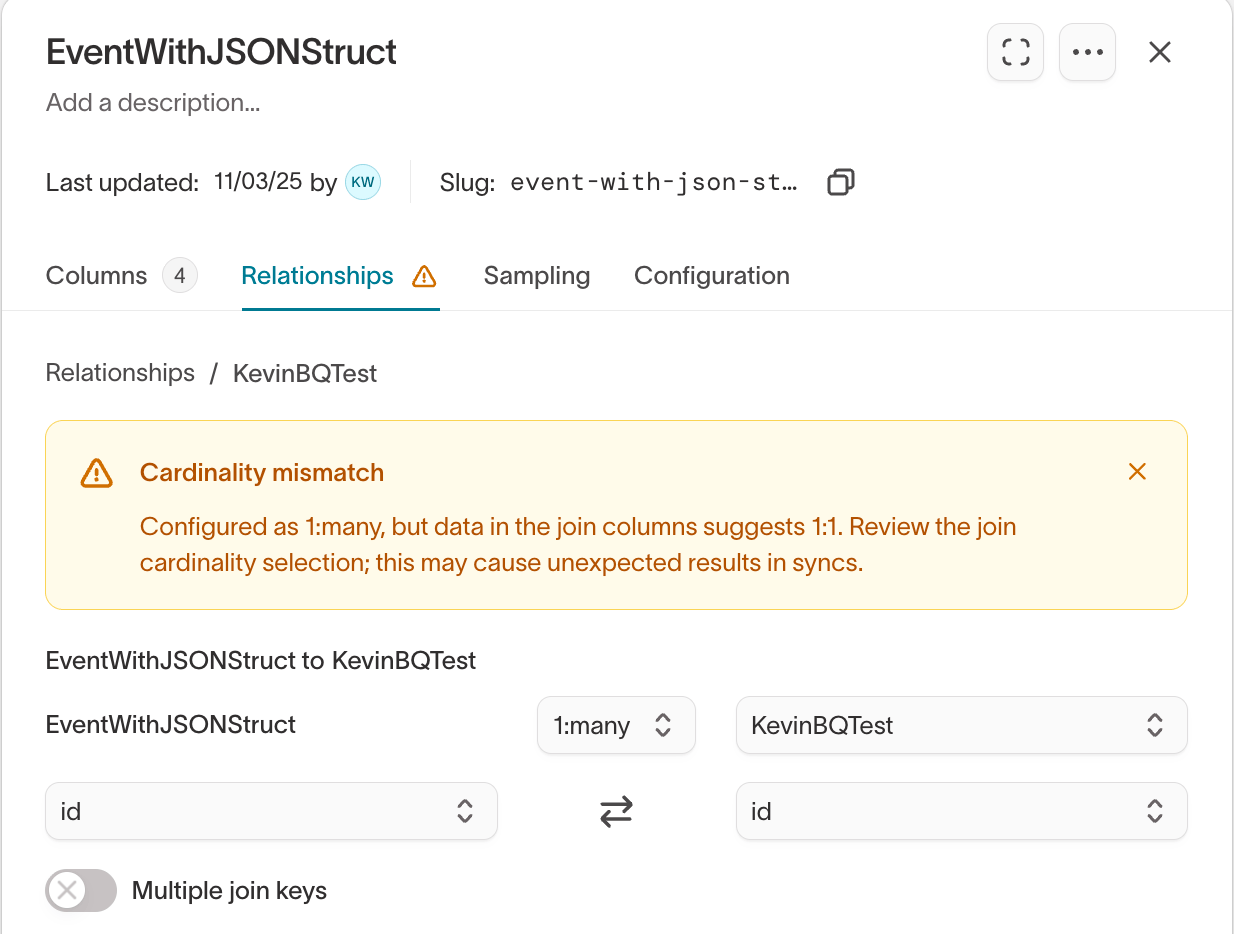
1:1, 1:many, or many:1 settings so you can fix them before they affect audience counts.New Partnerize destination — sync conversion events to Partnerize for server-to-server affiliate attribution, supporting single- and multi-item orders with campaign-level tracking.
ImprovementChat suggestion cards on the Agents page are now context-aware, surfacing relevant actions based on what’s happening in your workspace.
Styles save a visual direction, built from reference images, that anyone on your team can apply when they create ads. Designers set up the style once, and marketers use it to keep ads on brand.
Message tags now flow into the destination sync payload, so you can reference message-level metadata like UTM values, A/B variant labels, and content routing keys directly in your destination templates.
New OpenAI destination — sync conversion events to OpenAI’s Events API across all 11 standard event types.
The Hightouch MCP server connects your AI assistant to your marketing stack. Build audiences, design journeys, generate creatives, and analyze performance in plain language from Claude, ChatGPT, or another AI assistant you already use.
Select which user columns AI Decisioning includes in destination sync payloads, instead of sending every column from your parent model. Trimming unused columns prevents sync failures on destinations with payload size limits.
The Signals tab in Insights lists current and upcoming events relevant to your business. Create an ad project from a signal in one click.
The Health tab gives you real-time visibility into agent pipeline runs, channel delivery rates, and outcome data freshness. Agent alerting proactively notifies you when something goes wrong — run failures, stalled agents, slow runs, or drops in recommendation volume. Every agent ships with a default failure monitor, and you can route alerts to Slack, Email, PagerDuty, SMS, or Webhooks.
ImprovementBulk eligibility guardrail editing now supports merging new conditions with existing per-message guardrails instead of replacing them. A toggle lets you choose between adding to existing guardrails or replacing all guardrails when editing in bulk.
The messages table now shows a sortable Audience column with the eligible audience size for each message. Hover over the count to see which channel and message-level eligibility filters are applied. Messages not yet included in a recommender run display “Pending” with an option to calculate on demand.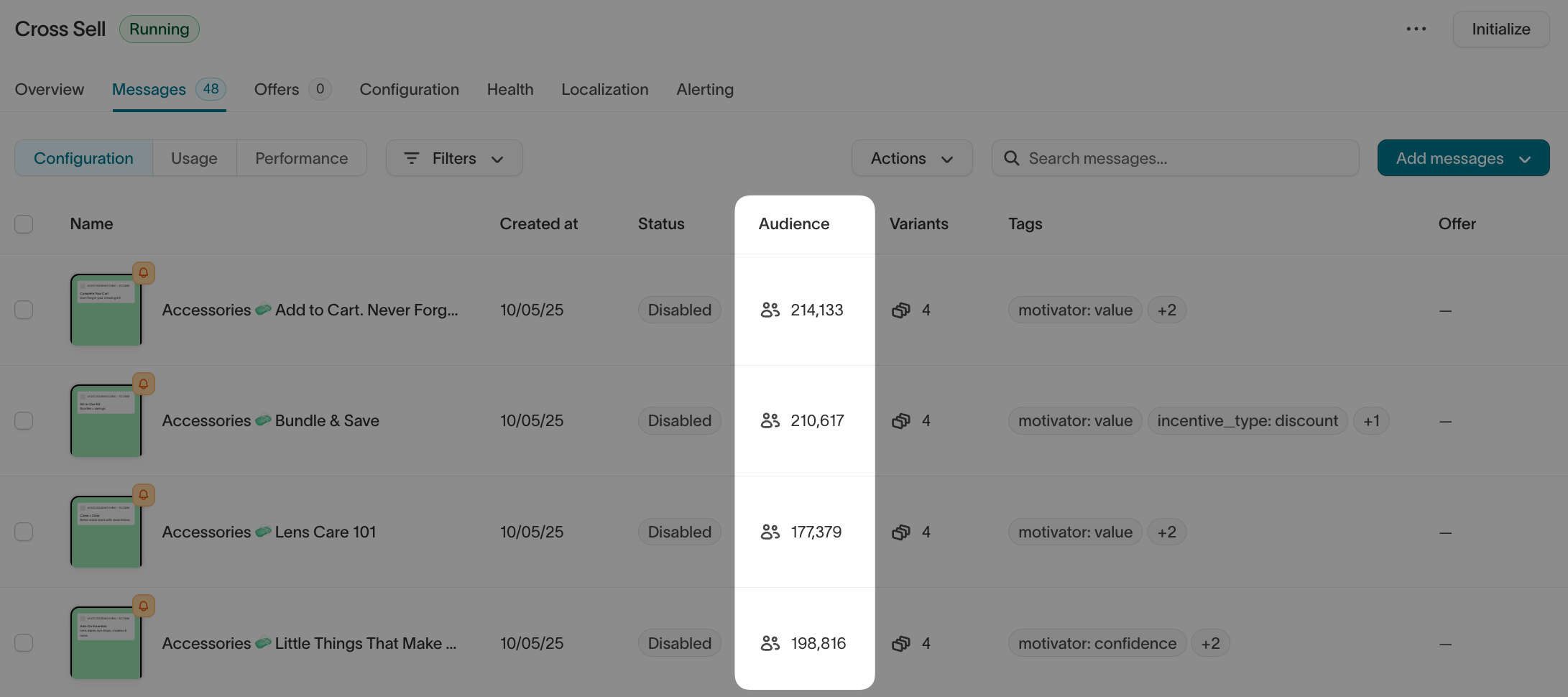
Preview emails in dark mode directly within the Lifecycle Studio canvas.
Preview email templates with sample variable values before exporting to your ESP. Fill in sample values for variables and conditional logic to see exactly how the email renders.
ImprovementThe Journeys canvas is noticeably faster when dragging tiles, selecting tiles, and opening details, especially on larger flows.
Copy filter conditions from an audience directly into the audience trait builder, including conditions based on related and event models. Eliminates manually rebuilding complex filter logic when creating audience traits that match existing audience conditions.
ImprovementRelated model filters in the Audience Builder support nested AND/OR condition groups. Each condition shows a menu option to wrap it in an AND/OR group for rules that combine required conditions with flexible alternatives on the same related record.
ImprovementAudiences with string filters run faster when the underlying columns are set to case-sensitive in the schema. Workspaces created after March 2026 default to case-sensitive for new string columns.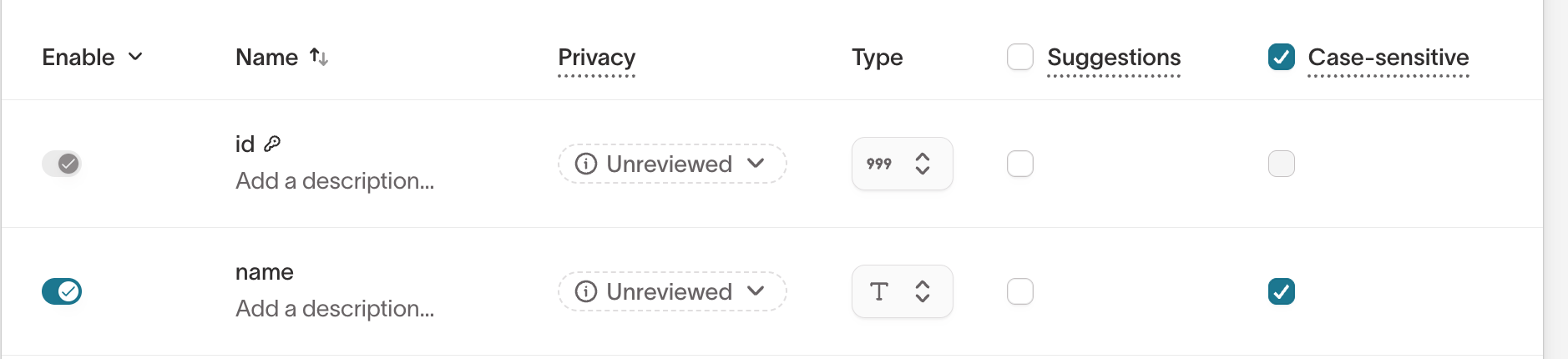
ImprovementRealtime event syncs support multiple custom event configurations in a single sync. Previously, forwarding multiple event types to the same destination required a separate sync for each.
The Event Debugger traces the full path an event takes through Hightouch — which streaming syncs it was sent through, whether any syncs filtered it out, what audience membership changes it triggered, and where the resulting entrance events went.
New Ometria destination — sync contacts, orders, products, and custom events via the Ometria push API.
New WebDAV destination — sync data to any WebDAV server as CSV, JSON, NDJSON, XML, or Parquet files.
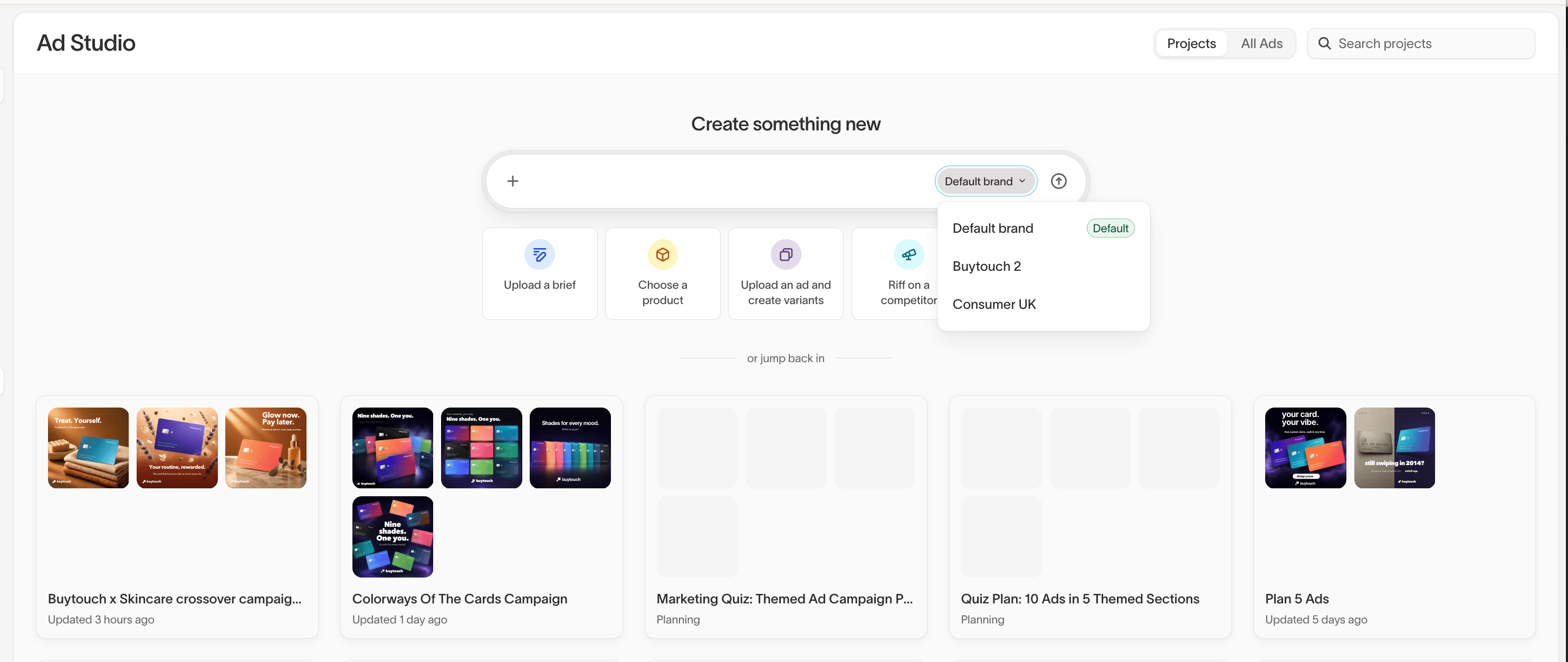
Brand profiles let you define brand-specific logos, fonts, and context for ad and campaign generation. When creating ads or lifecycle campaigns, select which brand profile the agent should use.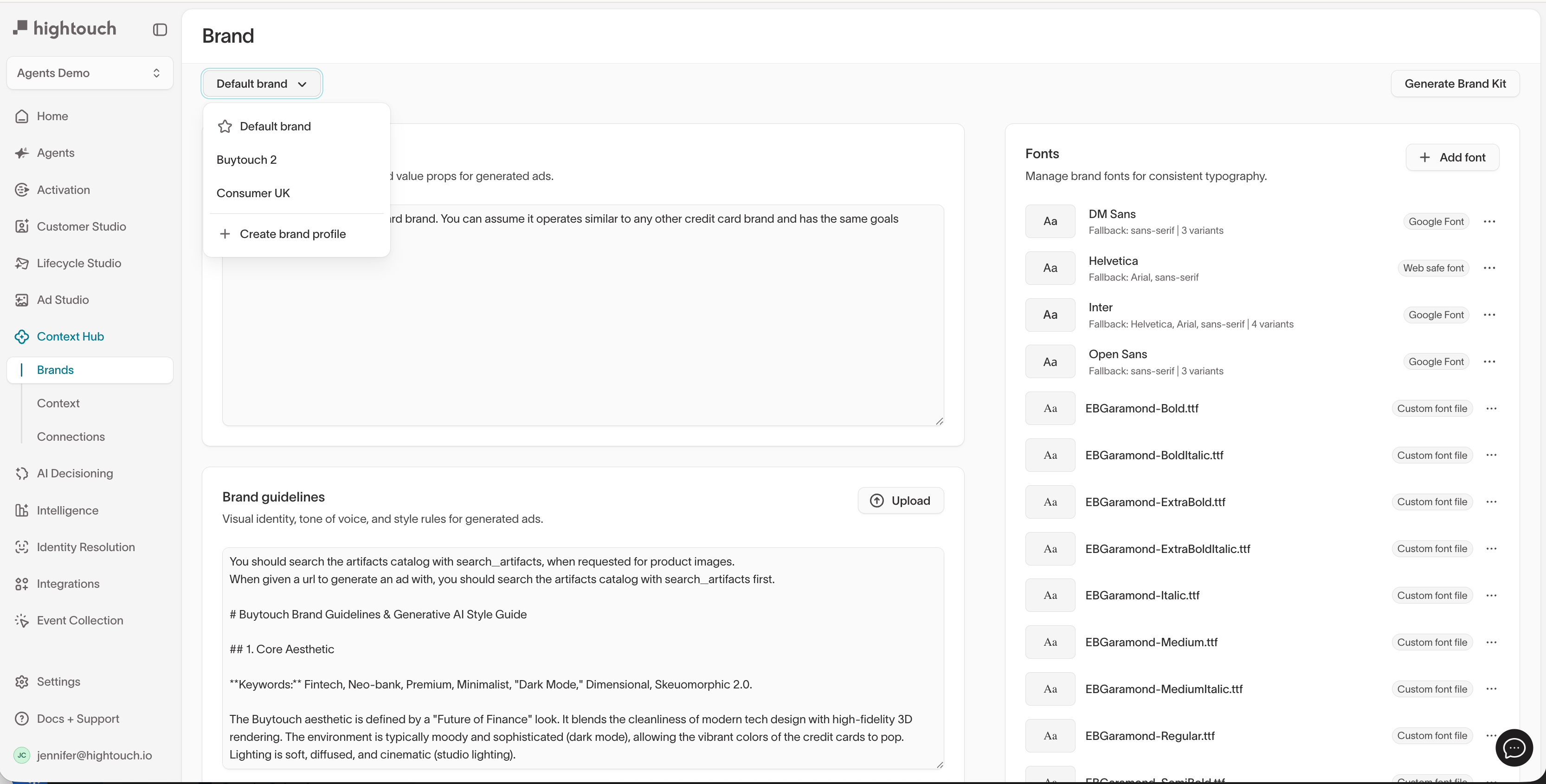
Pinterest Ads data connector — connect Pinterest Ads reporting data so agents can answer questions and generate reports across your Pinterest campaigns.
ImprovementAgents with a Klaviyo connection pull in engagement data over time, including conversions, not just metadata about flows, forms, and segments.
Launch ads and their variants to Meta directly from Hightouch.
Track a competitor in Insights to get a scheduled report on their recent Meta ads.
Run identity resolution in stages — configure graphs to run in sequence so the output of one step feeds into the next. Match on high-confidence fields first, then run broader matching on remaining records.
Test liquid templates against real data directly in sync configuration. Select a record from your model and see exactly what the rendered output looks like before your sync runs.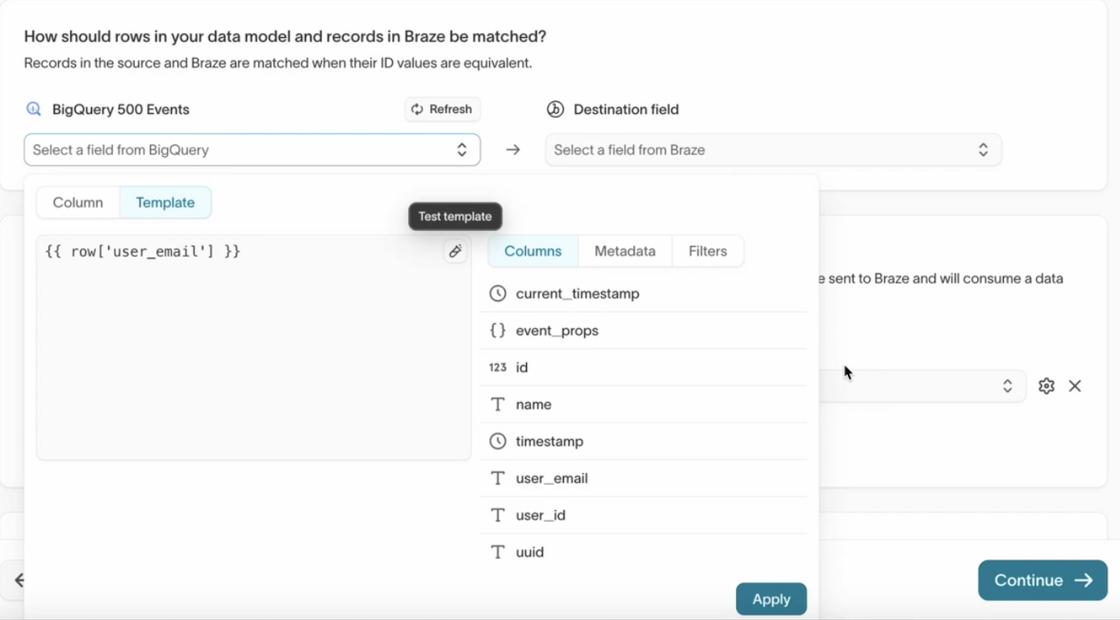
Array expansion automatically fans out array-typed source columns into individual destination rows, enabling one-to-many syncs from a single source row.
Coupon assignment in audience-based Journeys — assign per-user coupon codes and related values like expiration within a single Journey tile.
Test sync tiles in Journeys by running test syncs against real or injected data, without modifying Journey logic.
Message delivery window guardrails let you restrict agent message delivery to specific time windows per channel.
ImprovementAgent reports now support comment mode — leave comments on a generated report and an agent updates the instructions accordingly. PDF attachments are now available for email and Slack delivery.
ImprovementNew custom email editor with inline text editing, link management, and block styling. Image editor now works for all images, not just agent-generated ones.
New Knock destination — sync audiences, users, and objects to Knock for notification routing.
New Topsort destination — sync audiences to Topsort’s Segments API for retail media network campaign targeting.
Google Ads via Data Manager — connect to Google Ads through Google’s Data Manager API for new features and passwordless authentication.
Email notification when a draft is denied — draft authors now receive an email when their requests are rejected.
Queue backlog alerting for queue-based event sources — set thresholds for unprocessed event backlogs and receive alerts when they’re exceeded.
New Google BigQuery Iceberg source via BigLake REST catalog — use BigQuery as a query layer on top of Iceberg tables.
ImprovementAudience size limits now include a Random selection option, in addition to Top and Bottom, for more representative user selection across campaigns.
Traits support trait-to-trait comparisons in audience filters, alongside static values and column properties.
Journeys have a refreshed interface for building and managing flows, with improved navigation and layout.
Real-time audiences include a dedicated Overview tab with live performance metrics: audience entrances, events processed, error rate, and time-series charts with selectable time ranges.
New PAR Punchh destination for syncing audience data for customer segment management.
New Adestra destination for syncing contact data and managing list subscriptions in Adestra (MessageFocus).
New Resonate destination for matching first-party data against Resonate’s identity graph for audience enrichment and targeting.
AI Decisioning resources are accessible via a REST API for agent retrieval, message management, and programmatic run triggers.
Field selectors in event streaming and real-time event configuration include autocomplete suggestions based on actual event data, reducing typos and speeding up setup.
“Test connection” errors display detailed messages for easier troubleshooting during setup.
Webhook alerting supports custom HTTP headers, including secure handling for sensitive values like Authorization or X-API-Key. Secret values are encrypted and stored securely.
Create and measure experiments directly from an A/B split tile in Journeys. Configure experiment metrics on the split tile and view results in Intelligence alongside other experiments.
Journeys support more granular entry controls for both audience-based and event-based journeys, giving more control over how often members can enter and preventing repeated message sends.
Charts and Dashboards support manual refresh and scheduled runs. Charts only recalculate on refresh, schedules run automatically, and pages load using the most recent cached run to reduce warehouse costs.
Export data from Charts, Dashboards, and Audience Overviews as CSV files. Dashboards and Audience Overviews download as a ZIP containing each chart’s CSV.
New Snowflake Iceberg destination for syncing models directly into Snowflake Iceberg tables.
Events supports syncing directly into SQL tables stored in Microsoft Fabric for Azure-based data stacks.
Page sidebars automatically collapse on smaller screens (below 1024px), with sidebar content accessible through a toggleable drawer.
ImprovementList traits support arrays of objects, not just arrays of individual values. Build structured lists like recent purchases or bookings and use them in filters or syncs.
Journeys support Context Variables for setting values about a user as they move through a journey and referencing those values in later sync tiles.
New FreeWheel destination for syncing audience segments directly to FreeWheel.
Google Data Manager supports sending audiences to both Google Ads and Display & Video 360 (DV360) from a single destination, with Match Booster support for all sync types.
ImprovementTalon.One supports event syncing, including event endpoints and event forwarding for promotions, incentives, and real-time decisioning.
New Podscribe destination for syncing event data for podcast ad tracking and measurement.
New Magnite Match destination for sending email-based audiences directly to Magnite for audience matching and activation.
Identity Resolution automatically detects and isolates superclusters caused by bad data like placeholder phone numbers. Quarantined changes are not applied to the live identity graph until you review and resolve them.
Route different workloads to different warehouses optimized for how they’re used. Hightouch automatically chooses between warehouses designed for interactive queries and batch workloads like IDR or large syncs.
ImprovementThe schema model drawer opens to the left of the search sidebar, so you can browse and search your schema while viewing model details simultaneously. Main navigation is collapsed by default on schema pages.
ImprovementMatch Booster supports matching user records using a combination of name and residential address when email or phone aren’t available.
ImprovementDefine traits on related and event models, not just parent models. Calculate traits at the level where the data lives and use them to filter audiences without upstream calculations or schema workarounds.
Manage data privacy settings from a central Privacy data masking page. A unified, filterable view replaces model-by-model configuration and includes automatic PII detection, granular privacy controls, and a default Consent management subset.
Add descriptions and free-form notes to Journey tiles and the canvas. Notes persist across versions and are visible in the details panel.
Splits are now called Experiments. Find them under the Intelligence tab with a dedicated space to view all tests, compare performance across groups, and interpret results.
New Amplitude Cohorts destination for syncing audiences using User IDs and Amplitude IDs.
New Moloco destination for syncing mobile advertising identifiers (IDFAs and GAIDs) to Moloco Customer Sets.
New Rakuten destination for syncing conversion events to the Rakuten Transactions API.
New Qualified destination for syncing and updating lead and company attributes.
New Bazaarvoice destination for syncing transactional data to support user-generated content workflows.
New workspace region: GCP Middle East (Dammam, Saudi Arabia) for regional data residency and lower latency.
The Billing page now includes interactive charts showing active sync counts and breakdowns by destination type, replacing the old billing table.
Journeys now support granular, V2-level permissions that decouple audience and sync access from journeys for finer control over who can configure or launch them.
New Bird destination for syncing Contact Lists and Contact Objects.
Refreshed color palette and loading animations across all charts for improved contrast and readability.
ImprovementEvent-based journeys now support additional entry filters, allowing you to refine which users enter a journey with audience-based targeting precision while keeping event-trigger flexibility.
A new Profiles tab makes it easy to search, explore, and understand individual users in the parent model, with an Overview tab consolidating key details into one view.
Share direct URLs to specific journeys and views in Customer Studio. Each URL captures the current journey and context for easy collaboration.
Tile placements in the Journeys canvas are now saved automatically, persisting across refreshes, sessions, and collaborators.
Each audience now includes an Overview tab with a visual summary of size, activity, and syncs. Attach a custom dashboard for richer KPIs.
ImprovementNested filters now support up to three levels deep in the audience builder for targeting users based on attributes or events several relationships away.
Sync Templates in Journeys let admins create reusable templates that marketers can apply across audiences and journeys. Update a sync value once and the change applies everywhere.
New Viant destination for syncing audiences for people-based digital campaign activation.
New Yahoo DataX destination for syncing audience data to Yahoo’s advertising ecosystem.
New Unify destination for syncing standard and custom object records to UnifyGTM.
The Profile Reprocessing API lets you selectively delete and reprocess identity profiles without triggering a full IDR rerun.
ImprovementRefreshed chart labels, legends, and tooltips across Hightouch for improved clarity.
Dashboards are available in Hightouch Intelligence for building and sharing multi-chart views.
A centralized tagging tab lets you view, edit, and manage all tags across agents and messages in one place, with AI-powered auto-generation for tags.
ImprovementAgent messages now live in a dedicated tab with thumbnail previews, tag support, and a layout designed for bulk management.
Match Booster supports enrichment with hashed phone numbers for improved match rates.
Filter on fields stored inside JSON columns using dot-path notation (e.g.,
booking.product.geo.city = ‘Florence’). Supports standard operators like equals, contains, greater/less than, and exists. Contact your Hightouch team to enable this feature.Experiments measurement is available in the Intelligence tab. Set up audience split groups and compare treatment vs. holdout performance side-by-side.
Journey Alerts notify you when a journey run fails. Alerts are configured globally and can be updated or muted per journey.
Reorder filters in query builders across the app using drag-and-drop, with smooth repositioning and clear nested filter indicators.
New Xtremepush destination supporting user profiles, events, campaign triggers, and user lists.
Eloqua supports an Email Trigger sync type for triggering emails to contacts after audience updates.
Refreshed look and feel across the app for improved consistency while keeping all existing workflows the same.
Collapsible side navigation lets you maximize working space, with submenu items accessible via hover.
Adobe Experience Platform supports Adobe Journey Optimizer (AJO) for triggering campaign sends like email, SMS, or push.
Google Analytics 4 supports syncing anonymous audiences using a custom dimension based on warehouse-tracked behavioral events.
New Cadent destination for syncing conversion events to Cadent’s converged TV platform.
Sailthru supports custom, purchase, and return event syncing.
Journey Templates let you save and reuse commonly used journey structures, including tiles like delays, splits, segments, and syncs.
List Traits aggregate values into arrays, capturing behaviors over time like products viewed or recent purchases. Use them in filters to identify users who have performed certain actions.
A detailed activity log for Journeys tracks changes like added/removed tiles and start/stop actions.
A new API endpoint lets you programmatically fetch run status and metadata for IDR graphs to monitor progress and trigger downstream workflows.
ImprovementRefreshed design for destination connection and authentication tables with unified styling, clearer OAuth metadata, and better error visibility.
ImprovementSortable columns added to Audiences, Schema, Metrics, Data Governance, Integrations, and Settings pages.
Audience Builder now supports waterfall breakdowns showing how each filter block contributes to the final audience size.
ImprovementEvent-based journey entry logic now supports comparisons between event properties, parent model fields, related model fields, and trait values.
ImprovementJourney Membership Filters now support has entered/not entered, has completed/not completed, and has exited/not exited conditions, with optional time constraints.
ImprovementAudience Builder now supports comparing values across columns (strings, numbers, and booleans) for advanced cross-field filters.
ImprovementTraits and audience traits now support up to three levels of nested grouped conditions.
ImprovementThe Journey canvas now includes drop zones that automatically align and connect tiles when dragged into position.
Filter audiences based on Journey membership status using “currently in” and “is not currently in” conditions.
ImprovementNew time-based filter options in the Audience Builder: time of day, day of week, calendar-based filters, and exact date equals.
Set exclusion rules that prevent users from entering a journey if they’re already active in another.
ImprovementAdd tiles directly from the Journey canvas for faster workflow building.
ImprovementEvent-triggered Journeys now support historical events using a static date or rolling time window.
ImprovementCustomer Studio now supports additional functionality for Microsoft Fabric data sources, including sampling, snapshots, percentile and JSON filtering, size caps, and column suggestions.
ImprovementChart Related models, Related model properties, and Traits within Audience Insights and the Charts page. Breakdown charts created in Audience Insights can now be opened directly in the Charts page.
New Sprig destination for syncing users and attributes for targeting and feedback automation.
HubSpot supports syncing sensitive and highly sensitive data using newly approved scopes.
New Contentstack destination for syncing user data to power personalized content experiences.
ODP supports syncing and managing user subscription status for audiences.
Sync Templates can be duplicated across the same parent model and destination, reducing manual repetition for small configuration changes like schedules or destination paths.
Journey Simulations let you preview how users will move through journey logic without affecting real users. Run simulations on actual audience data to validate logic, catch edge cases, and test instantly without modifying the journey.
ImprovementHold Until tiles now accept non-event criteria, including user property changes, audience membership, and trait values. Control how long to check criteria before routing users down a “rule not met” path.
ImprovementCharts now include events from all users who have ever entered an audience, not just users currently in the audience. This provides more accurate behavior tracking for time-bound or fast-changing audiences.
New Sanity destination for syncing data to Sanity’s content platform.
New AppLovin destination for syncing user data for mobile ad campaign optimization.
ImprovementApply filters to your parent model before running an enrichment to enrich only the subset of users you need.
ImprovementThe Hightouch App for Slack is now Slack-reviewed and approved, ensuring compliance with Slack guidelines.
New Bluecore destination for uploading customer info via SFTP.
New impact.com destination for uploading conversion event data.
New Loops destination for keeping email contacts and mailing lists up to date.
New Adform destination for sending conversion events.
New Branch destination for uploading event data.
New Adobe Experience Platform destination for syncing customer data.
New Stuzo / PAR Retail Open Commerce destination for syncing data to convenience and fuel retail engagement platforms.
New LG Ad Solutions destination for syncing audiences to LG’s premium CTV inventory.
New Roku Ads destination with Match Booster support for matching first-party identifiers with Roku-connected devices.
New Samsung Ads destination for syncing audiences to Samsung’s premium CTV inventory.
New Vizio Ads destination for targeted campaigns across Vizio Smart TV inventory.
New Dynata destination for syncing first-party audiences to measure and optimize advertising effectiveness.
New iSpot.tv destination for uploading first-party audience data.
New Digital Turbine destination for onboarding audience data for mobile growth and monetization.
New Talon.One destination for powering promotions and loyalty programs with warehouse data.
ImprovementCustomer.io supports custom object data.
New Zoomd destination for digital marketing activation.
New Kayzen destination for syncing mobile advertising data.
New LiveIntent destination for matching audiences across LiveIntent’s publisher network.
Template mapper includes the CDC operation for each row as a variable, so downstream tools know whether a row was added, changed, or removed.
The Trade Desk supports offline conversion event syncing from any source.
New Marigold Engage+ destination for marketing automation.
New Waterfall destination for targeted SMS/MMS mobile messaging.
Reddit Ads supports syncing custom audiences via the Reddit Audiences API.
New Adobe Campaign Classic destination for syncing recipient objects.
New Marigold Engage destination (formerly Selligent).
Google Sheets source supports service account authentication for flexible per-file access.
SugarCRM supports contacts, accounts, and opportunities.
Google Content API for Shopping supports syncing product data.
ImprovementGoogle Sheets and Google Drive integrations use Google’s more secure file picker, letting you select exactly which files Hightouch can access.
New Genesys Cloud destination for external contacts and organizations.
New Adjust destination for server-to-server events.
ImprovementStackAdapt supports the new conversions API.
New Dynamic Yield destination for product feeds and user data.
New Common Room destination.
ImprovementHTTP Request supports custom parameters for authorization, token, and refresh requests, plus password credentials grant type.
New CJ Affiliate (Commission Junction) destination.
New SAP HANA destination.
New Twilio SMS destination for sending SMS directly from Hightouch.
New Cordial destination for syncing contacts from your warehouse.
New Kameleoon destination for syncing personalization data to Kameleoon’s experimentation platform.
ImprovementZendesk supports the latest custom objects API, alongside the legacy API.
ChangedGoogle Ads upgraded to API v15 with consent parameters required for European Economic Area (EEA) users.
New MinIO destination with all S3 and file storage capabilities.
New Adikteev destination for syncing mobile audience identifiers.
Permissioned subsets on parent models let you restrict which portions of users certain marketers can build audiences from.
New Salesforce Commerce Cloud destination for ecommerce personalization and automation.
New Medallia destination for keeping user contact info up to date.
New Monday.com destination for syncing data to board items.
New SAP IBP destination for syncing master and planning data for forecasting.
Databricks available as an Events destination, joining Snowflake and BigQuery.
LinkedIn Ads supports syncing conversion events via LinkedIn’s new conversions API.
The Trade Desk supports syncing real-time conversion events.
LaunchDarkly supports Hightouch-managed segments that can only be modified by Hightouch.
Taboola supports server-to-server conversion events.
New Google Search Ads 360 destination for automating conversion uploads.
New Brevo destination (formerly Sendinblue) for syncing contacts and contact info.
New Google ADH destination with Match Booster support for audience enrichment.
New Nextdoor Ads destination for syncing conversion events to the Nextdoor Conversions API.
HTTP Request supports OAuth authentication.
Sync sequence runs can be triggered and monitored via the API.
Streaming Reverse ETL syncs data from the warehouse at low latency for use cases like abandoned cart campaigns, conversion events, onboarding emails, and lead routing.
Identity Resolution includes a dashboard with details on graph inputs and outputs.
New Oracle DB source.
ImprovementRefreshed UI shows visual mapping from experiment split to sync and back.
New StackAdapt destination for syncing data to CRM segments.
New Oracle DB destination.
New Rockerbox destination.
Hightouch Events collects web, mobile, and server-side events directly into your data warehouse.
Private Service Connect enables direct, private connectivity between Hightouch and services in customer GCP networks.
Row export runs in the background so you can navigate away from the run page without interrupting the job.
New AWS EventBridge destination.
ImprovementAmazon Ads supports DSP Audiences with hashed records, instead of relying solely on third-party identifiers.
New Xandr destination for programmatic advertising campaigns.
New LINE Ads destination.
New Sage Intacct destination for syncing adjustments, payments, customers, contacts, invoices, journal entries, and transactions.
ImprovementWorkday supports the positions object.
ImprovementUpdates to Traits functionality.
New Materialize source.
ImprovementMailchimp supports creating and syncing to segments.
ImprovementAmazon Ads supports offline conversion events.
Identity Resolution builds unified customer profiles and resolves identities directly in your data warehouse without writing code.
Environments let you create models and syncs in test environments and push them to production without writing code.
New SingleStore source for syncing transactional data to any destination.
New Respondent destination for enriching interview participant data with first-party attributes.
New Rokt destination for audience segment activation.
New Planhat destination for syncing customer data to support teams.
New Workday Adaptive Planning destination for syncing enriched data to modeled sheets.
ImprovementGainsight supports custom objects.
ImprovementSyncs can delete accounts/users when a row leaves your query for regulatory compliance.
ChangedHubSpot OAuth now includes the sales-email-read scope for syncing to email objects. Re-authorize your connection to include it.
ImprovementRokt supports Hightouch Audiences.
New SmartSheet destination for enriching sheets with customer data from your warehouse.
New PlanetScale destination for syncing warehouse data to a transactional database.
New Workday destination for keeping employee, financial, and operations data up to date.
New OpenSearch destination for syncing data and attributes to make content more searchable.
New Apollo destination for enriching leads with warehouse attributes.
New Ortto destination for lifecycle marketing campaigns.
New AppsFlyer destination for server-side events.
New Maxio destination for subscription business data.
ImprovementAudience builder improvements for self-serve campaign performance and attribution.
ImprovementRefreshed audience builder UX with percentile-based filtering and audience size caps.
New Microsoft Excel source for syncing data from Excel worksheets.
Match Booster enriches first-party audiences with additional identifiers from trusted third-party sources for better ad platform match rates.
ImprovementGit Sync supports aliases and manifests for managing multiple workspace environments from the same repository. Create custom IDs for sources and destinations to reuse model and sync files across workspaces.
Inline Mapper creates nested objects and arrays from model query results without altering the model definition.
ImprovementModel columns support descriptions. dbt-based models use dbt model metadata by default.
New BigCommerce destination for syncing order details, shipping info, and contacts.
New Elasticsearch destination for syncing data to make content more searchable.
New Redis destination for backing caches with warehouse data.
ImprovementPendo supports Parent Accounts.
New Help Scout destination for syncing customer data.
ImprovementBraze supports Canvas Triggers for sending messages to specific audiences.
New Microsoft Excel destination for syncing warehouse data to Excel worksheets.
New FullStory destination for syncing user properties on a schedule.
ImprovementPinterest Ads supports conversion event syncing to promote pins to specific audiences.
New Yahoo DSP destination for syncing conversion events and audience segments.
ImprovementIntercom supports events for audience segmentation.
New Retention Science destination for syncing warehouse data.
New WhatsApp (via Twilio) destination for sending promotional messages, special offers, or order updates to opted-in customers.
New Algolia destination for syncing index data from your warehouse.
New Chameleon destination for keeping user data in sync with your warehouse.
New Tableau source for using Tableau workbooks as data models.
New Gladly destination for syncing customer data to support teams.
New MariaDB destination for syncing warehouse data to a transactional database.
New CitrusAd destination for building custom audiences for onsite and web ads.
New Correlated destination for syncing custom audiences and building propensity scores.
Customer Studio launched with a suite of marketer-first features for activating warehouse data.
New Azure Blob Storage source for reading CSV or JSON files.
Git Sync integrates with Azure Repos for bi-directional model and sync management.
New DV360 destination for syncing custom audiences.
ImprovementHubSpot supports the line items object for product, quantity, and price details.
New Eloqua destination for maintaining contacts and segments for marketing automation.
ImprovementIterable supports commerce events like updateCart and trackPurchase.
New Google Cloud Storage source for reading CSV or JSON files.
Personalization API lets you programmatically query data from any model in real time.
ImprovementOAuth authentication replaces username/password for supported destinations.
ImprovementHTTP header configuration supports obscured and encrypted sensitive properties.
ImprovementAWS PrivateLink support for Snowflake connections (Business Tier).
New Bloomreach destination for enriching customer profiles.
ImprovementThe Trade Desk supports CRM data and first-party data segments via two endpoints.
New Criteo destination for creating and updating audience memberships.
New Greenplum source.
New Azure Synapse source.
Fivetran extension schedules Hightouch syncs to run after upstream Fivetran connectors and dbt transformations complete.
ImprovementBraze supports syncing to catalogs for enriching messages and product surfacing.
New Amobee destination for transferring data via SFTP file drop.
ImprovementCustom roles let admins specify access grants per resource type (Business Tier).
SSO improvements for smoother integration with Okta and other identity providers (Business Tier).
Audit log lets you browse, filter, and search a historical log of all resource changes, user sessions, and query previews (Business Tier).
Priority Lists ensure users are only included in the highest-priority audience they qualify for.
New Amazon Kinesis destination for sending streaming JSON data.
New DynamoDB destination for syncing analytical query results to your production database.
New Singular destination for server-to-server mobile attribution events.
New NetSuite destination for keeping financial data up to date.
Approval flows require approval before pushing changes to production models and syncs. Save edits as drafts until ready.
Improvementdbt integration shows raw output on config pages for easier self-diagnosis.
dbt CI checks detect removed, moved, or renamed dbt models linked to active syncs when you push changes in GitHub.
ImprovementSync run errors are categorized as source, destination, or internal errors.
Audience Breakdowns display the distribution of specific characteristics for monitoring and tuning audiences.
New SQL Server destination for powering internal applications and in-app personalization.
ImprovementMarketo supports triggering campaigns directly from Hightouch.
Developer-focused destinations (HTTP Request, Amazon Kinesis, Webhooks) connect Hightouch to internal tools and third-party APIs.
New MongoDB source for syncing user events and behavioral data.
Randomized audiences distribute customer attributes evenly for multivariate testing.
ImprovementSync logs can be applied at the source level and inherited by all syncs, with per-sync overrides.
Sync sequences run syncs sequentially, triggered by the completion of another sync or dbt Cloud job.
New ChartMogul destination for syncing invoices and transactions for real-time reporting.
New Dynamics 365 destination for syncing warehouse data.
New Twitter Conversions destination for sending conversion events from your warehouse.
New Box destination for exporting data as .json or .csv files.
ImprovementStripe supports pricing estimates and quotes before starting subscriptions.
ImprovementLOAD DATA statements in upsert queries can be up to 20x faster than default INSERT INTO queries.
ImprovementManual full resync trigger and git branch selection for dbt exposures sync. dbt model columns are now visible.
dbt exposures provide lineage visibility showing where models are used in syncs.
New Google Drive destination for exporting data as .json or .csv files.
New Campaigner destination for managing subscribers and suppression lists.
New Dropbox destination for exporting data as .json or .csv files.
New OneDrive destination for exporting data as .json or .csv files.
New Campaign Monitor destination for marketing campaigns with warehouse data.
New HubSpot relational DB integration for richer customer experiences.
New Emarsys destination for driving experiences based on user activity like cart abandonment or signups.
ImprovementMoEngage supports events.
ImprovementIterable supports static lists.
NetSuite REST API integration supports Custom Transactions and SuiteBilling.
New Rockset destination for powering in-app experiences.
ImprovementSalesforce supports publishing event messages receivable by flows, processes, and Apex triggers.
ImprovementCustom roles let admins define specific roles, policies, and labels for business units, beyond the default admin/editor/viewer roles.
Dagster extension for orchestrating and monitoring syncs in your data activation flow.
ImprovementExtensions provide a centralized place to connect and manage integrations with technology partners.
Hightouch available on Databricks Partner Connect for provisioning workspaces directly from the Lakehouse.
ImprovementContact data can be enriched with behavioral events from your warehouse.
ImprovementResource history shows which user created or updated a resource and Git change status.
ImprovementSnowflake supports RSA private key authentication with a key file and passphrase.
Hightouch available through Snowflake Partner Connect.
New Amazon Ads destination for custom audiences using cookie IDs, mobile advertising IDs, or external IDs.
Traits are computed user attributes used alongside audiences for personalization across marketing channels.
ImprovementAudience builder supports drag-and-drop CSV import for multi-value filters.
Sync logs write sync trends and errors directly to your warehouse, queryable with SQL.
ImprovementSync-level errors display more actionable information for troubleshooting.
Filtering, labels, and custom views available on sources, syncs, models, and destinations.
ImprovementSample models let you demo Hightouch without bringing data or writing SQL.
New Firestore destination with support for collections and nested objects.
ImprovementStripe supports additional objects: products, prices, subscriptions, and invoices.
New Vitally destination for syncing customer and event data.
New Delighted destination for syncing customer attributes and automating surveys.
New CleverTap destination for keeping user profiles in sync.
New Zapier destination for triggering Zaps when rows are added, changed, or removed.
New Courier destination for powering notifications with warehouse data.
New Gong destination for syncing customer data.
New Chargebee destination for enriching subscription data.
New ClickUp destination for creating and updating tasks with warehouse data.
New Shopify destination for syncing customers, discount codes, and products.
HubSpot supports Lists for building custom audiences.
Audience property filters support multiple values for EQUALS and DOES NOT EQUAL operators in a single condition.
ImprovementAirflow Operator updated with synchronous execution by default, waiting for sync completion before returning.
ImprovementSample data sources provide curated datasets simulating real business scenarios.
New Mattermost destination for sending messages and notifications to channels or users.
New LaunchDarkly destination for creating and updating segments.
New Beeswax destination for updating segments with warehouse data, including Hightouch audiences.
New Microsoft Teams destination for sending messages to channels or users.
Hightouch Notify sends data-driven notifications to Slack, Mattermost, and Microsoft Teams.
Google Analytics 4 supports Firebase and Gtag.js events from the warehouse.
Klaviyo supports lists, syncing users segmented with SQL or Audiences.
New Google Cloud Storage destination for storing CSV files.
Databricks source supports Hightouch Audiences.
Looker Looks can be used as model sources.
New PostHog destination for enriching product analytics with warehouse data.
New Appcues destination for enriching user data for Flows and Segments.
New Amplitude destination for syncing warehouse data to product analytics.
New ServiceNow destination for automating workflows with warehouse data.
Metabase source is GA.
Datadog integration provides real-time metrics and events for sync observability.
Sync Templates centralize configuration when syncing audiences to a destination, avoiding duplicated config.
New Zoho destination for syncing enriched data to sales, marketing, and support tools.
New Twitter Ads destination for syncing custom audiences for ad retargeting.
New MySQL destination for syncing warehouse data to your production database.
New Webflow destination for syncing data to your Webflow CMS.
New Attio destination for syncing data to CRM workspaces.
New Freshsales destination for enriching contacts with behavioral and product usage data.
Mixpanel supports enriching events and user profiles with lookup table data.
ChurnZero supports events and custom tables for profile enrichment.
Iterable supports product catalog syncing for marketing campaigns.
New Airtable source for querying any table and syncing to any destination.
New ClickHouse source for syncing OLAP data to any destination.
New Heap destination for syncing behavioral and product data, including server-side events and custom objects.
New Jira destination for creating and updating projects and tickets with warehouse data.
New MongoDB destination for syncing data models directly to your production database for in-app personalization.
New Userflow destination for syncing user data to power in-app tours, checklists, and surveys.
New Reply destination for syncing contact data to the sales engagement platform.
Workspace permissions revamped with three roles (Admin, Editor, Viewer) and configurable default roles for new users.
Git Sync supports bi-directional syncing. Models and syncs write their configs to Git, and Hightouch reads changes from Git.
New Rokt destination for syncing conversion event data from your warehouse.
New Qualtrics destination for syncing user and product usage data.
New Auth0 destination for syncing user lists to automate permissions and grants.
New TikTok destination for syncing customer data and events to TikTok’s marketing API with automatic PII hashing.
New Google Campaign Manager destination for ad-serving and measurement.
New Outreach destination for syncing lead data to the sales engagement platform.
Improvementdbt model selector supports multiple dbt versions. Set a particular version in the dbt Sync tab on your source configuration.
Revamped alerting system with Slack, email, SMS, and PagerDuty integrations. Configure project-wide and sync-specific alerts for fatal errors and row errors, with customizable intervals and thresholds.
New Notion destination.
New ClientSuccess destination.
ImprovementNetSuite supports custom records.
SFMC File Drop supports sending millions of rows via CSV file drops for marketing automation.
Iterable supports events like signups and purchases for triggering marketing campaigns.
New Sailthru destination for personalizing emails and notifications.
dbt model selector is GA. Use dbt as the source of truth for SQL queries and create syncs directly from dbt models.
Test a sync by selecting any row from the first hundred and sending it as a test before running a full sync.
New Salesloft destination for syncing people and accounts.
ImprovementBigQuery authentication uses a service account for simplified, more secure setup.