

New to Hightouch’s data model? The Data activation
concepts page explains sources, models, syncs,
destinations, and Change Data Capture (CDC). This article focuses on the
hands-on setup work for data teams.
Before you begin
- Workspace created by your platform admin
- Warehouse credentials (Snowflake, Databricks, BigQuery, or Redshift)
- A role with permission to create sources, models, and syncs
- Your marketing team’s first use cases, so you know which data and destinations they need. See the examples for lifecycle and paid media teams.
Setup steps
Connect your data
Decide: which warehouse Hightouch reads from, how it connects, and which sync engine it uses.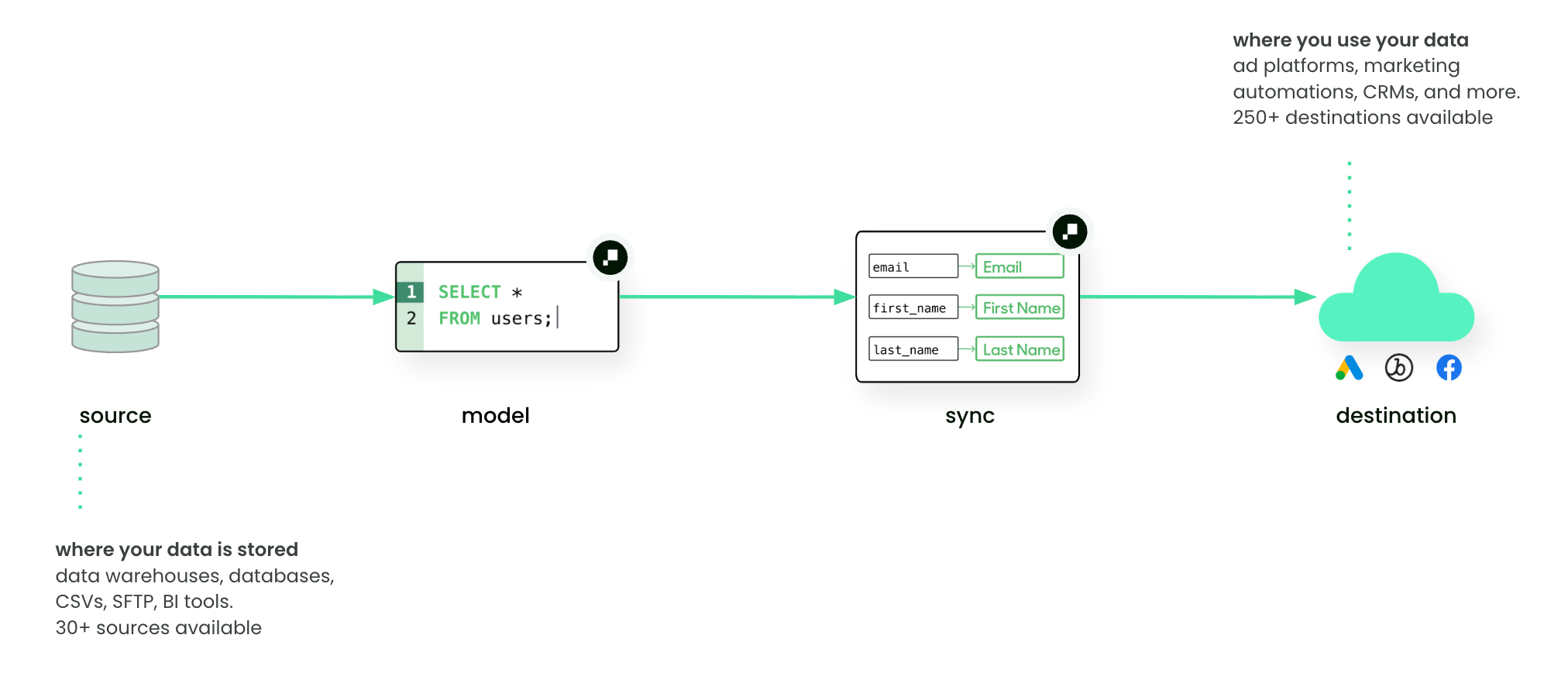
Hightouch syncs modeled data from your warehouse to destinations through sources, models, and syncs.
Hightouch syncs modeled data from your warehouse to destinations through sources, models, and syncs.
Add your primary data source from Integrations, then Sources. Find setup steps for your warehouse.
Configure sync infrastructure
Decide: how you’ll monitor syncs, and which destinations to connect first.
Define your schema
Decide: what one audience member represents, and how marketers should see each kind of data. Define the schema that marketers use in Customer Studio to build audiences and campaigns.If you only use Reverse ETL and not Customer Studio, set up models for each use case instead of a schema.Start with the parent model. Each row is one audience member, so choose it based on who marketers need to target, not on which table has the most fields. For most businesses that’s a user or customer. Use one parent model for your highest-priority use case, and add another only when a campaign needs to target a different kind of record, such as accounts.Then decide how each kind of data should appear:
Before you hand the schema to marketers:
- Make sure every row in the parent model has a unique primary key, and keep that key stable. Changing it later breaks dependent audiences and syncs.
- Use the same data type for join keys on both sides of each relationship.
- Do expensive joins and calculations in your warehouse, not in Customer Studio.
- Show only the columns marketers need, with names and descriptions they’ll recognize. Agents use these names too.
-
Build a few real audiences to confirm the counts look right.
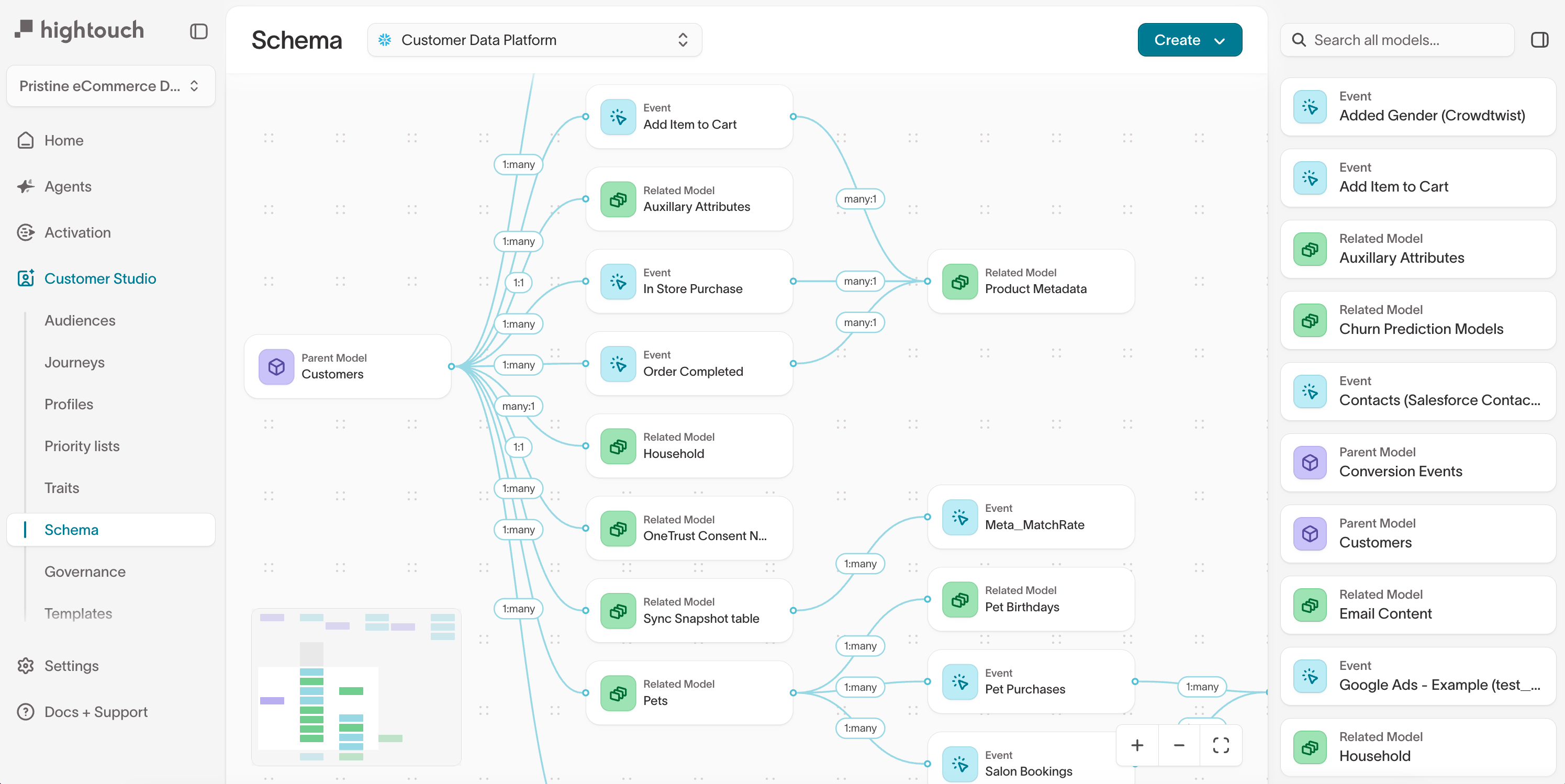
Data teams define parent, related, and event models, including traits. Marketers use these attributes in Customer Studio to build audiences.
Set up security and change management
Decide: how changes reach production once marketers depend on your data.Platform admins usually manage security and workspace governance as part of Workspace setup. As a data team, coordinate with them to ensure:
- Environments are available for staging models and syncs
- Audit logs and approval flows are enabled per compliance policies
Troubleshoot common setup issues
These are the setup questions data teams ask most often.Readiness checklist
Before marketers build audiences and activate data, confirm the following is in place.- Primary source connected with a dedicated Hightouch user, using the Lightning sync engine (or Basic if you only need basic syncs)
- Identifiers that your first use cases’ destinations match on are available
- Warehouse Sync Logs on for the source, or for key syncs
- Parent model has a unique, stable primary key
- Related models, events, and traits added for the filters marketers need, with matching join key types
- Only the columns marketers need are visible, with names they’ll recognize
- A test audience built from a real marketing request returns the counts you expect
- Spaces and subsets checked with your platform admin, if your workspace uses them
Next steps
- Data activation concepts to review how sources, models, syncs, and destinations fit together.
- Lifecycle marketing to see how marketers build audiences and run campaigns with the data you set up.
- Workspace setup to see how your platform admin sets up access, governance, and security.