

Overview
Campaigns slow down on manual steps: pulling numbers, writing briefs, making variants and sizes, checking work, and launching. In AMP, Hightouch’s Agentic Marketing Platform, agents take the first pass at those steps. Your team spends its time on strategy, review, and the decisions only people should make. AMP is where agents help your team produce content and run marketing operations across channels. That covers ads, emails, SMS, and push, and the projects that take a campaign from brief to launch. It’s built on Agents and Context, which come with every Hightouch product. To send the messages you create, use Delivery or your own email service provider.What agents work from
General AI tools don’t know your customers, your brand, or your rules. Agents in Hightouch work from three things you control:- Your data. Agents query the warehouse models your team set up in Customer Studio, and the ad platforms and email providers you connect. The audiences they suggest and the results they report come from your actual customers and campaigns.
- Your context. In Context, your team adds brand profiles, business definitions, guardrails, assets, and templates. Agents work from them when they create ads and emails and answer questions in chats.
- Marketing skills. Agents come with skills for marketing work, such as analyzing creative fatigue, building audiences, and writing on-brand copy. Your team can add its own skills and custom agents.
Where your team stays in control
Agents create drafts. People decide what ships.- Approval before anything goes out. Agents don’t launch ads or send messages on their own. You approve each ad before it’s queued for launch, and each message before it’s sent or exported.
- Review built into projects. When content is ready, you send it for review. Reviewers approve it or request changes. See Review and approval.
- Guardrails. Admins set what agents can change in images, which ad sizes and channels to use, and the rules emails must follow. See Set guardrails.
- Data access. Roles, column settings, and row-level rules limit what agents can read. See Data governance.
How the work is organized
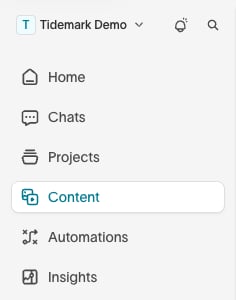
To open any of these, press
⌘K (Ctrl+K on Windows) and search for it by name.
For fixed KPI dashboards and prebuilt charts, use Intelligence, and for holdout tests that measure lift, use Intelligence experiments. To have AI choose the message, channel, and timing for each customer, use AI Decisioning.
Start with your team’s guide
Paid media and lifecycle teams use the same building blocks for different work. Each team guide covers that team’s goals, setup, and the pages they use.Paid media marketers
Spot fatigue, create ad concepts and sizes, review them with your team, and launch approved ads.
Lifecycle marketers
Find a segment, brief a campaign, create on-brand emails, approve them, and send.
Get started with agents
Start with a few use cases and a small group of marketers. Ask questions in Chats to learn what the agent can see and where its answers fall short. Then add the context it’s missing, such as definitions, brand rules, and templates, so the next answers start closer to right.Next steps
- Workspace setup for admins, to set up roles and the context agents work from.
- Paid media marketers or Lifecycle marketers for marketers, to start with your team’s goals and pages.